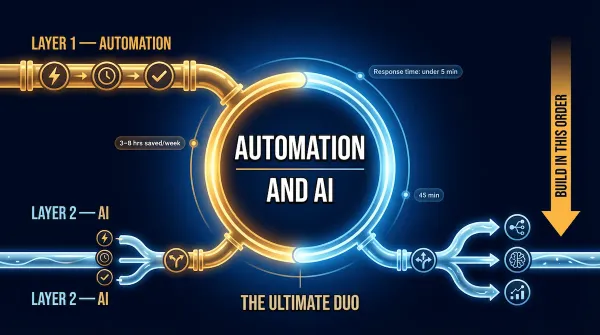
Automation in Marketing in 2026: The Complete System That Lets One Person Do the Work of a Marketing Team
Most small businesses know they should be using automation in marketing. Very few have a system that actually runs. This is the complete playbook — every channel, every workflow, every tool — built for one person doing the work of an entire marketing team.
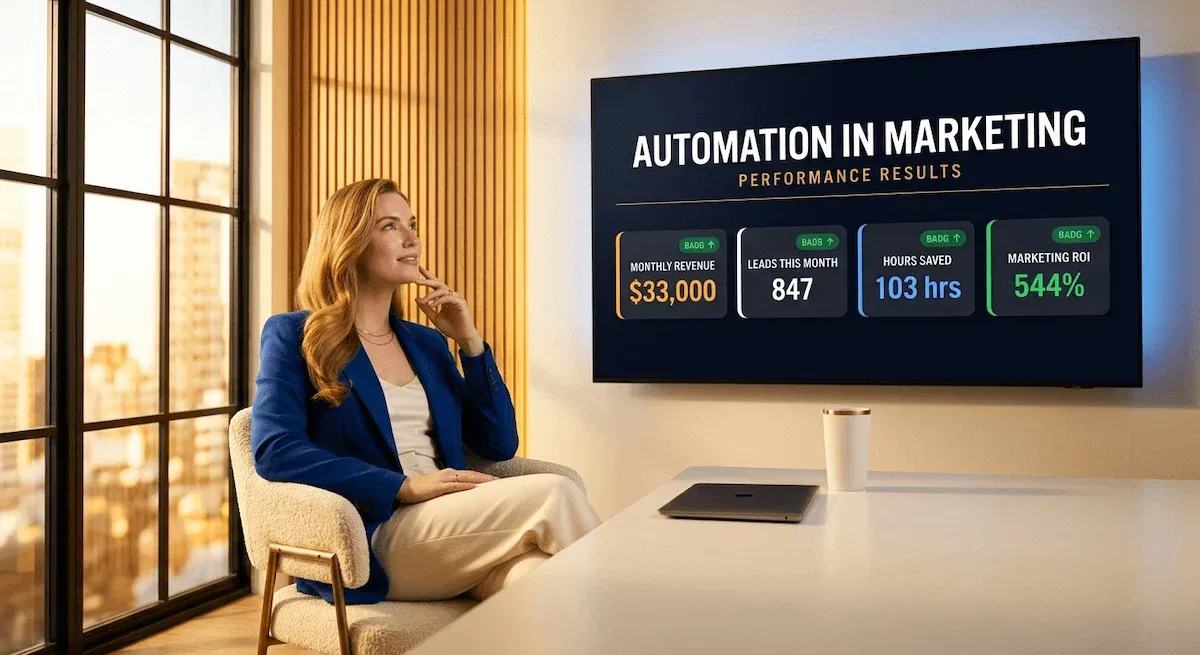
I used to think automation in marketing was something you built when your business was big enough to justify it.
I was wrong. And that mistake cost me about fifteen hours a week for longer than I care to admit.
Here is what I know now: automation in marketing is not a reward for growth. It is the thing that produces it. The businesses I watch scaling in 2026 — the solopreneurs, the one-person service businesses, the founders doing everything alone — are not growing because they work harder than everyone else. They are growing because their marketing runs while they work on everything else. Emails go out. Leads get followed up. Social channels stay active. New subscribers move through sequences. None of it requires them to be present.
That is not luck. That is a system.
This guide is the complete version of that system. I have broken it into every channel that matters — email, social, lead nurturing, CRM, content distribution — and built the case for exactly which order to build them in, which tools to use at each stage, and how to know whether the whole thing is actually working once it runs.
What you will not find here is a list of tools with no context, a definition section that stops at theory, or a guide written for a marketing team of eight. This is built for one person. The founder. The solopreneur. The small business owner who cannot afford to hire a marketing manager but cannot afford to keep doing everything manually either.
The good news: you do not need a team. You need a build order.
Let us get into it.
1 - What Automation in Marketing Actually Means — and Why Most Small Businesses Get It Wrong
The first mistake most small business owners make with automation in marketing is treating it like a product they can buy rather than a system they have to build.
They sign up for a platform — MailerLite, HubSpot, ActiveCampaign, whatever someone recommended in a Facebook group — and then sit in front of a blank workflow builder with no idea what to put in it. Three weeks later, they have one half-configured email sequence, two disconnected tools that do not talk to each other, and a growing suspicion that automation was oversold.
It was not oversold. The foundation was skipped.
The Two Types of Marketing Automation — and Why the Difference Matters
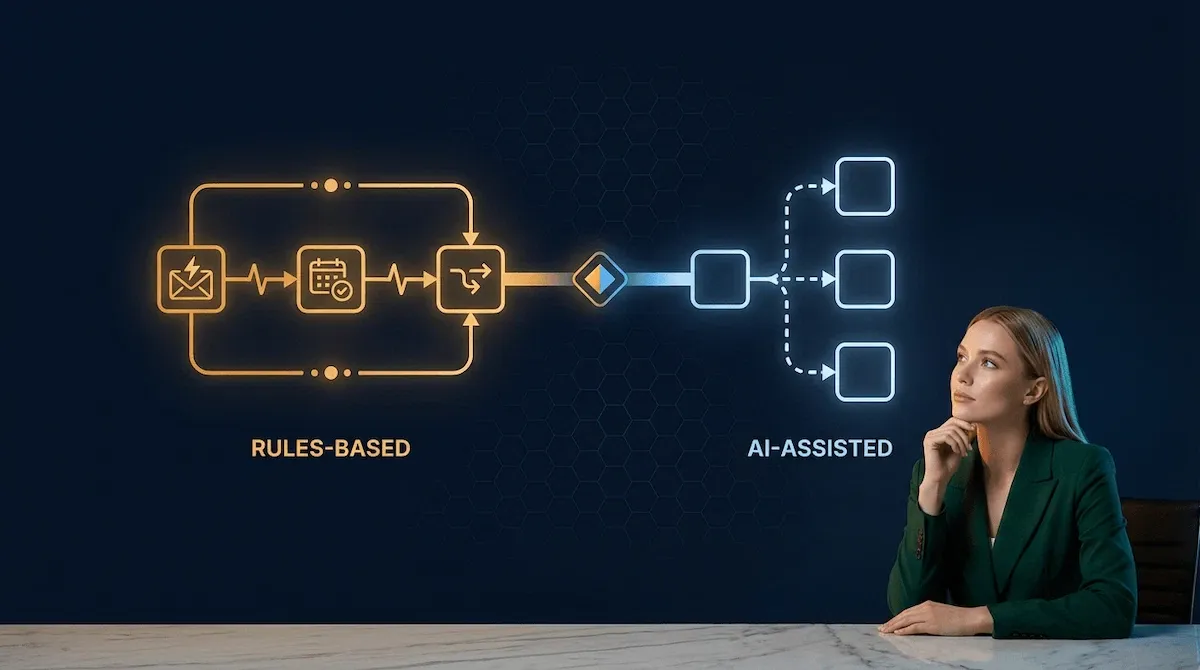
I think about automation in marketing as two distinct things that most people collapse into one — and the confusion between them is where most early builds go wrong.
The first type is rules-based automation: a defined trigger produces a defined output, every single time, without variation. A new subscriber joins your list — a welcome email goes out. A lead fills in your contact form — a follow-up sequence starts. A customer completes a purchase — a thank-you and onboarding email fires. The input is consistent. The output is known. The automation simply removes you as the person who has to make it happen manually each time.
The second type is AI-assisted automation: the system evaluates context, makes a decision, and produces an output that varies based on what it reads. A lead replies to your nurture sequence with a question — an AI layer drafts a personalised response for your review. A subscriber's engagement score drops — the system re-segments them and adjusts their content track automatically.
Both types belong in a complete system. But they are built in a specific order — and building the second before the first is the single most common reason small business automation stacks fail. I cover that build order in full later in this guide. For now, the distinction matters because it tells you exactly what you are building and when.
If you want to go deeper on where automation ends and AI begins, I have written a dedicated breakdown in automation and ai that covers the exact boundary between the two — including the one-sentence test that tells you which layer any given task belongs in.
What Automation in Marketing Is Not
Three misconceptions I hear constantly — and each one leads to a different type of wasted build.
It is not a replacement for strategy. Automation executes. It does not decide what to say, who to say it to, or what offer to make. A bad marketing strategy automated is just a bad strategy running faster. The thinking still belongs to you.
It is not only for large businesses. This is the one that frustrates me most. Automation in marketing is disproportionately valuable for small businesses precisely because the cost of manual execution falls entirely on one person — the founder. Every hour spent manually sending follow-ups, scheduling posts, and copying leads between tools is an hour not spent on the work that only you can do.
It is not one tool. It is a stack of connected tools, each handling a specific job, passing information between each other. Thinking of it as one tool is why people buy the most expensive all-in-one platform they can find and then use fifteen percent of its features.
The One Question That Tells You What to Automate First
Before anything else — before you look at a single tool, before you build a single workflow — ask this: does this task have a consistent input and a predictable correct output?
If the answer is yes, it belongs in Layer 1. Automate it.
If the answer is no — if the right response depends on context, relationship, or judgement — it belongs either in Layer 2 with AI assistance, or it stays human. Understanding this distinction before you build saves weeks of rework.
A client of mine spent three weeks automating her inquiry response process before realising the process itself was undefined. Every inquiry she received got a different response depending on factors she had never written down. The automation did not fix that — it just made the inconsistency arrive faster. We stopped the build, documented the process properly, and rebuilt it in four hours. The automation has run without her touching it since.
That is the foundation. Define it before you automate it. Every time. According to Dataopedia's, 65% or more of marketers report their automation strategies are highly effective — but the businesses reporting poor results share one common pattern: they automated before they defined the process the automation was meant to serve.
If you want to understand how this applies across your entire business — not just marketing — automation business process walks through the exact readiness test for every workflow in your stack.
🎯 Pro Tip
Before you open a single automation platform, write down the five tasks you do most often in your marketing — manually, every week. Then run each one through the consistency test: same input, same correct output, every time? Those are your first five automations. Build nothing else until those are running.
The next question most small business owners ask after understanding what automation in marketing actually is — is why they cannot afford to keep putting it off. The answer is more specific than most people expect, and the numbers behind it are hard to ignore.
2 - Why Automation in Marketing Is No Longer Optional for Small Business Owners in 2026
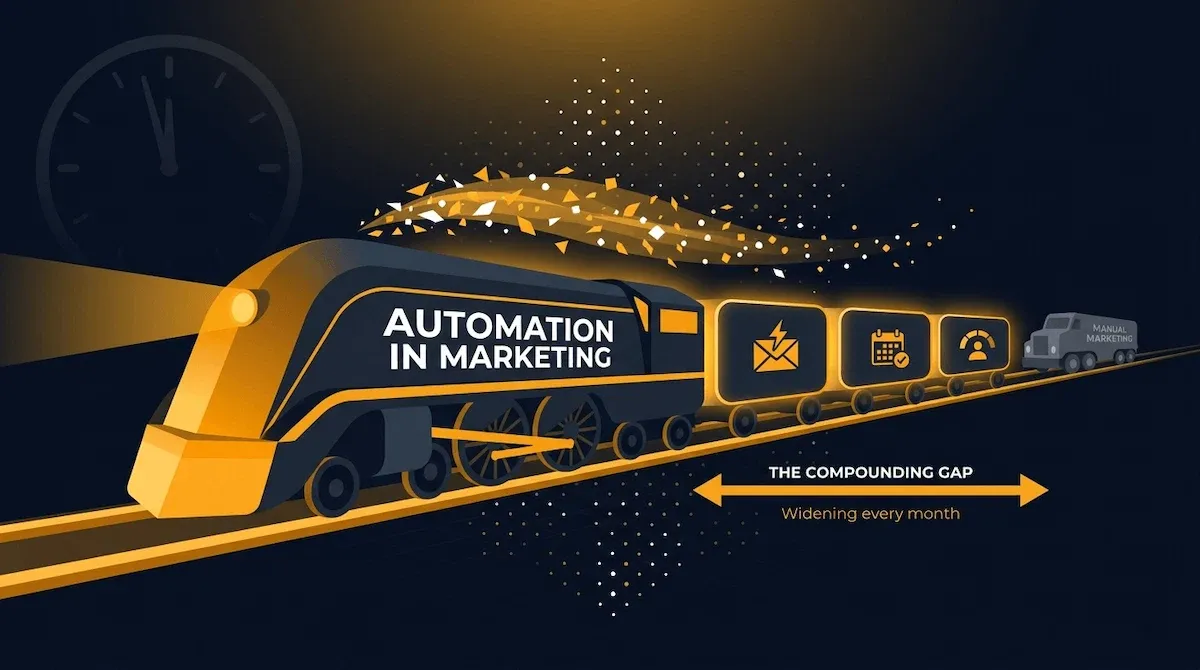
The conversation used to be: should I invest in automation? In 2026, that conversation is over. The question now is how far behind you are willing to fall before you start.
I do not say that to be dramatic. I say it because the gap between businesses that have automated their marketing and businesses that have not is no longer theoretical — it is visible in their numbers, their capacity, and their ability to show up consistently in front of their audience without burning out the person running everything.
The Competitive Gap Between Automators and Non-Automators Is Widening Fast
Here is the reality that most guides bury in a footnote: 80% of companies using marketing automation report seeing an increase in leads — and roughly the same share report improved conversion rates — Dataopedia. That is not a coincidence. It is a compounding advantage — and it has been compounding for two or three years already for the businesses that started early.
What does that compounding look like in practice? The business that automated its welcome sequence two years ago has two years of open rate data, two years of subject line tests, two years of optimised timing. Its sequences convert better not because the founder is smarter, but because the system has had time to improve. The business starting today is not building the same thing. It is building a version two years behind.
That is the part nobody talks about. Automation is not just about saving time today. It is about building a system that gets better the longer it runs — and the longer you wait, the more of that compounding you forfeit.
What the Numbers Actually Say About Marketing Automation ROI
I am careful about statistics in guides like this because the marketing automation industry produces a lot of vendor-commissioned data that flatters the category. But two numbers I keep coming back to are independently verified and consistently replicated across business sizes.
The typical company attributes a 34% revenue increase directly to marketing automation, and 76% of companies see positive ROI within the first year of implementation — not within three years, within twelve months — RevenueMemo.
For a small business generating $8,000 a month, a 34% revenue increase is an additional $2,720 per month. From a system that costs less than $100 to build and runs without anyone managing it daily. That is the return on investment case — and it is why the businesses I work with treat their first automation build as one of the highest-priority projects in their quarter.
The Small Business Case: Why Automation Matters More When You Are a Team of One
Large businesses automate to scale faster. Small businesses automate to survive without burning out. Those are different problems with the same solution — but the urgency is completely different.
When you are a team of one, every hour you spend manually sending follow-up emails, scheduling social posts, and pulling contact data between tools is an hour you are not spending on client work, product development, or the strategic thinking that actually moves the business forward. There is no team to absorb that cost. It lands entirely on you.
I worked with a service business owner last year who was spending eleven hours a week on marketing execution — emails, scheduling, lead tracking, follow-ups. Eleven hours. That is not a minor inefficiency. That is more than a full working day, every week, going into tasks that a properly built automation stack handles in the background without anyone touching them.
She built her stack over six weeks. The eleven hours dropped to under two. The two hours she kept are the ones that genuinely require her — the strategy, the creative direction, the relationships. Everything else runs.
For a full breakdown of how automated marketing for small business actually works in practice — the exact workflows, the tools, and the realistic time savings — that post covers it in detail.
✅ Apply It
This week, track every marketing task you do manually and log how long each one takes. Do it for five working days. At the end of the week, add up the total time. That number — in hours — is your automation opportunity. Most small business owners who run this exercise for the first time find between six and fourteen hours of automatable work they are currently doing by hand every single week.
The case for building is clear. What most small business owners need next is not more convincing — it is a specific answer to which channels to build first and in what order. That is exactly what the next section covers.
3 - The Five Marketing Channels Every Small Business Should Automate in 2026 — and the Build Order That Changes Everything
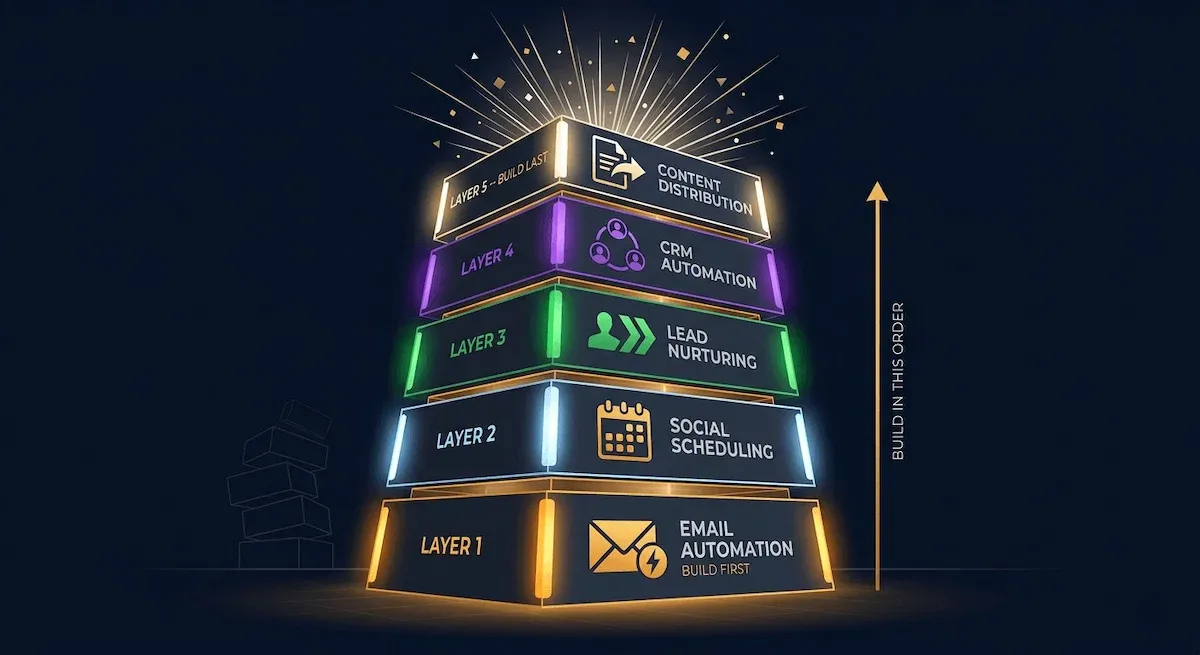
Most small business owners approach automation in marketing the same way they approach their inbox — by dealing with whatever is loudest first. Social media feels urgent, so they automate that first. A salesperson recommends a CRM, so they set that up next. Someone in a podcast mentions lead scoring, so they spend a weekend on that.
Six months later they have five half-connected tools and no clear picture of whether any of it is working.
The build order is not a preference. It is a sequence that exists because each channel depends on the infrastructure of the one before it. Get the order right and every new layer you add makes the whole system stronger. Get it wrong and you spend most of your time fixing connection problems between tools that were never set up to talk to each other properly.
Channel 1: Email — The Foundation That Everything Else Runs On
Email automation goes first. Always. No exceptions.
The reason is not that email has the best ROI — though it does, and I will cover that in detail in Section 4. The reason is that email is the channel every other automation eventually connects to. Your CRM tags a lead as high-intent — email fires a targeted sequence. Your social media drives a new subscriber — email delivers the welcome. Your lead nurture workflow follows up a form submission — it does it via email. Take email out of the stack and the other channels lose their primary output channel.
Build your welcome sequence, your lead nurture sequence, and your re-engagement sequence before you touch anything else. Everything downstream depends on them being there.
Channels 2 Through 4: Social, Lead Nurturing, and CRM — The Middle Stack
Once email is running, the next three channels build on top of it in a specific order.
Social media automation goes second — not because it is the second most important channel, but because it is the fastest to set up and the one that keeps your business visible while you are building everything else. Thirty minutes of scheduled content keeps three channels active for a full week. Set it up early and it runs quietly in the background while you focus on the higher-complexity builds.
Lead nurturing goes third. This is where the first real intelligence enters the stack — behaviour-triggered sequences that fire based on what a lead does rather than when they signed up. Clicked a link in your email but did not book a call? A nurture sequence follows up. Downloaded a resource but went quiet? A re-engagement track starts. This layer requires email to already be working, which is why it cannot go first.
CRM automation goes fourth — and this is the layer that most small business owners skip entirely, which is exactly why their stacks never compound the way they should. The CRM is the memory of the system. It holds the contact data, the engagement history, the tags, and the scores that tell every other tool what to do next. Without it, each channel operates in isolation. With it, the whole stack starts behaving like one connected engine.
According to Dataopedia, 76% of marketers integrate their automation tools with a CRM system to unify workflows and data — and the businesses that skip this integration are the ones whose stacks plateau rather than compound.
For a detailed look at how automated sales and marketing works when the CRM layer is properly connected — the specific triggers, the handoff points, and the workflows that close more leads without manual follow-up — that post covers the full picture.
Channel 5: Content Distribution — The Compounding Layer
Content distribution automation goes last because it amplifies what you are already producing — and if you build it before the other four channels are running, there is nothing worth amplifying yet.
Once email, social, lead nurturing, and CRM are live, content distribution becomes the layer that makes every piece of content work harder than it would on its own. A new blog post published — a Zapier workflow shares it to your email list, your social channels, and your LinkedIn simultaneously. A new resource added to your vault — it triggers an email to the relevant segment of your list. One piece of content. Five distribution touchpoints. Zero additional manual work.
I think of this layer as the compounding return on everything you built before it. The first four channels handle acquisition and conversion. Content distribution handles reach and retention. Together, they form a complete system — and none of it requires you to be present at the point of execution.
For a practical look at how marketing solutions for small businesses fit into this five-channel architecture — including the tools that handle distribution without complexity — that post is worth reading alongside this one.
💜 Stack Snapshot
The five-channel build order — follow this sequence exactly:
① Email automation — welcome, nurture, re-engagement sequences
② Social scheduling — batch, schedule, distribute across three channels
③ Lead nurturing — behaviour-triggered follow-up sequences
④ CRM automation — tagging, scoring, routing, pipeline management
⑤ Content distribution — automated amplification of everything you publish
With the five channels mapped and the build order locked, the next section goes deep on the first and most important channel in the stack — email automation — and exactly how to build the sequences that generate consistent revenue without requiring your daily presence to function.
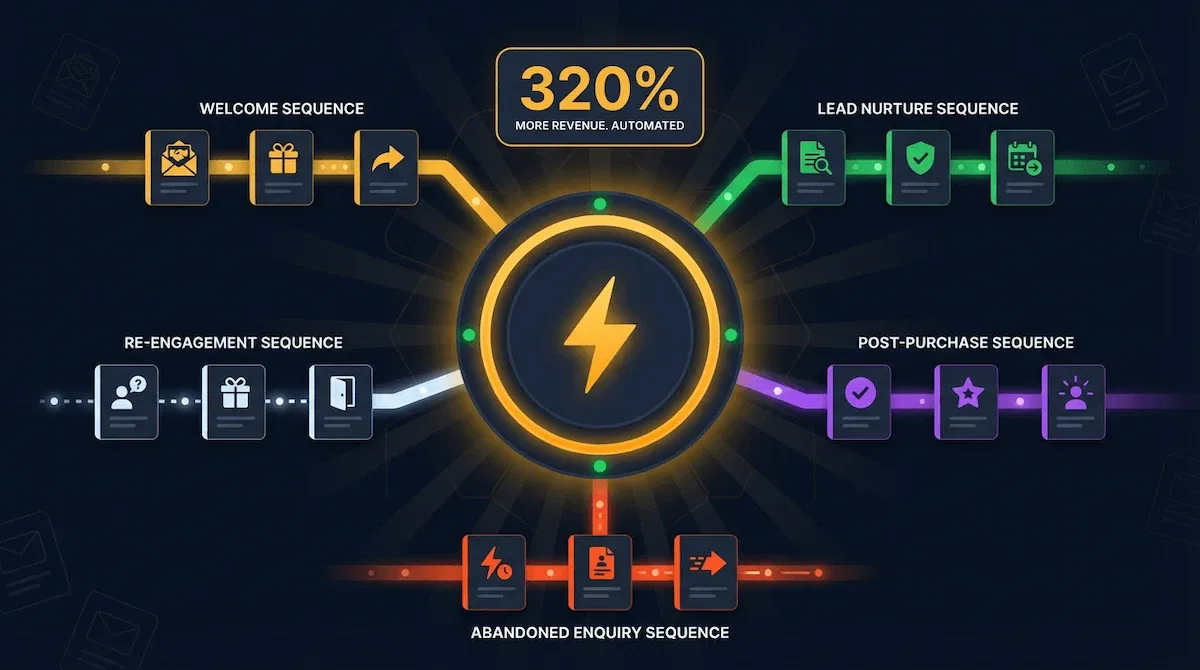
4 - Automation in Email Marketing: The Channel That Generates 320% More Revenue Without Extra Work
Every time I tell a small business owner that automated emails consistently outperform manually sent emails by a margin most people find hard to believe, I get one of two reactions. Either they do not believe it — or they immediately want to know why they have not built this yet.
The answer to both reactions is the same: most people underestimate email because they think about it as a broadcast channel. You write a newsletter, you send it to your list, some people open it. That model works, but it is not what produces the numbers that matter. What produces them is trigger-based automation — emails that fire based on what a specific person did, at the exact moment that action makes the email relevant to them.
That is a fundamentally different thing. And it is the thing worth building first.
The Five Email Sequences Every Small Business Needs Running Right Now
I am going to be specific here because most guides on this topic stay vague enough to be useless.
The five sequences that produce the majority of email automation revenue for small businesses are: the welcome sequence, the lead nurture sequence, the re-engagement sequence, the post-purchase or post-enquiry sequence, and the abandoned enquiry sequence.
The welcome sequence is the one to build first — not because it is the most complex, but because every new subscriber triggers it immediately. It sets expectations, delivers your lead magnet or first value piece, and moves a cold contact toward a warm one inside the first seventy-two hours of them knowing you exist. Most businesses have zero automation running for new subscribers. This one sequence alone changes the trajectory of every lead that enters your list from the moment it goes live.
The lead nurture sequence is the one that does the heavy lifting for service businesses. A prospect downloads a resource, books a discovery call, or submits an enquiry — and a sequence of five to seven emails follows up over the next two to three weeks, handling objections, demonstrating expertise, and making a clear invitation to work together. No chasing. No manual follow-up. No leads falling through the cracks because you were busy with a client.
The other three sequences — re-engagement, post-purchase, and abandoned enquiry — each handle a specific gap in the customer journey that most small businesses leave completely unaddressed. Combined, they cover the full lifecycle from first contact to repeat business without requiring manual intervention at any point.
For the complete build guide on each of these sequences — the exact emails, the trigger logic, the timing, and the copy structure — automation in email marketing covers every sequence in detail.
Behaviour-Triggered vs Schedule-Based — Which Emails Produce the Higher ROI
This is the distinction that separates the small businesses seeing real returns from email automation from the ones running it and wondering why nothing moves.
Schedule-based emails go out on a fixed cadence regardless of what the recipient has done. Day one, day three, day seven — the sequence fires whether the person opened the first email or ignored it, whether they clicked the link or unsubscribed from three similar lists that week. The timing is yours, not theirs.
Behaviour-triggered emails fire when something specific happens. A subscriber opens three emails in a row without clicking — a different offer goes out. A lead clicks the pricing link twice in one week — a direct invitation sequence starts. A customer has not purchased in ninety days — a re-engagement track fires. The trigger is their action, which means the email arrives at the exact moment it is relevant.
Automated emails average a 70.5% higher open rate and a 152% higher click-through rate than standard broadcast messages — a gap that exists entirely because relevance and timing are doing the work that volume used to do — WinSavvy.
I always tell founders building their first stack: set up one behaviour-triggered sequence before you build anything schedule-based. The results it produces will tell you more about your audience in thirty days than six months of broadcast emails ever will.
How to Build Your First Email Automation in Under Two Hours
The two-hour build is not a trick. It is a scope decision.
Pick one sequence — the welcome sequence. Write three emails: a delivery email that fulfils whatever you promised when someone signed up, a value email that gives them something genuinely useful on day two, and a soft-invitation email on day five that tells them what working with you looks like and invites them to take the next step. Set the trigger — new subscriber added to your list. Set the timing — immediate, day two, day five. Test it by subscribing with a personal email address and running through the sequence yourself.
That is the build. It takes under two hours including the writing. And from the moment it goes live, every new subscriber on your list moves through a sequence that would have required you to do manually before.
Everything else — the nurture sequences, the re-engagement tracks, the behaviour triggers — gets built on top of that foundation. But the foundation itself is three emails and one trigger. Start there.
For a practical look at how email marketing marketing automation connects to the rest of your stack — the integration points, the tool setup, and the handoff between email and CRM — that post covers the full integration picture. And if you are specifically building for a small business audience, email marketing small business walks through the exact system built for a lean operation running on minimal tools and maximum automation.
⚡ Automate It
This week: write your three-email welcome sequence. Email one delivers your lead magnet or first value piece — send it immediately on signup. Email two delivers one genuinely useful insight with no ask — send it on day two. Email three makes a clear, direct invitation to take the next step — send it on day five. Set the trigger. Test it on yourself. Go live. That sequence will outperform every broadcast email you have ever sent — and it will keep running long after you have moved on to building the next layer of your stack.
Email is the foundation — but a marketing system built on email alone leaves the majority of your audience unreached. The next channel in the build order handles the problem that trips up almost every small business owner who relies on manual outreach: showing up consistently on social media without spending your entire working day doing it.
5 - Social Media Automation in Marketing: How to Maintain Consistent Presence Without Daily Manual Work
Let me tell you what I see almost every time a small business owner shows me their social media approach. They post three times in one week because they had a good content idea and some spare time. Then nothing for ten days because a client project took over. Then a flurry of five posts in two days to make up for the gap. Then silence again.
It is not laziness. It is the absence of a system. And inconsistency on social media is more damaging than most people realise — not because any single gap matters, but because the algorithm reads irregular posting as low relevance and reduces your reach accordingly. The audience you spent months building stops seeing you. Not because they unfollowed you. Because the platform decided you were not worth showing.
Social media automation does not solve your content problem. It solves your consistency problem. And for a small business owner running everything alone, that distinction is everything.
What Social Media Automation Actually Covers — and What It Does Not
I want to be precise here because this is the channel where people most often over-automate and then wonder why engagement drops.
Social media automation covers three things: scheduling content to publish at optimal times without manual posting, distributing new blog posts or resources across multiple channels simultaneously via a Zapier workflow, and republishing evergreen content on a rotation so your best posts keep working long after you wrote them.
It does not cover replies, comments, or direct messages. Those stay human. A tool that auto-replies to comments with a generic response does more damage to your brand than posting nothing. The personal interaction — the actual relationship-building that social media is designed for — is not automatable and should not be. Schedule the content. Show up for the conversation.
The Batching System That Keeps Every Channel Active on Thirty Minutes Per Week
This is the approach I use and recommend to every founder who tells me they do not have time for social media.
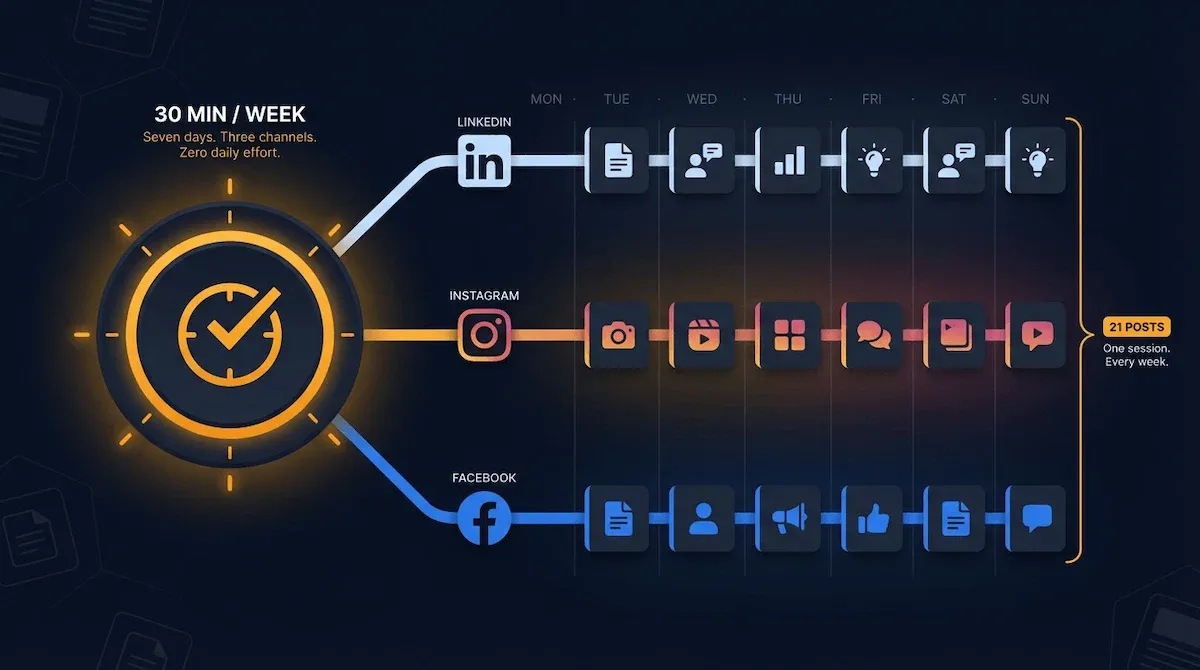
One thirty-minute session per week. In that session: write seven short posts — one for each day of the week. They do not need to be long. A sharp observation, a quick tip, a question to your audience, a behind-the-scenes moment. Each one between fifty and one hundred and fifty words. Schedule all seven in Buffer or Later in one sitting. Done.
Three channels — LinkedIn, Instagram, Facebook or X — get the same content with minor formatting adjustments. That is twenty-one posts scheduled across three platforms from one thirty-minute session. Your social presence is now active and consistent for the entire week without you touching it again. 50% of marketers already automate social media management this way — Cazoomi.
The Tools That Handle Social Scheduling Without Complexity or Cost
Three tools are worth knowing at this stage — and none of them require a technical background or a paid tier to get started.
Buffer handles scheduling across six platforms on its free plan, with a clean interface that takes under ten minutes to learn. You connect your accounts, write your posts, pick the times, and it handles the rest. For most small businesses in the early stages of their automation build, Buffer is all they need.
Later is the better choice if your business is visual-first — products, food, fashion, interiors, anything where Instagram is your primary channel. Its visual content calendar and link-in-bio tool are genuinely useful, and the free plan covers the basics without limitation.
Hootsuite covers the most platforms and offers the deepest analytics, but its pricing reflects that. I would not recommend starting there. Build the habit with Buffer or Later first. Upgrade when you have outgrown what the free tier offers and you have the engagement data to justify the investment.
The one rule across all three: schedule content at least five days in advance. Never live-post as your primary strategy. The moment you rely on posting in real time, you are back to being the person who goes quiet every time something more urgent comes up.
For a broader look at which tools belong at each stage of the build — including how social scheduling fits into the full stack — best marketing methods for small business breaks down the complete tool picture across every channel.
🎯 Pro Tip
Your first social media automation build should take one afternoon. Connect Buffer to three platforms. Write seven posts. Schedule them across the next seven days at your audience's peak engagement times — Buffer suggests these automatically based on your account data. Go live. That is your social presence handled for the week. Repeat next Monday. The consistency compounds faster than you expect.
Social media keeps your business visible. But visibility without a follow-up system means you are generating awareness that goes nowhere. The next section covers the automation layer that catches every lead your social presence creates and follows up with them so you never have to chase manually again.
6 - Lead Nurturing Automation: The Workflow That Follows Up So You Never Have To
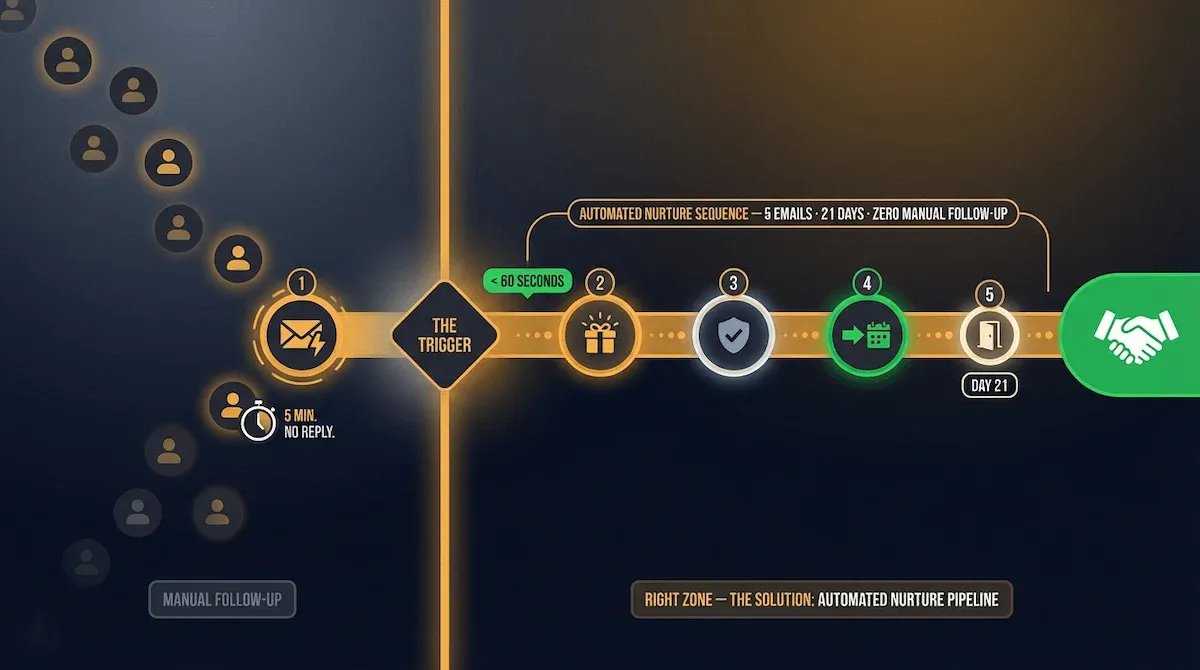
Here is a number that should bother every small business owner reading this: 9 out of 10 leads who do not hear back within five minutes of making contact will move on. Not because your offer was wrong. Not because your price was too high. Because someone else followed up faster.
I have watched this happen to good businesses with genuinely excellent offers. A lead comes in through the contact form on a Tuesday afternoon. The founder is in a client meeting. By the time she gets back to her desk three hours later and sends a reply, the lead has already booked a discovery call with a competitor who had an automated response waiting the moment the form was submitted.
That is not a sales problem. That is a systems problem. And it has a direct, buildable solution.
Why Most Small Businesses Lose Leads They Should Be Closing
The honest answer is that manual follow-up does not scale — and most small business owners know this but do not act on it until they have lost enough leads to feel the cost.
When your follow-up depends on you remembering, having time, and being in the right headspace to write a good response, it will always be inconsistent. Some leads get a thoughtful reply within an hour. Others wait three days and get something rushed. A few never hear from you at all because they arrived during a particularly busy week and fell off your radar entirely.
The leads who do not hear from you do not assume you are busy. They assume you are uninterested or disorganised. Either impression costs you the relationship before it starts.
Lead nurturing automation removes the inconsistency entirely. Every lead gets the same quality of response, at the same speed, regardless of what else is happening in your business that day. The system does not have bad weeks. It does not forget. It does not send a rushed reply because a client deadline is looming.
The Five-Email Nurture Sequence That Replaces Manual Follow-Up
This is the sequence I build first for every service business I work with — and it covers the full arc from initial contact to clear buying decision without a single manual touchpoint.
Email one goes out immediately — within sixty seconds of the lead making contact. It acknowledges their enquiry, sets an expectation for next steps, and delivers something immediately useful: a relevant resource, a case study, or a short answer to the most common question people in their position ask. The goal is not to sell. The goal is to confirm they made the right decision reaching out.
Email two goes out on day two or three. This is the value email — one genuinely useful insight, tip, or perspective that demonstrates expertise without asking for anything in return. No pitch. No call to action beyond a soft invitation to reply if they have questions.
Email three arrives between day five and seven and handles the most common objection for your specific offer. Not aggressively. Just honestly. Address the thing that makes people hesitate — price, time commitment, whether your service is right for their situation — and give them the honest answer that builds trust rather than deflects the concern.
Email four goes out between day ten and fourteen. This is the direct invitation — a clear, specific ask. Book a call. Start a trial. Request a proposal. Whatever the next step in your sales process is, this email names it directly and makes it easy to take.
Email five is the graceful close — sent around day twenty-one. A brief, low-pressure final message that acknowledges they may not be ready right now, leaves the door open without desperation, and removes them from the active sequence so your list stays healthy.
Five emails. Three weeks. Zero manual follow-up. Businesses that automate lead nurturing this way generate 50% more sales-ready leads at 33% lower cost than businesses relying on manual outreach — WinSavvy.
How to Set Up Behaviour-Triggered Lead Nurturing Without Technical Knowledge
The trigger is the most important part of the build — and it is simpler than most people expect.
The trigger is whatever action signals genuine interest: a contact form submission, a resource download, a pricing page visit logged in your CRM, a reply to one of your broadcast emails. When that action happens, the sequence starts automatically. No manual tagging. No copy-pasting into a spreadsheet. No reminder in your task manager that you will inevitably miss.
The platform handles the trigger. You handle the writing. And the writing — five emails, five hundred words each at most — takes one focused afternoon to complete. Once it is written and the trigger is configured, it runs for every lead who meets the criteria from that day forward.
For the complete framework on how email sequences and lead nurturing connect across the full business — including the specific triggers worth setting up first and the platforms that handle them without technical overhead — email marketing for business covers the full picture.
✅ Apply It
This week, write email one of your nurture sequence — the immediate acknowledgement that goes out the moment a lead makes contact. Keep it under 150 words. Acknowledge their enquiry, tell them what happens next, and give them one useful thing they did not expect. Set it to trigger automatically from your contact form or lead capture page. That single email, running automatically within sixty seconds of every enquiry, will do more for your conversion rate than any other single change you make this month.
Lead nurturing handles the follow-up. But the system that decides which leads get which sequence, and when to escalate a lead to a direct conversation, lives in a different layer of the stack entirely — your CRM. The next section covers exactly how CRM automation turns a contact list into a revenue pipeline that works without you managing it manually.
7 - CRM Automation in Marketing: The System That Turns Your Contact List Into a Revenue Pipeline
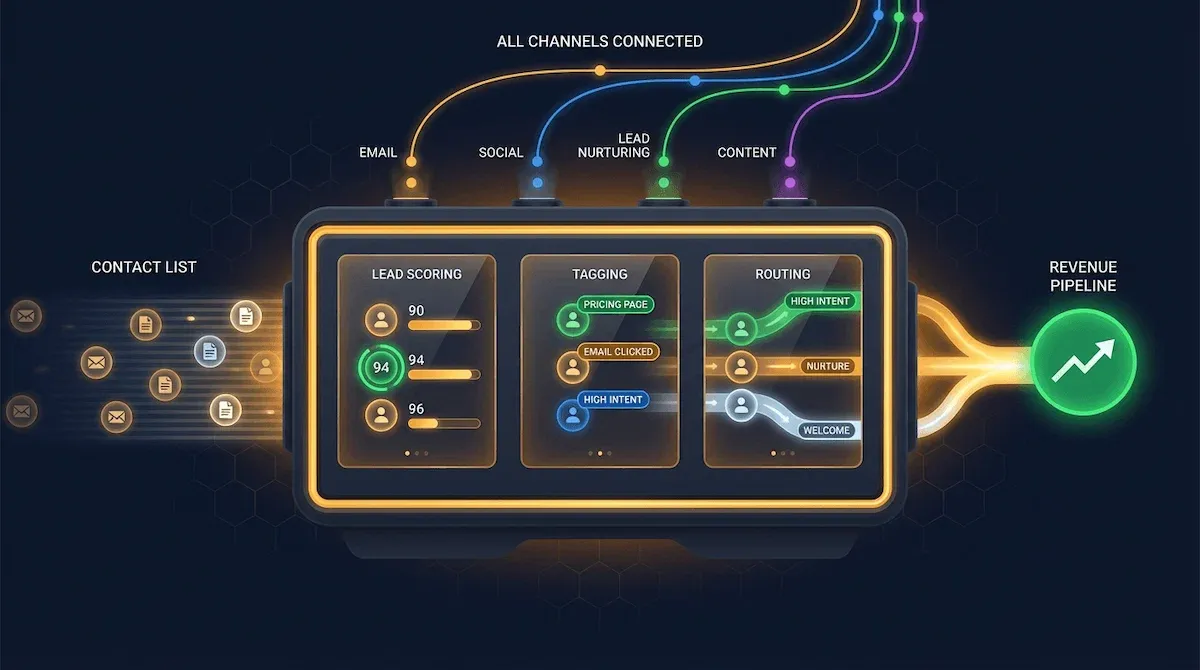
Most small business owners have a contact list. Very few have a pipeline. The difference between the two is not the number of contacts — it is what the system does with them after they arrive.
A contact list is static. Names and email addresses sitting in a spreadsheet or an email platform, treated identically regardless of whether they downloaded a free resource three years ago and never opened another email, or visited your pricing page twice last week and clicked every link in your last nurture sequence. A pipeline is dynamic. It knows the difference between those two people. It treats them differently. And it moves each one toward the next logical step in their relationship with your business — automatically, based on what they actually do.
The CRM is what makes that possible. And CRM automation is what makes it happen without you managing it manually.
What CRM Automation Actually Does Inside a Small Business Marketing Stack
I want to clear up a misconception I encounter constantly: a CRM is not a contact database. That is what it looks like from the outside. What it actually is — when it is set up correctly — is the intelligence layer of your entire marketing stack.
Every action a contact takes gets recorded. Every email opened, every link clicked, every page visited, every form submitted, every reply sent. The CRM collects that data, processes it against the rules you have defined, and triggers the appropriate next action across every connected tool. A lead visits your pricing page — the CRM tags them as high-intent and notifies you. A subscriber opens five consecutive emails without clicking — the CRM moves them into a re-engagement sequence. A prospect completes your discovery call form — the CRM updates their pipeline stage, fires a confirmation email, and adds a task to your calendar.
None of that requires you to be present. You defined the rules once. The system executes them every time, for every contact, at the exact moment the trigger condition is met.
Lead Scoring, Tagging, and Routing — The Three Automations That Change Everything
These are the three CRM automations I build before anything else — and they are the ones that produce the most immediate, most visible results for small business owners who have never used a CRM properly before.
Lead scoring assigns a numerical value to every contact based on their behaviour. A new subscriber starts at zero. They open an email — plus five points. They click a link — plus ten. They visit the pricing page — plus twenty-five. They submit a contact form — plus fifty. When a contact crosses a threshold you define — say, one hundred points — the CRM flags them as sales-ready and triggers a direct outreach sequence or a personal notification to you. You stop guessing which leads to prioritise. The system tells you, based on behaviour, not intuition.
Tagging organises contacts by interest, behaviour, and pipeline stage without manual segmentation. A contact downloads your email automation resource — they get tagged "email automation interest." They later download your social media resource — they get an additional tag. Over time, every contact in your system carries a set of tags that tell you exactly who they are, what they care about, and where they are in their buying journey. Those tags determine which sequences they enter, which content they receive, and which offers they see.
Routing sends the right contact to the right next step at the right time. A high-scoring lead gets a direct invitation sequence. A low-engagement contact gets a re-engagement track. A contact who has been in your pipeline for ninety days without moving forward gets a final check-in. The routing logic is defined once and runs automatically forever.
Businesses using CRM automation see an average 30% increase in lead conversion rates compared to businesses managing contacts manually — Cazoomi.
How to Connect Your CRM to Every Other Marketing Channel You Are Running
The CRM only becomes the intelligence layer of your stack when it is connected to everything else. A CRM that operates in isolation from your email platform, your lead capture forms, and your social scheduling tools is just an expensive spreadsheet.
The connections that matter most for a small business stack are three. First: your lead capture forms feed directly into the CRM — every new contact appears automatically, tagged by the source they came from. Second: your email platform syncs bidirectionally with the CRM — email engagement data updates contact scores in real time, and CRM pipeline changes trigger the appropriate email sequences. Third: Zapier bridges any gap between tools that do not have native integrations — passing data between your CRM and every other tool in your stack without manual exports or copy-pasting.
Once those three connections are live, the system starts behaving as one engine rather than a collection of separate tools. For a detailed look at how automated sales and marketing works when the CRM layer is properly connected to the rest of the stack — the specific triggers, the handoff points between marketing and sales, and the workflows that close more leads without manual intervention — that post covers the full integration picture.
💜 Stack Snapshot
The three CRM automations to build first — in this order:
① Lead scoring — assign points to every contact action and flag sales-ready leads automatically
② Tagging — organise contacts by interest, behaviour, and pipeline stage without manual segmentation
③ Routing — send every contact to the right next sequence based on their score and tags automatically
With the CRM connected and running, your stack now has memory — it knows who every contact is, what they have done, and what they need next. The question that follows is which tools actually power all of this without requiring a developer, a three-month onboarding process, or an enterprise budget. That is exactly what the next section covers.
8 - The Best Marketing Automation Tools for Small Business in 2026 — Organised by Job, Not by Feature List
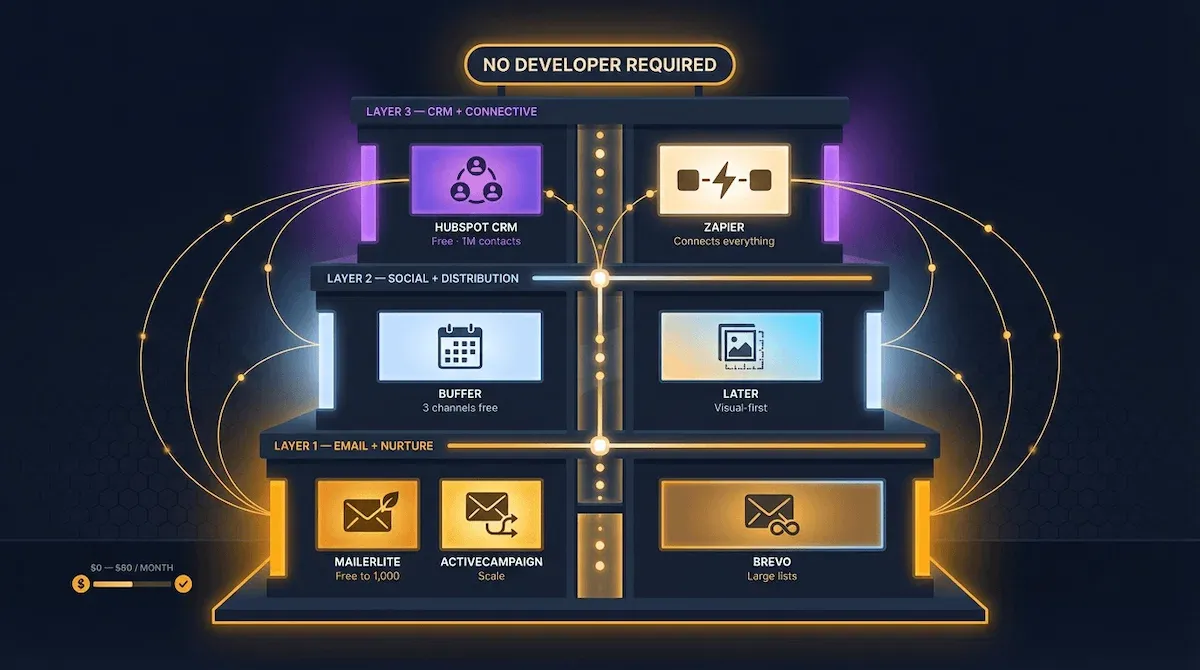
Every marketing automation tool comparison I have ever read makes the same mistake: it organises tools by feature list. Drag-and-drop builder. A/B testing. Multi-channel support. Advanced segmentation. The features sound impressive in a comparison table and tell you almost nothing about whether the tool will actually do the specific job you need it to do right now.
I organise tools differently. By job. What task does this tool handle, how well does it handle that specific task, and what does it cost before you hit a paywall that makes it unworkable for a small business running on a lean budget? Those three questions produce a much more useful answer than any feature comparison ever will.
Here is the complete tool picture for a small business automation stack in 2026 — organised by the layer of the build it belongs in.
The Email and Nurture Layer: Three Tools Worth Knowing
MailerLite is where I send most first-time builders. The free plan covers up to one thousand subscribers and includes automation workflows, landing pages, and pop-up forms — everything a small business needs to build and run its first three sequences without paying anything. The interface is clean enough to learn in an afternoon. The automation builder is visual and intuitive. And the deliverability is genuinely good, which matters more than most people realise when they are starting out.
ActiveCampaign is the upgrade path when MailerLite's segmentation becomes too limited for what you are trying to do. The automation builder is the most powerful in this category for small business use — deep conditional logic, multi-step sequences, CRM integration that actually works, and behaviour-triggered workflows that respond to contact actions across email, site visits, and form submissions simultaneously. It starts at around $fifteen per month for five hundred contacts and scales from there. Worth every dollar once you have outgrown the free tier of a simpler platform.
Brevo — formerly Sendinblue — is the tool I recommend when unlimited contacts matter more than advanced automation depth. Its free plan allows up to three hundred emails per day with no contact limit, making it the right choice for businesses with large lists and simple sequence requirements. The automation builder is capable without being complex. For a founder who needs to send a welcome sequence and a monthly newsletter to ten thousand contacts without paying for a platform sized for that list, Brevo is the answer.
The Social and Distribution Layer: Two Tools That Cover Everything
Buffer handles social scheduling for most small businesses at every stage of the build. The free plan covers three social channels and ten scheduled posts per channel — enough to keep LinkedIn, Instagram, and Facebook active simultaneously without manual posting. The interface takes under ten minutes to learn. The scheduling suggestions are genuinely useful. And the analytics, while not deep, tell you enough to know which content is working and which is not.
Later is the better choice when Instagram is your primary channel and visual planning matters. Its drag-and-drop content calendar lets you see exactly how your grid will look before anything goes live — which is more useful than it sounds for product businesses, food brands, and anyone whose Instagram aesthetic is part of their brand identity. The free plan covers one social profile per platform with fourteen scheduled posts. For most visual-first small businesses, that is sufficient.
The CRM and Connective Layer: The Foundation That Ties the Stack Together
HubSpot's free CRM is the most capable free tool in this entire list. One million contact limit. Deal pipeline management. Email tracking. Task automation. Form builders. Meeting scheduling. Live chat. All free, all genuinely useful, all available without a credit card. The catch is that HubSpot's paid marketing features — the ones that make the CRM truly powerful as an automation engine — start at prices that push beyond lean small business budgets quickly. Use the free CRM as the intelligence layer of your stack. Connect it to MailerLite or ActiveCampaign for the email automation. Let each tool do the job it does best.
Zapier is the connective tissue of the entire stack. It bridges every tool that does not have a native integration with every other tool — passing data between your CRM, your email platform, your social scheduler, your lead capture forms, and your content distribution channels without code or developer involvement. The free plan covers one hundred tasks per month across five Zaps. Most small businesses in the early stages of their automation build stay well within that limit. 76% of marketers integrate their automation tools with a CRM to unify workflows — and Zapier is how most small businesses make that integration possible without an IT department — Dataopedia.
The one filter I apply to every tool before recommending it: does it support all the workflows a small business actually needs without a paid upgrade to access the features that make those workflows possible? Every tool in this list passes that test. For a deeper look at how automation and AI tools compare across use cases — including which ones are worth paying for and which free tiers genuinely hold up — automation and ai covers the full comparison.
💜 Stack Snapshot
The complete small business automation stack — by layer and job:
Email + Nurture: MailerLite (free to 1,000) · ActiveCampaign (scale) · Brevo (large lists)
Social + Distribution: Buffer (three channels free) · Later (visual-first, Instagram)
CRM: HubSpot Free (up to 1M contacts, pipeline + task automation)
⚙️ Connective tissue: Zapier (bridges every tool in the stack without code)
Knowing which tools exist is one thing. Knowing which one to start with — given where your business is right now, not where you plan to be in two years — is a different and more important question. The next section gives you the exact framework for making that decision without wasting three months on the wrong platform.
9 - How to Choose the Right Marketing Automation Platform Without Wasting Three Months on the Wrong One
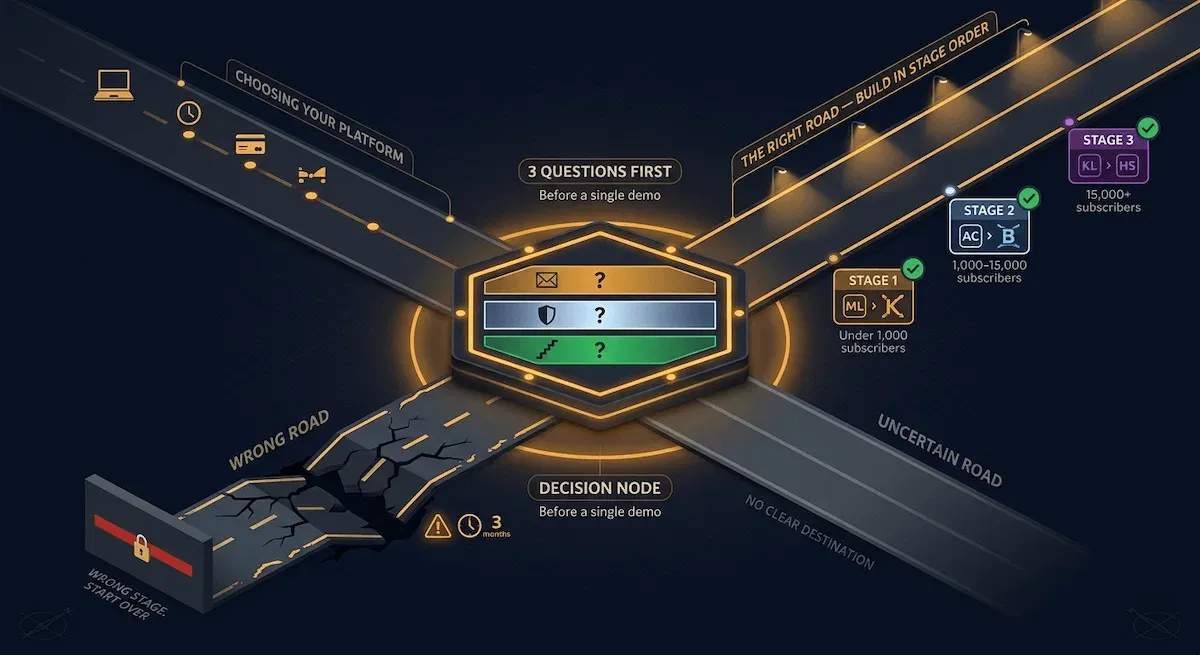
The most expensive mistake I see small business owners make with marketing automation is not choosing a bad tool. It is choosing a good tool that is wrong for where they are right now.
They read a comparison article, find the platform with the most five-star reviews, sign up for the trial, spend six weeks configuring it, discover that the features they actually need are locked behind a pricing tier that costs four hundred dollars a month, and start over. Three months gone. Zero automations running. A deep reluctance to try again.
The platform decision is not complicated if you ask the right questions before you look at a single demo. Most people skip the questions entirely and go straight to the demos. That is why they end up in the wrong place.
The Three Questions to Answer Before You Look at a Single Platform
Question one: what is the single highest-volume repetitive task in my marketing right now?
Not the most important task. Not the one you wish you had time for. The one you actually do most often, manually, every week, that produces a known correct output every time. That task defines your minimum viable automation. The platform you choose must handle that specific workflow — completely, without a paid upgrade, without developer involvement — or it is the wrong platform regardless of how good everything else about it is.
Question two: does this platform support that workflow on its free or entry-level plan?
I am direct about this with every founder I work with: do not buy capacity you have not earned yet. A small business with four hundred subscribers and one welcome sequence does not need a platform built for a team of twelve managing twenty thousand contacts across five channels. Buy for where you are. Upgrade when you outgrow it. The money you save by not over-buying in the first three months funds the upgrade when the upgrade is actually justified.
Question three: what does the upgrade path look like when I need more?
This is the question almost nobody asks upfront — and it is the one that determines whether you spend the next two years on the right platform or rebuilding your entire stack because the tool you chose does not scale the way you assumed it would. Look at the next two pricing tiers before you commit to the free one. If the jump from free to the features you will eventually need costs more than your current monthly revenue from automated channels, the platform is wrong for your growth stage.
How to Match a Platform to Your Current Business Stage
I use a simple three-stage framework that maps directly to where most small businesses are when they first start building.
Stage one is under one thousand subscribers with one or two sequences running or planned. MailerLite or Kit — both free at this scale, both capable of handling welcome sequences, lead nurture tracks, and basic tagging without limitation. Start here. Do not go further until you have outgrown it.
Stage two is one thousand to fifteen thousand subscribers with multiple sequences running across different audience segments, behaviour-triggered workflows firing regularly, and a CRM that needs to sync bidirectionally with the email platform. ActiveCampaign or Brevo — both handle this scale cleanly, both integrate with HubSpot's free CRM without friction, and both sit at price points a small business can justify once the automation stack is generating measurable return.
Stage three is fifteen thousand subscribers and above, with complex multi-channel workflows, advanced lead scoring, and revenue attribution requirements. Klaviyo for e-commerce businesses. ActiveCampaign for service businesses. HubSpot's paid marketing tier for businesses that want everything in one place and have the revenue to justify the investment.
The rule across all three stages is the same: the right platform is the least powerful one that fully handles everything you need right now. Simplicity compounds. Complexity costs.
The One Platform Worth Avoiding at Every Stage
I will be specific because being vague here does not help anyone.
Mailchimp. Not because it is a bad product — it is not. Because its pricing model has become genuinely punishing for small businesses as they grow. The free plan counts unsubscribed contacts toward your limit, meaning your billing tier inflates faster than your active list grows. The automation features that matter — multi-step sequences, behaviour triggers, advanced segmentation — are locked behind a Standard plan that costs significantly more than ActiveCampaign or Brevo for equivalent functionality. And migrating away from Mailchimp once your list is established is a painful, time-consuming process that most founders regret not avoiding earlier.
Start somewhere else. The migration cost later is not worth the familiarity now.
For a broader look at how platform selection fits into the full automation business process — including how to audit your existing tools before adding anything new and the readiness test that tells you whether your processes are ready to automate at all — that post covers the complete decision framework.
🎯 Pro Tip
Before you sign up for any platform, run this test: find the specific automation workflow you want to build in their documentation, follow the setup steps exactly, and check whether the feature you need is available on the plan you intend to use. Do not assume. Do not infer from the marketing page. Read the documentation. The platforms that hide their limitations do so in the gap between what the marketing page implies and what the documentation confirms.
Choosing the right platform solves the build problem. But a platform running workflows you never check is not a system — it is a black box. The next section covers the three numbers that tell you whether your automation in marketing is actually working, and the thirty-minute monthly review that keeps the entire stack honest.
10 - How to Measure Whether Your Automation in Marketing Is Actually Working
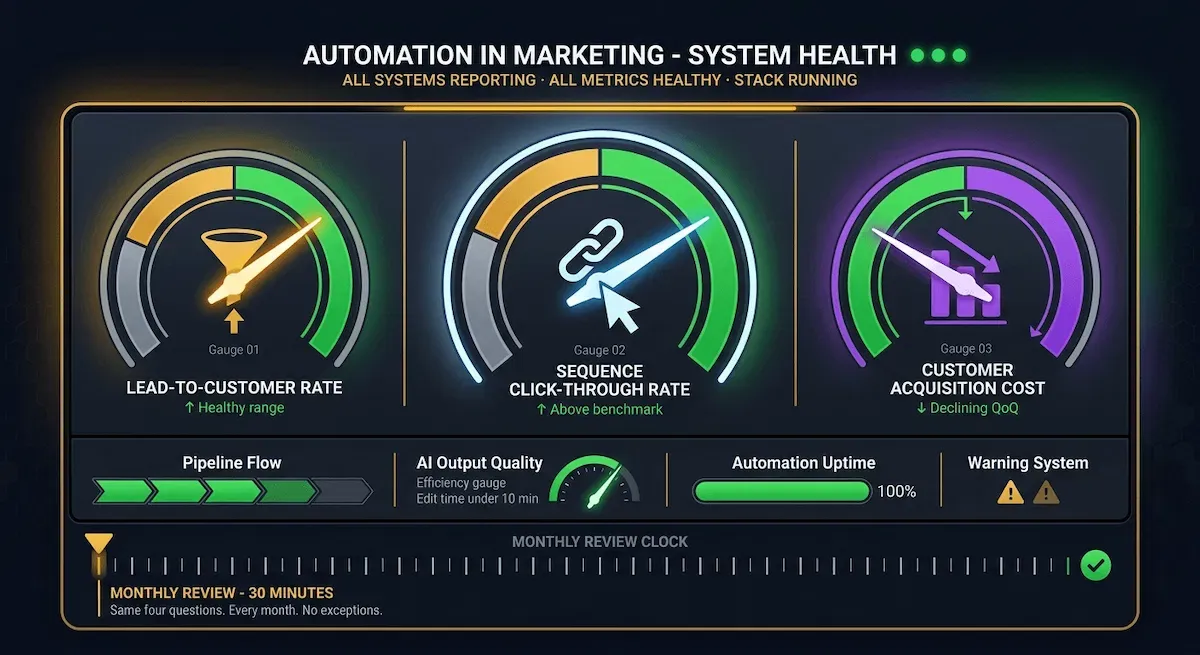
Building the stack is the part most people focus on. Measuring it is the part most people skip — and skipping it is why so many small business owners end up six months into their automation build with a vague sense that something is running but no clear picture of whether it is producing anything worth keeping.
I have been in that position. Workflows firing, sequences sending, tools connected — and genuinely no idea whether any of it was moving the business forward or just creating the comfortable illusion of productivity. The fix was not rebuilding the stack. It was adding ten minutes of measurement to the beginning of every month.
That ten minutes — expanded to thirty when you do it properly — tells you everything worth knowing. Which automations are working, which are running but producing nothing useful, and where the one change that would make the biggest difference actually sits.
The Three Numbers That Tell You Everything
I track three metrics for every automation stack I build or audit — and I look at nothing else until these three are healthy.
The first is lead-to-customer conversion rate. Of every lead that enters your system in a given month — every new subscriber, every contact form submission, every resource download — what percentage becomes a paying customer within ninety days? A healthy range for most service businesses running automated nurture sequences is between three and eight percent. Below three percent, the issue is usually in the nurture sequence itself — the emails are not handling objections effectively or the invitation to take the next step is unclear. Above eight percent consistently, the issue is almost always that you are not generating enough leads to feed the system. The conversion is working. The volume is not.
The second is sequence click-through rate. For every automated email sequence running in your stack, what percentage of recipients click at least one link? The benchmark for automated nurture emails is eight percent and above — significantly higher than the two to three percent typical of broadcast emails. A sequence sitting below five percent has a content problem: the emails are not relevant enough to the segment receiving them, the links are not compelling enough to click, or the sequence is firing to contacts who are not ready for it yet.
The third is customer acquisition cost — how much you spend in time and money to acquire each new customer — tracked quarter over quarter. This number should decline as your automation stack matures. The first quarter it is high because you are building. The second quarter it drops as the sequences optimise. By the end of the first year, a well-built automation stack should be acquiring customers at a meaningfully lower cost than the same business was achieving with manual outreach. If it is not declining, something in the stack is broken — and the other two metrics will usually tell you where.
The Two Warning Signs That Mean Something in Your System Is Broken
The first warning sign is automations firing at high volume with no downstream output. Sequences sending, open rates reasonable, click rates acceptable — but leads not progressing through the pipeline. This is a routing problem. The system is communicating but not directing. The CRM is not moving contacts forward based on their engagement, or the sequences are ending without a clear enough next step to prompt action. Fix the routing logic before you touch the copy.
The second warning sign is AI outputs requiring as much editing as writing from scratch. If the AI layer of your stack is generating content that needs forty-five minutes of revision before it is usable, the prompt is the problem — not the tool. A well-configured AI layer with a specific, detailed prompt and a clearly defined output format should produce content that requires ten minutes of light editing at most. More than that and the time saving disappears entirely. Audit the prompt before you audit the platform.
76% of companies report positive ROI from marketing automation within the first year — but the businesses that do not see that return almost universally share one characteristic: they measured nothing during the build and had no baseline to compare against when they tried to evaluate results — RevenueMemo.
The Thirty-Minute Monthly Review That Keeps the Entire Stack Honest
Once a month. Thirty minutes. The same four questions every time.
Which automations fired last month and produced a used output — a lead that progressed, a sale that closed, a contact that moved forward in the pipeline? Which automations fired but produced nothing useful downstream? Of the AI outputs generated last month, what percentage were used without significant editing? And — the most important question — what is the one change that would make the biggest difference to the stack's performance next month?
Answer those four questions. Make the one change. Move on. That is the entire review. It is not a deep analytics session. It is not a platform audit. It is thirty minutes of honest assessment that keeps the stack improving rather than quietly degrading while you assume it is working.
For the complete measurement framework — including the specific dashboards worth setting up in HubSpot and the reporting templates that make the monthly review even faster — automated marketing for small business covers the full picture.
✅ Apply It
Before you build your next automation, record your baseline. Write down your current lead-to-customer conversion rate, your best-performing email sequence click-through rate, and your current customer acquisition cost. Put those three numbers somewhere you will find them in ninety days. Without a baseline, you cannot measure improvement — and without measurement, you are running a system you cannot improve. Ten minutes now saves months of guesswork later.
With measurement in place, the stack is no longer a collection of tools you hope are working — it is a system you can see, evaluate, and improve. The next section covers the step that most small businesses never reach: connecting every channel into one compounding system where each layer makes every other layer more effective over time.
11 - How to Connect All Your Marketing Automation Channels Into One System That Compounds Over Time
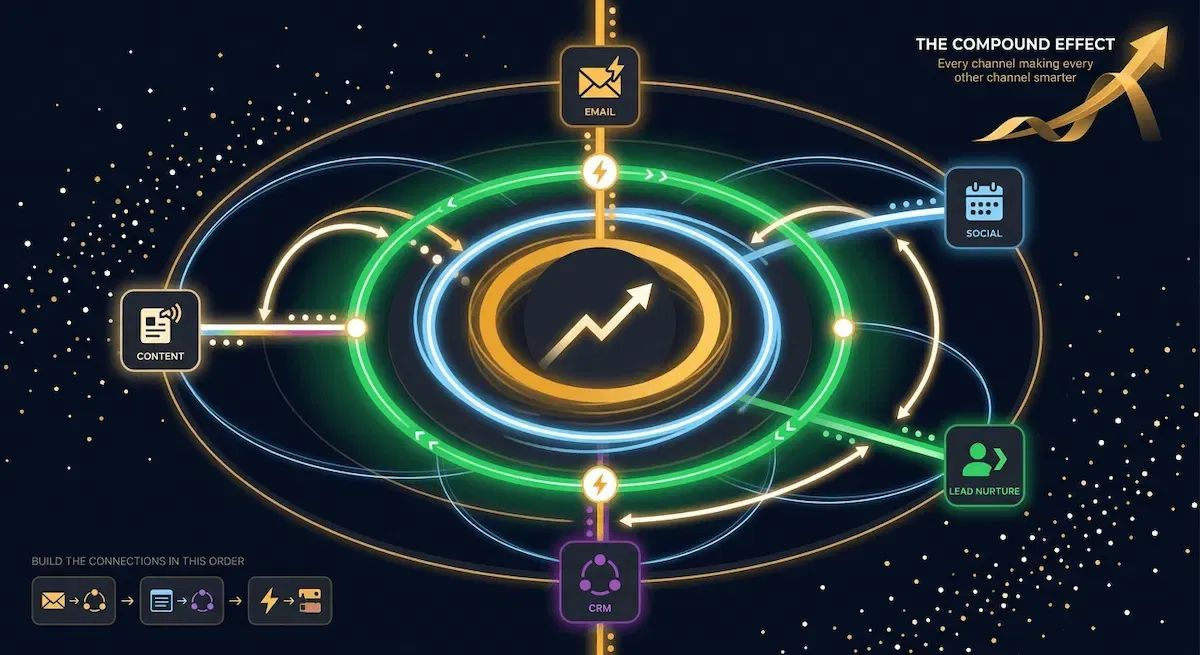
There is a specific moment in building an automation stack when everything changes. It is not when you set up your first email sequence. It is not when you connect your CRM. It is the moment the tools stop feeling like separate pieces of software and start behaving like one system — where data flows between them automatically, where each channel informs every other channel, and where the output of one automation becomes the trigger of the next.
Most small businesses never reach that moment. Not because it is technically difficult. Because they build each channel in isolation and never wire them together.
I want to be clear about what connecting them actually produces. It is not just efficiency — though the time saving is real. It is compounding. A system where email engagement data improves CRM scoring, CRM scoring triggers better-targeted nurture sequences, and nurture sequence performance informs content distribution priorities is not twice as effective as three separate tools. It is ten times as effective. Because each layer is making every other layer smarter.
The Three-Layer Architecture That Makes Separate Tools Behave as One System
Layer one is rules-based automation — every high-volume, consistent, predictable task across all five channels running without manual intervention. Email sequences firing on trigger. Social posts scheduling on cadence. Lead capture forms routing contacts into the CRM automatically. Content publishing triggering distribution workflows. This layer handles the execution. It does not make decisions. It does not vary its output based on context. It runs the rules you defined and produces the output you specified, every time, at scale.
Layer two is AI at the decision points inside proven automations — where the input is variable and the correct output depends on context. A lead replies to your nurture sequence — an AI layer reads the reply, classifies the intent, and routes the contact to the appropriate next sequence without you being present. A new subscriber's engagement score crosses a threshold — an AI step generates a personalised subject line for their next email based on their tag history. This layer does not replace layer one. It sits on top of it, adding intelligence to the moments where rules alone are not enough.
Layer three is the feedback loop — where AI outputs from layer two trigger new automations in layer one, creating a circuit that improves the system's performance over time without additional manual input. The personalised subject line generated in layer two gets tested against the standard subject line — the winner updates the template automatically. The intent classification from the reply routing feeds back into the lead score — contacts who reply positively get accelerated through the pipeline. The system learns from its own outputs and adjusts without you restarting the process each time.
This is what I mean by compounding. Not a stack that works well on day one. A stack that works better on day ninety than it did on day one — and better still on day three hundred and sixty-five.
The Feedback Loops That Turn Good Automation Into a Compounding Advantage
Three feedback loops produce the majority of the compounding value in a well-connected small business automation stack.
The first is the email-to-CRM loop. Every email a contact opens, clicks, or ignores updates their CRM score in real time. High engagement increases their score and moves them closer to the sales-ready threshold. Low engagement decreases their score and triggers a re-engagement sequence before the relationship goes cold entirely. The email platform and the CRM are talking to each other continuously — and the conversation makes both tools smarter than either one would be operating alone.
The second is the CRM-to-sequence loop. When a contact's CRM score crosses a defined threshold — upward or downward — a new sequence fires automatically. A high-scoring contact enters a direct invitation track. A disengaging contact enters a win-back track. A contact who completes a purchase enters an onboarding and upsell track. The CRM is not just storing data. It is using that data to direct the flow of communication across every connected channel without manual oversight.
The third is the content-to-distribution loop. Every piece of content published — blog post, resource, case study, video — automatically triggers a distribution workflow that pushes it to every relevant channel simultaneously. Email list. LinkedIn. Social scheduler. Relevant audience segments tagged in the CRM. One publication event. Seven distribution touchpoints. The content works harder because the distribution is automatic, and the distribution is smarter because the CRM knows which segments care about which content types.
For a detailed look at how the email and CRM layers connect specifically — the integration points, the sync settings, and the workflow logic that makes bidirectional data flow work without breaking — email marketing marketing automation covers the full technical picture in plain language.
The Build Sequence: What to Connect First and Why the Order Matters
Connect email to CRM first. This single integration produces more immediate compounding value than any other connection in the stack — because it gives your CRM real behavioural data to work with from day one, and it gives your email platform the segmentation intelligence it needs to send the right sequence to the right contact at the right time.
Connect lead capture to CRM second. Every form, every opt-in, every resource download feeds directly into the CRM with automatic source tagging. No manual imports. No spreadsheet exports. Every new contact arrives in the system already tagged, already scored at zero, already assigned to the appropriate welcome sequence.
Connect Zapier last — to bridge every gap the native integrations do not cover. This is where the stack stops having seams. A new podcast episode published automatically creates a social post in Buffer, sends a segment-specific email in MailerLite, and updates a content log in your CRM. One event. Four automated outputs. Zero manual steps.
Organisations that build connected automation architectures this way report significantly faster process execution and meaningful reductions in marketing overhead — and the small businesses I work with consistently confirm that the compounding effect becomes visible within sixty to ninety days of the full stack going live — email marketing marketing automation.
⚡ Automate It
This week, make one connection you have not made yet. If your email platform and CRM are not syncing bidirectionally — connect them. If your lead capture forms are not routing automatically into your CRM — fix that. If your content publishing is not triggering distribution across every channel — build the Zapier workflow. One connection. One afternoon. The compounding starts the moment the data starts flowing between the tools that were previously working in isolation.
The stack is connected. The feedback loops are running. The system compounds. What comes next is understanding where all of this is heading — because the businesses that position themselves correctly for the next twelve months of development in automation and AI will compound their advantage faster than anything they built in the previous two years.
12 - The Future of Automation in Marketing — What Changes in the Next 12 Months and What to Build Now
Every guide on automation in marketing covers what exists today. Very few cover what is coming — and for a small business owner making decisions about where to invest their time and money right now, that forward visibility matters more than most people give it credit for.
I am not going to speculate about technology that is five years away. I am going to tell you what is already happening, what is twelve months from becoming standard for small businesses, and — most importantly — what you need to have built today to be positioned for it when it arrives.
The businesses that compound their automation advantage fastest in the next twelve months will not be the ones that adopt every new tool the moment it launches. They will be the ones that built a clean, connected foundation — defined processes, proven sequences, connected channels, measurement in place — and are now positioned to layer new capability on top of it without rebuilding from scratch.
Where Automation in Marketing Is Heading in 2026 and Beyond
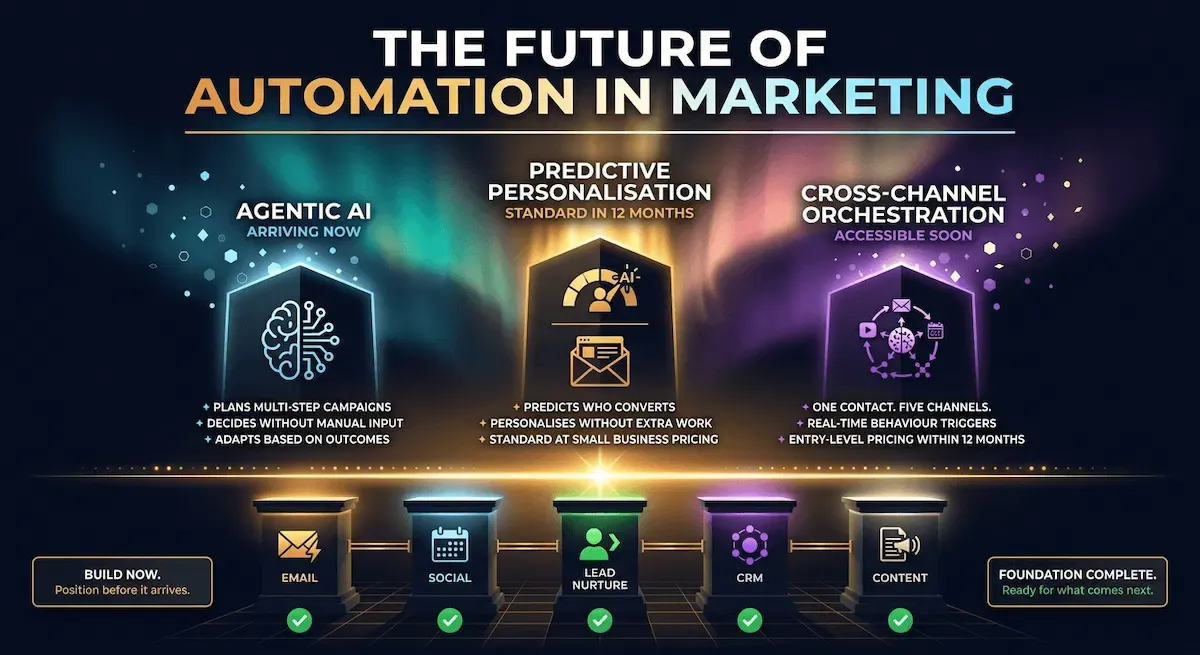
The most significant shift happening right now is the move from rules-based automation to agentic AI — systems that do not just execute predefined workflows but plan, decide, and act across multiple steps based on context and outcome.
Traditional automation follows the rule you wrote. If this, then that. A lead submits a form — a sequence starts. A contact score crosses a threshold — a notification fires. The rule runs. The output is always the same.
Agentic AI operates differently. It receives a goal — generate a follow-up sequence for this lead based on their engagement history and industry — and decides autonomously how to achieve it. It reads the CRM data. It evaluates the engagement signals. It drafts the sequence. It schedules the send. It monitors the results and adjusts the next email based on how the first one performed. The human defines the goal. The system handles the execution and the iteration.
This is not science fiction. 62% of organisations are already experimenting with AI agents in their marketing operations — and the gap between early adopters and everyone else is widening at a pace that makes waiting a genuinely costly decision — Digital Di Consultants.
The AI Capabilities That Will Become Standard in the Next Twelve Months
Three capabilities that are currently available but underused by small businesses will become table stakes within the next year.
Predictive lead scoring will replace manual threshold-based scoring for most businesses running more than a few hundred contacts through their pipeline. Instead of assigning fixed point values to specific actions, predictive models analyse the full behavioural history of every contact and assign a conversion probability based on patterns from every previous lead in the system. The contacts most likely to convert get identified earlier, with more accuracy, without you defining every scoring rule manually.
Dynamic content personalisation will move from enterprise-only to small business standard. An email sequence that shows different content blocks to different contacts based on their tags, their industry, their pipeline stage, or their previous engagement — without you writing a separate version for each segment — is already possible on platforms like ActiveCampaign and Klaviyo. Within twelve months, every serious email automation platform will offer this natively on entry-level plans.
Cross-channel orchestration — where a single contact's experience across email, social retargeting, SMS, and direct outreach is coordinated by one central system based on their real-time behaviour — will become accessible to small businesses at price points that currently only exist for mid-market companies. The tools are already converging. The pricing is following.
What to Build Today So You Are Ready for What Is Coming
This is the section I most want small business owners to take seriously — because the answer is not "wait and see what the new tools can do."
The answer is: build the foundation now, so the new tools have something to work with when they arrive.
Agentic AI needs clean data to make good decisions. If your CRM is a mess of untagged contacts, inconsistent scoring, and disconnected sequences, an AI agent operating on top of it will make bad decisions confidently and at scale. Clean data is not a technical problem. It is a discipline problem. Start now.
Predictive lead scoring needs a history of contacts moving through your pipeline to build its models on. If you have not been running your sequences and recording outcomes for at least six months, the predictive models have nothing to learn from. Start the sequences now. Record the outcomes now. The model trains on data you have already collected by the time the capability becomes standard.
Cross-channel orchestration needs connected channels to orchestrate. If your email platform, CRM, and social scheduler are not talking to each other today, there is nothing for an orchestration layer to coordinate. Connect the channels now. The orchestration layer slots in on top of existing connections — it does not create them.
The businesses I watch positioning themselves most effectively for the next twelve months of development in this space are not the ones chasing every new tool. They are the ones building slowly, connecting deliberately, and measuring consistently — so that when the capability arrives, the foundation is already there.
For a broader look at where marketing solutions for small businesses are heading and which investments produce the strongest returns at each stage of the build — that post covers the full strategic picture across every channel and tool category.
💜 Stack Snapshot
Future-readiness checklist — what to have in place before the next wave arrives:
✦ Clean CRM data — every contact tagged, scored, and assigned to the correct pipeline stage
✦ Six months of sequence data — open rates, click rates, and conversion outcomes recorded and accessible
✦ Connected channels — email, CRM, social, and lead capture syncing bidirectionally without manual exports
✦ Measurement baseline — the three core metrics tracked monthly so you have a comparison point when new capabilities go live
✦ Defined processes — every workflow documented before it is automated so AI agents have clear goals to execute against
The foundation is built. The channels are connected. The measurement is running. The system is positioned for what comes next. All that remains is understanding what the complete picture looks like when it is working — and what it makes possible for a small business owner who built it correctly.
What the System Looks Like When It Is Running
Let me tell you what Tuesday morning looks like when the stack is built and running correctly.
You wake up. Before you have opened your laptop, three things have already happened. A new subscriber who signed up overnight has received their welcome email and the first piece of value you promised them. Two leads who clicked your pricing page yesterday have entered a direct invitation sequence that will follow up with them six more times over the next three weeks without you writing a single word. A blog post you published last week has been distributed to your email list, your LinkedIn, and your Instagram by a Zapier workflow that fired the moment it went live.
Your social channels posted at six this morning. Your CRM scored every contact who opened an email yesterday and flagged the three who crossed the sales-ready threshold. Your re-engagement sequence caught two subscribers who had gone quiet for forty days and sent them something worth coming back for.
None of that required you. You were asleep.
That is not a fantasy. That is what a properly built automation in marketing system produces for a small business owner who followed the build order, connected the channels, and measured the results consistently enough to know what to improve each month.
The build takes time. The first sequence feels slow to set up. The CRM connection feels fiddly the first time you configure it. The Zapier workflow takes an afternoon you did not plan to spend on it. But every hour you invest in building the system is an hour that pays you back every single week from the moment it goes live — compounding quietly in the background while you focus on the work that only you can do.
You do not need a marketing team. You never did. You needed a system.
What Vault AI Pro Members Build in a Weekend
Every workflow described in this guide — the welcome sequence, the nurture track, the CRM scoring logic, the social scheduling system, the content distribution Zap, the lead routing rules — exists inside Vault AI Pro as a done-for-you resource. Written, structured, ready to deploy. Not a template that requires two hours of configuration to become usable. A finished, field-tested workflow that plugs into the tools you are already using and starts running the same day you install it.
Members who come to Vault AI Pro with no automation stack built have their first three sequences live within a weekend. Members who already have sequences running use the vault to close the gaps — the CRM integrations they skipped, the distribution workflows they never got around to building, the measurement framework they knew they needed and kept deferring.
The system in this guide is not theoretical. Every piece of it is buildable by one person with no technical background and a lean budget. The only variable is whether you build it from scratch or use what is already built.
Your Complete Marketing Automation System. Built. Connected. Ready to Run.
Every workflow, sequence, and tool connection in this guide already exists inside the Vault — done for you, field-tested, and ready to deploy in your business today. No blank screens. No building from scratch. No endless trial and error.
🔒 Instant access · Cancel anytime · Saves 3–5 hours every day · Used by 10,000+ entrepreneurs
Replaces $50/hr freelancer work · Saves 3–5 hours every day · Instant ROI · No contracts