What Automated Marketing for Small Business Actually Looks Like in 2026 (No Fluff, No Tech Overwhelm)
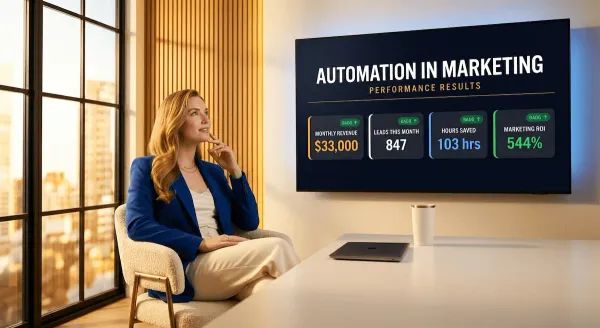
Most small businesses think automated marketing is too complex, too expensive, or built for companies bigger than theirs. Every one of those assumptions is wrong. This is exactly what it looks like in 2026 — five channels, a clear build order, and zero tech overwhelm.
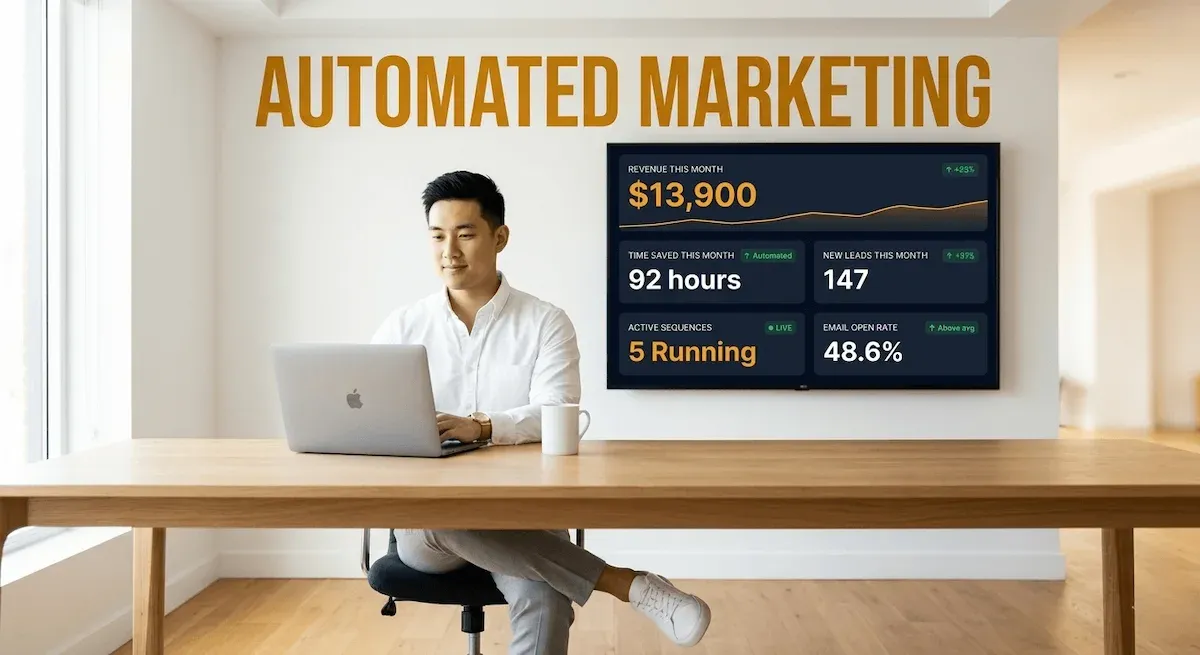
The conversation I have most often with small business owners about automated marketing for small business goes something like this.
They tell me they have been meaning to look into it. They say they have heard it is powerful but assume it is designed for companies with dedicated marketing teams, proper budgets, and someone technical on staff to set it all up. They tell me they will get to it once things slow down.
Things never slow down.
Here is what I want to say clearly before this post goes any further: every assumption in that conversation is wrong. Automated marketing is not a large-business tool that small businesses aspire to eventually. It is a small-business survival tool — because small businesses are the ones who cannot afford to do marketing manually every single week without burning out or falling behind. Large companies have teams. You have yourself, or close to it. Automation is not a luxury for your situation. It is the structural answer to the time problem you have been trying to solve with effort alone.
Small businesses see a 25% increase in marketing ROI when they start using automation Cazoomi — and that uplift does not come from complexity or expensive enterprise stacks. It comes from replacing the manual, repetitive, forgettable marketing tasks with systems that run the moment a trigger fires, regardless of what else you have on your plate that day..
68% of small businesses that have abandoned automation platforms did so because of cost and complexity — but the problem was never automation itself. It was choosing the wrong platform. Go Online Now The right tools in 2026 are genuinely accessible. The right build order makes the whole thing far less overwhelming than the guides you have read before made it seem.
This post is about what automation in marketing actually looks like when you strip away the jargon, ignore the enterprise use cases, and focus entirely on what a small business can build, run, and benefit from this week. Five channels. A clear sequence. Zero tech overwhelm.
1) What Automated Marketing for Small Business Actually Means — and What It Definitely Is Not
Let me start with the definition that actually matters for a small business owner — not the one in the software vendor's glossary.
Automated marketing for small business is not a complicated tech stack. It is not an enterprise CRM that costs more per month than your accountant. It is not something that requires a developer to configure, a marketing operations specialist to maintain, or a six-month implementation project to deploy.
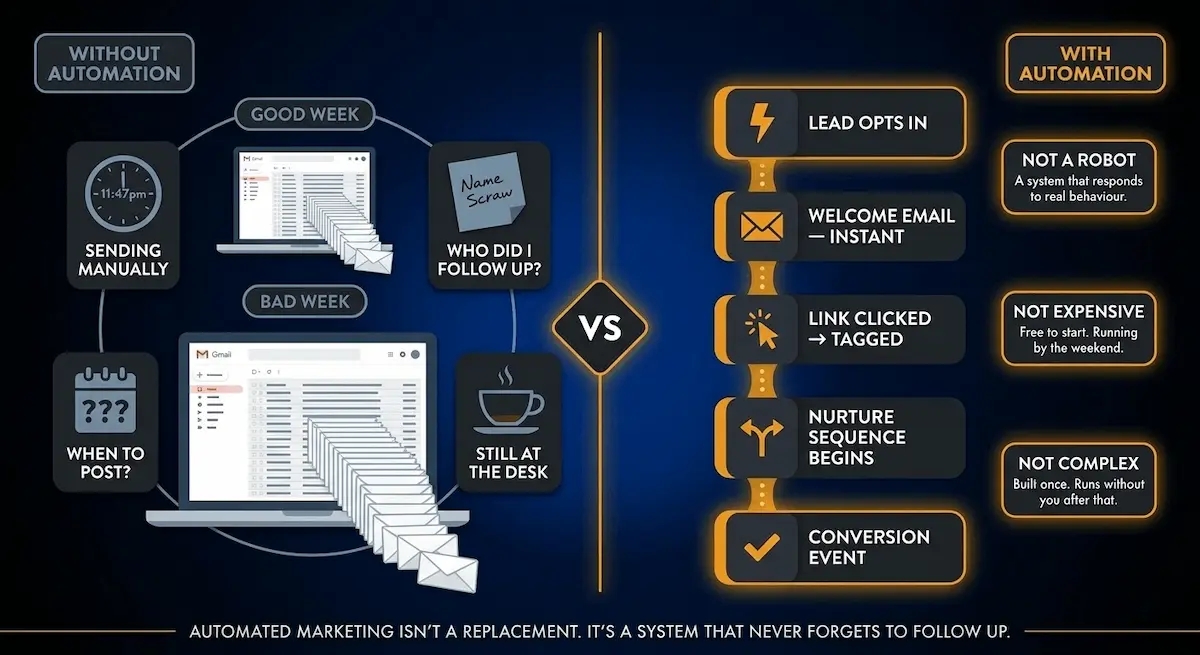
Here is the definition I use: automated marketing is any system that completes a marketing action on your behalf — without you having to manually initiate it each time — based on either a schedule you set or a behaviour your customer or lead performs.
Read that again, because the distinction matters. There are two types of automation. The first runs on your schedule — you decide a newsletter goes out on Tuesday mornings, and it goes out on Tuesday mornings without you touching it. The second runs on your customer's behaviour — someone fills in your contact form at 11pm, and a welcome sequence starts immediately, whether you are awake or not. The second type is where the real compounding value lives, and it is the one most small businesses either never build or build incorrectly.
The Honest Difference Between Manual Marketing and Automated Marketing
I want to put this in terms a busy small business owner actually feels rather than a terms a software brochure describes.
Manual marketing means your marketing output is directly proportional to your time input. Good week, lots of bandwidth, you send the follow-up emails, post consistently, nurture your leads, stay visible. Bad week — client emergency, family obligation, you are simply exhausted — the marketing stops. The follow-ups do not go out. The leads go cold. The visibility gap widens. And because marketing results are typically delayed by weeks or months, you often do not feel the damage until three months later when the pipeline is thin and you cannot immediately trace it back to the Tuesday you decided not to send the newsletter.
Automated marketing breaks that dependency. Marketing automation speeds up repetitive, time-consuming tasks so your team can focus on strategy and results Sprout Social — but for a small business owner working alone or with a tiny team, the more precise statement is this: it means your marketing continues running at full effectiveness even when you are not the one running it.
63% of companies that outperform their competitors are already using marketing automation. Revenue Memo That gap is not explained by budget differences or team size. It is explained by compounding. The businesses running automated systems have been accumulating lead nurture sequences, welcome flows, and re-engagement campaigns that keep working in the background every single day. The businesses doing it manually are starting from zero every week.
What Automated Marketing Is Not — Three Misconceptions Worth Clearing Up
The first misconception is that it means spamming people. Automated marketing done correctly is the opposite of spam — it is the right message to the right person at the right moment, triggered by what they actually did. A welcome email that fires when someone joins your list is not spam. It is the most relevant communication you could send at that exact moment.
The second misconception is that it replaces the human voice. It does not. The copy inside every automated sequence is still written by you — or with your guidance. Automation handles the timing and the delivery. You still provide the personality, the expertise, and the reason someone should care.
The third — and most damaging — misconception is that it is only for businesses at a certain stage of growth. Even businesses with ten to fifty contacts benefit from basic automation to stay organised and responsive HubSpot — because the value is not in scale, it is in consistency. A business with two hundred subscribers and a working welcome sequence converts more reliably than a business with two thousand subscribers and no sequences at all.
The full picture of what automated sales and marketing looks like — across email, social, lead nurturing, and beyond — is covered in detail in that post. For now, the foundation is set. Automated marketing is not complicated. It is consistent. And consistency, applied through systems rather than willpower, is the one thing a small business cannot manufacture manually week after week without burning out.
Section 2 maps the five specific channels where a small business should automate first — and the exact tools that make each one accessible without a technical background.
2) The Five Marketing Channels Every Small Business Should Automate First
The mistake I see most often when small business owners start thinking about automated marketing is trying to decide which platform to buy before they have decided which channels actually matter for their business.
Platform first, channel second is the wrong order. It is how you end up paying for a tool with features across twelve different channels, using three of them badly, and wondering six months later why the results do not justify the monthly cost.
Channel first. Then platform. Always in that order.
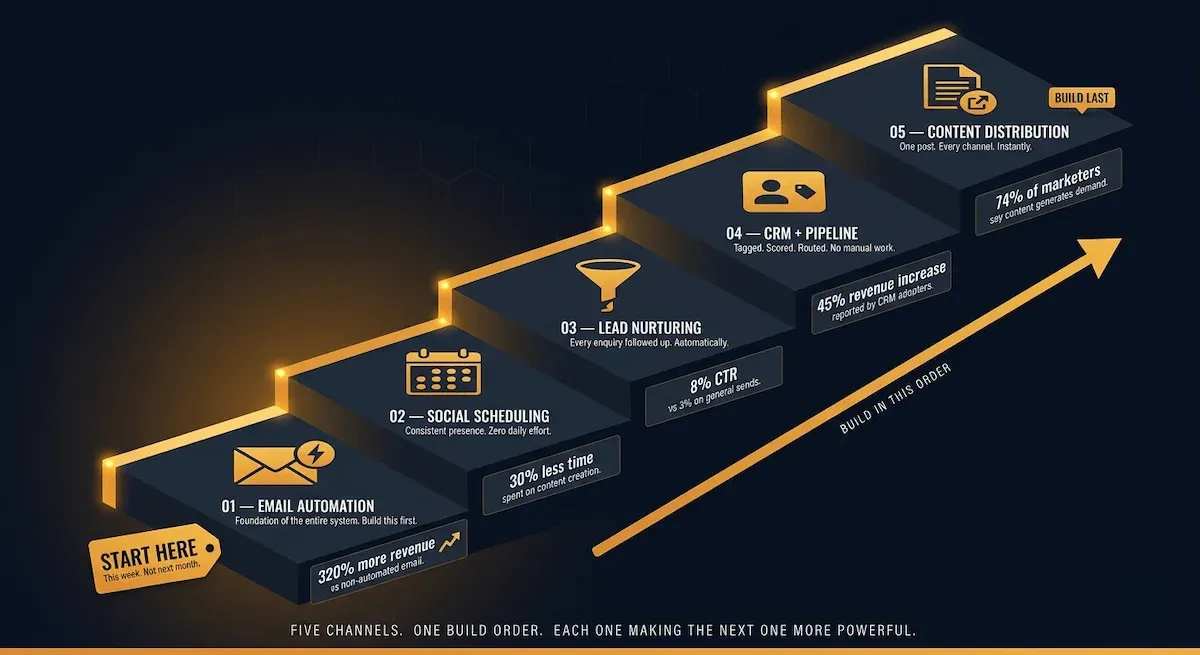
Here are the five channels where automated marketing delivers the clearest, most measurable return for a small business — and where I consistently recommend starting. Not all five simultaneously. In sequence, one building on the previous one, each layer adding compounding value to the one before.
Channel 1 — Email Marketing Automation
This is the foundation of every automated marketing system I have seen work for a small business. Not because it is the most exciting channel. Because it is the most controllable, the most cost-effective, and the one with the clearest direct line between automation and revenue.
63% of marketers report email as the most automated channel — and automated emails generate 320% more revenue than their non-automated equivalents. Cazoomi For a small business, the practical starting point is a welcome sequence for new subscribers, a nurture track for leads who show buying intent, and a re-engagement sequence for contacts who have gone cold. Those three automations alone, running simultaneously, create a marketing layer that works at all hours without a single manual send. The full playbook for this channel is covered in depth in our post on email marketing small business — but for the purposes of this section, know that email is always Channel 1 because it is the one that generates the most return for the least complexity.
Channel 2 — Social Media Scheduling Automation
Social media is not primarily a revenue channel for most small businesses. It is a visibility and trust channel — the place where potential customers encounter your brand, form a first impression, and decide whether they want to learn more. Its job is top-of-funnel. The problem is that maintaining consistent social media presence manually is a significant time drain — and inconsistency is worse than absence, because it signals to potential customers that the business is unreliable or inactive.
Companies that automate their social media posting see a 30% reduction in time spent on content creation. Cazoomi Scheduling tools — Buffer, Later, Hootsuite, or the native schedulers built into most platforms — let a small business batch-create content once per week or fortnight and distribute it automatically across channels at peak engagement times. This is not the same as automating social media engagement — replies and conversations still require a human. But the publishing and distribution layer becomes effortless, and consistency is maintained regardless of how demanding the week gets.
Channel 3 — Lead Nurturing Automation
This is the channel that most small businesses skip entirely — and it is the one that costs them the most in lost revenue.
Lead nurturing automation covers the gap between someone expressing interest and someone making a decision. A person downloads your lead magnet, attends your webinar, fills in your contact form, or asks for a quote. They are not ready to buy yet. Without automation, they receive a single response and then silence — and silence is where most potential customers quietly disappear to a competitor who followed up more consistently.
Lead nurturing emails generate an 8% click-through rate compared to 3% for general email sends, and nurtured leads make almost 150% more purchases than non-nurtured ones. Sender An automated nurture sequence — three to five emails over ten to fourteen days, each one delivering value relevant to what the person originally expressed interest in — keeps your business present and trusted during the consideration period without requiring you to remember to follow up manually. This is where automation in email marketing and the broader automated marketing system overlap most directly, and where the compounding effect of consistent follow-up becomes visible in the numbers within weeks.
Channel 4 — CRM and Lead Management Automation
A CRM — customer relationship management system — is the database that sits behind every other automated marketing channel and makes them intelligent. Without it, your marketing automations run against flat contact lists with no memory of what each person has done, where they are in the buying process, or how long they have been in your world.
With CRM automation, a new lead who downloads your resource is automatically tagged, scored, and routed into the right sequence. A lead who clicks your pricing page is flagged as high-intent and entered into a faster-moving nurture track. A customer who has not bought in ninety days is automatically flagged for re-engagement. 45% of companies report that their use of CRM software has directly increased sales revenue HubSpot — and for small businesses, the impact is proportionally higher because there is no human sales team to compensate for a broken follow-up process. The CRM does the memory work that a small team cannot do manually at scale.
Channel 5 — Content Distribution Automation
Content — blog posts, newsletters, social posts, videos, podcast episodes — is one of the highest-ROI marketing investments a small business can make over time. 74% of marketers say content marketing helped generate demand and leads, and 62% say it nurtured their audience. HubSpot The problem is distribution. Most small businesses publish content and then manually share it across channels — one by one, platform by platform — which turns content marketing from a high-leverage activity into a time-consuming one.
Content distribution automation means a new blog post is automatically shared to social channels, delivered to subscribers via newsletter, and repurposed into a sequence of social captions — all without manual intervention after the initial publish. This is the channel I typically recommend building last, because it requires the others to already be running — your email list needs to exist before you can distribute to it, your social scheduling needs to be in place before you can automate distribution to it. But once it is connected, every piece of content you create multiplies its own reach without additional effort.
✅ THE FIVE AUTOMATION CHANNELS — SMALL BUSINESS QUICK REFERENCE
| Channel | What It Automates | Starter Tool | Time Saved/Week | Build Order |
|---|---|---|---|---|
| Email Marketing | Welcome, nurture, re-engagement sequences | MailerLite · ActiveCampaign | 3–5 hours | ① First |
| Social Scheduling | Publishing across platforms at peak times | Buffer · Later | 2–3 hours | ② Second |
| Lead Nurturing | Follow-up sequences post-enquiry or download | ActiveCampaign · Brevo | 3–4 hours | ③ Third |
| CRM + Lead Management | Tagging, scoring, routing, follow-up reminders | HubSpot Free · Brevo CRM | 2–4 hours | ④ Fourth |
| Content Distribution | Cross-channel sharing of new content on publish | Zapier · Buffer | 2–3 hours | ⑤ Last |
Five channels, in sequence, each one building on the infrastructure of the one before. You do not need all five running simultaneously to see results — email alone, automated correctly, changes the trajectory of a small business within weeks. But once all five are connected, your marketing operates as a complete system rather than a collection of disconnected tasks you return to when you have spare time.
Section 3 covers the exact build sequence — what to set up first, what to layer in next, and what to leave until the foundation is solid.
3) How to Build Your Automated Marketing System Without Tech Overwhelm
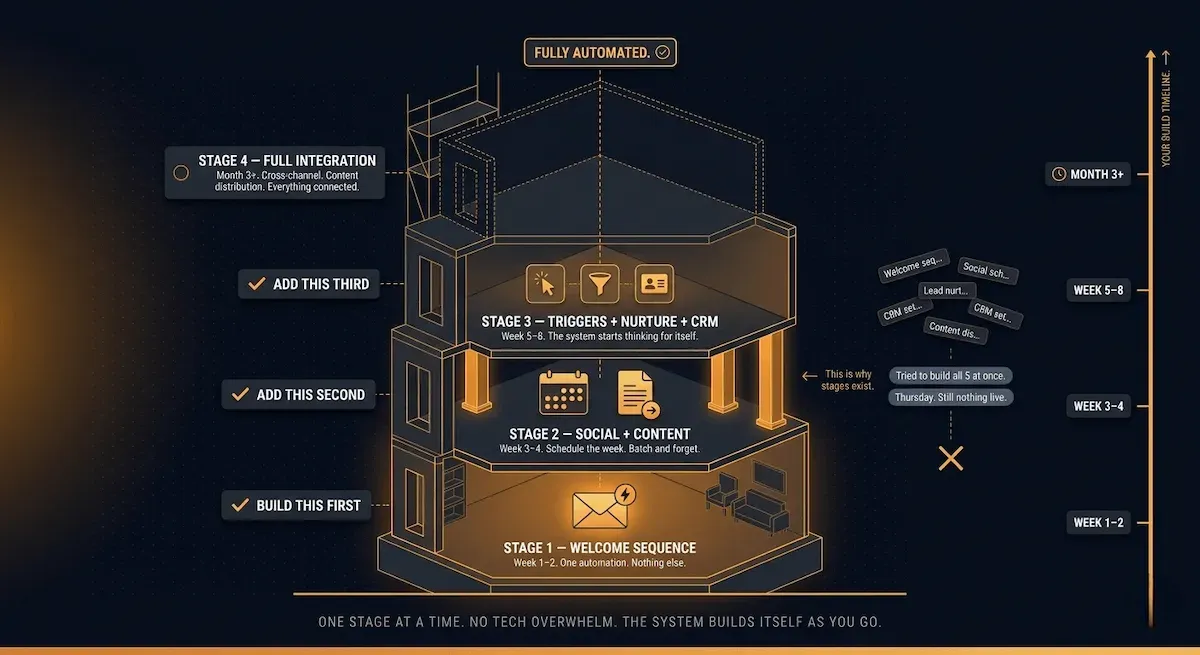
The reason most small businesses never finish building their automated marketing system is not that it is too difficult. It is that they try to build all of it at once.
I have seen this pattern more times than I can count. A business owner gets genuinely motivated — reads a post like this one, watches a few YouTube tutorials, maybe signs up for a platform — and then tries to set up email sequences, social scheduling, lead scoring, CRM tagging, and content distribution workflows simultaneously in the same week. By Thursday they have five half-finished automations, no complete workflows running, and the strong conviction that automated marketing is not for businesses like theirs.
It is not a complexity problem. It is a sequencing problem. Automated marketing, built in the right order, is genuinely manageable for a solo operator or a small team. Built in the wrong order — everything at once, or advanced workflows before the foundation exists — it will defeat even a technically capable person.
Here is the build sequence I use and teach. Four stages. Each one adding a layer on top of a working foundation.
Stage One — The Revenue Foundation (Week 1–2)
Before you touch social scheduling, before you think about CRM integration, before you explore any automation channel beyond email: build your welcome sequence and get it live.
One platform. One sequence. Three to five emails. That is the entire scope of Stage One.
Start with email — welcome sequence, abandoned cart for e-commerce, or lead nurture for B2B. These have the highest ROI and the lowest setup complexity. Enrichlabs The welcome sequence alone — firing automatically for every new subscriber at their moment of highest engagement — represents the highest-return automation a small business can run. It does not need to be perfect. It needs to be live. A functional three-email welcome sequence running imperfectly beats a perfect ten-email sequence still sitting in draft form.
The moment your welcome sequence is live and confirmed working, Stage One is complete. You now have automated marketing generating value. Everything that follows builds on that proof of concept.
Stage Two — The Visibility Layer (Week 3–4)
With email automation running, add social media scheduling. Pick one scheduling tool — Buffer and Later are both free or low-cost and require no technical setup — and batch-create two to four weeks of social content in a single session. Schedule it. Walk away.
This is not the most complex automation you will ever build, but it is the one that has the most immediate psychological impact. The first time you post consistently across platforms for an entire fortnight without opening a single social media app to manually publish something, the case for automated marketing becomes viscerally real rather than theoretically appealing.
The key discipline at this stage is batching. Do not drip-create content — one post today, another post when you remember it, a third one when you feel guilty about not posting. Batch two to four weeks in one session, schedule all of it, then return to building the next stage. Start with high-frequency, low-complexity processes that deliver immediate value — welcome sequences, lead follow-ups, and social scheduling. Monday.com Consistency is the point, not volume.
Stage Three — The Conversion Layer (Week 5–8)
This is where the email marketing marketing automation connection becomes most powerful — the point at which your email system starts responding to what leads actually do rather than simply running on a fixed schedule.
Stage Three introduces behaviour-triggered nurture sequences. A lead fills in your contact form — they enter an automated follow-up sequence. A subscriber clicks your pricing page link — a tag fires and they enter a high-intent nurture track. A contact downloads your resource — they are moved automatically into the relevant sequence for that resource's topic. Each of these connections requires a trigger, a tag, and a sequence — three components that most mid-tier email platforms handle natively without any technical configuration beyond a few dropdown menu selections.
This is also the stage where a basic CRM — even HubSpot's free tier — becomes worth setting up. Not to do anything complicated. Just to have a central place where every lead's history is visible, tagged by source, and connected to the automations that are following up with them.
Stage Four — The Compounding Layer (Month 3 onwards)
Stage Four is not a single workflow. It is the ongoing practice of connecting your automations to each other — so that actions in one channel automatically trigger actions in another.
A new blog post publishes — it is automatically distributed to your email list and shared to social media. A subscriber reaches a certain engagement score — they are automatically moved from nurture sequences to a more direct sales sequence. A customer makes a second purchase — they automatically exit the standard post-purchase flow and enter the loyalty track. These connections are what transform a collection of individual automations into a genuine automation in marketing system — one that compounds quietly in the background every single day.
🎯 AUTOMATED MARKETING BUILD SEQUENCE — SMALL BUSINESS ROADMAP
| Stage | What to Build | Timeline | Success Signal | Move to Next When |
|---|---|---|---|---|
| 1 — Revenue Foundation | Welcome sequence (3–5 emails) | Week 1–2 | Sequence fires on first real subscriber | Welcome sequence live and confirmed working |
| 2 — Visibility Layer | Social scheduling (2–4 weeks batched) | Week 3–4 | Two weeks posted without manual publishing | Batch cadence established and running |
| 3 — Conversion Layer | Behaviour triggers + nurture sequences + basic CRM | Week 5–8 | Leads entering nurture flows automatically on action | At least two trigger-based sequences live |
| 4 — Compounding Layer | Cross-channel connections + content distribution | Month 3+ | New content automatically distributed across channels | Ongoing — optimise, expand, compound |
Eight weeks from starting to having a real, running, multi-channel automated marketing system. Not perfect. Not fully optimised. But working — generating leads, nurturing them, posting consistently, and connecting your channels in ways that compound over time.
The most important rule across all four stages: do not move to the next stage until the current one is genuinely live and confirmed working. A half-finished Stage Three on top of an incomplete Stage One is not a system. It is three times as much to maintain and half as likely to generate results.
Section 4 goes deeper on the lead nurturing layer specifically — because it is the Stage Three workflow that generates the clearest and most measurable revenue return for a small business.
4) Automated Lead Nurturing — The Small Business Workflow That Replaces Manual Follow-Up
I want to tell you about a pattern I see constantly in small service businesses — consultants, coaches, therapists, designers, accountants, tradespeople, any business where the sale follows a conversation rather than a checkout button.
Someone reaches out. They fill in the contact form, send an enquiry email, or download the resource you promoted. The business owner responds promptly — often within the hour, because they are diligent and they know the lead is warm. The lead says they are interested but need a few weeks to think it over. The business owner says absolutely, no rush at all.
And then nothing. No follow-up on day three. No value-add email on day seven. No gentle check-in at the two-week mark. Just silence — the kind of silence that reads, to the person on the receiving end, as either disinterest or disorganisation. Three weeks later the lead has hired someone else. Not necessarily someone better. Just someone who stayed in touch.
This is the single most expensive gap in most small business marketing. And it is entirely fixable with automated lead nurturing.
Why Manual Follow-Up Always Fails at Scale
The problem with manual follow-up is not that business owners do not care. They care deeply. The problem is that manual follow-up competes directly with everything else the business demands in any given week — and in a close contest between following up with a lead from ten days ago and dealing with the client emergency happening right now, the follow-up loses every time.
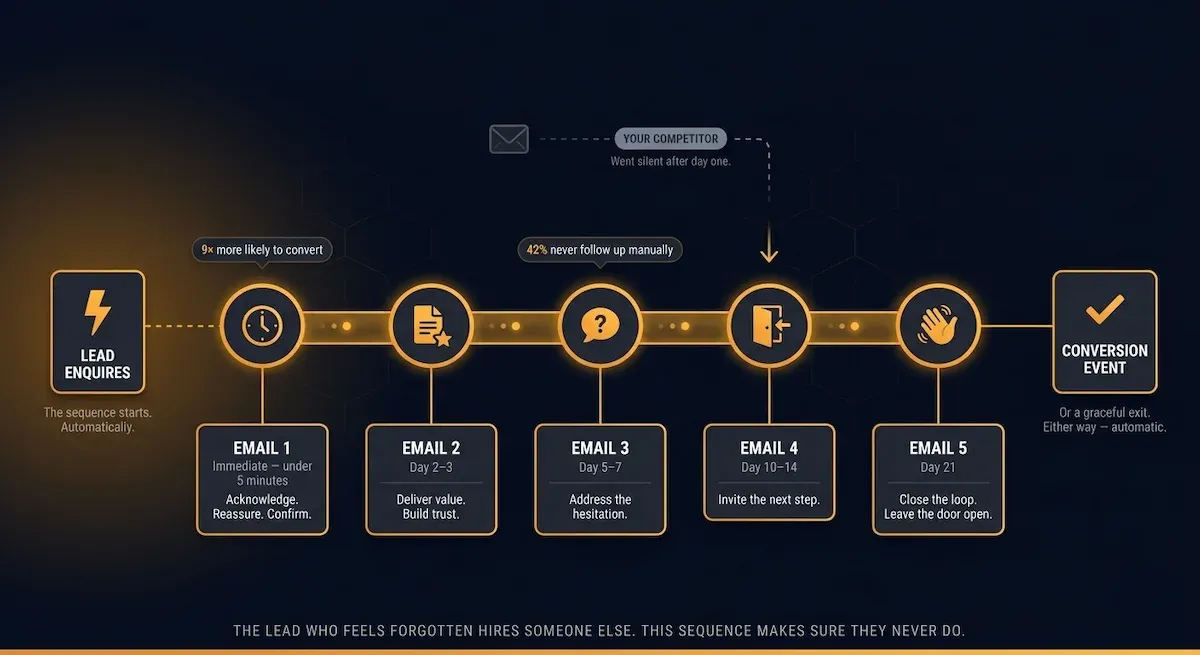
There are nine times more chances of converting a lead if you follow up within five minutes of their enquiry — yet 42% of sales professionals feel too busy to follow up that quickly, and 41% of businesses admit they do not have an efficient lead nurturing process. Martal Group That gap — between the response time that converts and the response time that actually happens — is exactly what automated lead nurturing closes. The system fires within minutes of the trigger, regardless of what you are doing when the enquiry arrives.
Companies that excel at lead nurturing generate 50% more sales-ready leads at 33% lower cost than those that do not. Saffronedge For a small business, the lower cost element is particularly significant — because lead nurturing automation does not require additional headcount. It requires a one-time investment of a few hours to build the sequences, and then it runs indefinitely without further manual effort.
The Exact Small Business Lead Nurturing Workflow
Here is the workflow I recommend for a small service business starting from scratch. It is deliberately simple — not because simple is all that works, but because simple is what actually gets built and stays running. Complex nurture sequences with seventeen branching conditions sound impressive in guides like this one and get abandoned within a month by the person who built them.
Trigger: A lead submits your contact form, downloads your lead magnet, or sends an enquiry email.
Email 1 — Immediate (within 5 minutes): Deliver whatever you promised or acknowledge the enquiry. If they contacted you directly, confirm you received it and set an expectation for when they will hear from you properly. Keep it short. Keep it human. The goal is simply to confirm they landed in the right place and that a real person will be in touch.
Email 2 — Day 2 or 3: Deliver value with zero ask. A short piece of content directly relevant to what they expressed interest in — a case study, a framework, a specific insight from your experience. This email establishes credibility and keeps the relationship warm without pushing for a decision before they are ready.
Email 3 — Day 5 to 7: Address the most common objection your leads have at this stage. Not aggressively. Conversationally. "One thing I hear a lot from people at this stage is [objection] — here is how I think about that." This email does more to convert hesitant leads than any promotional offer because it demonstrates you understand where they actually are.
Email 4 — Day 10 to 14: Soft invitation to take the next step. Not a hard close. An open door. "If you are ready to explore this further, here is how we would work together / here is the link to book a call / here is how to get started." Make the action completely low-friction and entirely optional-feeling.
Email 5 — Day 21 (optional, for longer sales cycles): A final check-in that gives the lead a graceful exit if they are not the right fit, or a second chance to act if the timing has shifted. Something like: "I wanted to check in one last time — if the timing is not right, no hard feelings at all. If it is, I am here."
Five emails. Three weeks. Zero manual effort after the initial build.
⚡ AUTOMATED LEAD NURTURING — SMALL BUSINESS WORKFLOW MAP
| Timing | Purpose | Tone | CTA | |
|---|---|---|---|---|
| Email 1 | Immediate (<5 min) | Confirm receipt · Deliver promise | Warm · Brief · Human | None — just acknowledgement |
| Email 2 | Day 2–3 | Deliver value · Build credibility | Helpful · Expert · No pitch | None — pure value |
| Email 3 | Day 5–7 | Address main objection | Conversational · Empathetic | Soft — invite a reply if they have questions |
| Email 4 | Day 10–14 | Invite next step | Direct · Low-pressure | Book a call · Get started · Learn more |
| Email 5 | Day 21 | Final check-in · Graceful exit | Relaxed · No pressure | Open door — "here if you need me" |
One important nuance on this workflow: the goal of every email is to be genuinely useful, not to manufacture urgency or pile on pressure. The business owners I see get the best results from automated lead nurturing are the ones who write these emails as if they are writing to one specific person they already like — not to a segment, not to a funnel stage, but to that one person who filled in the form last Tuesday. The automation handles the scale. Your voice handles the quality.
For the complete picture of how the best marketing methods for small business connect lead nurturing to the broader marketing stack, that post covers the full multi-channel picture. Section 5 of this post covers the specific tools that make this workflow accessible without a technical background or a significant monthly spend.
5) The Best Automated Marketing Tools for Small Business in 2026
The tool question is where I see the most decision paralysis — and it is almost always caused by the same mistake. Small business owners look at full-featured platform comparison articles, see fifteen tools evaluated across forty-seven criteria, and conclude that selecting the right automated marketing stack requires either a technical background or a dedicated afternoon they do not have.
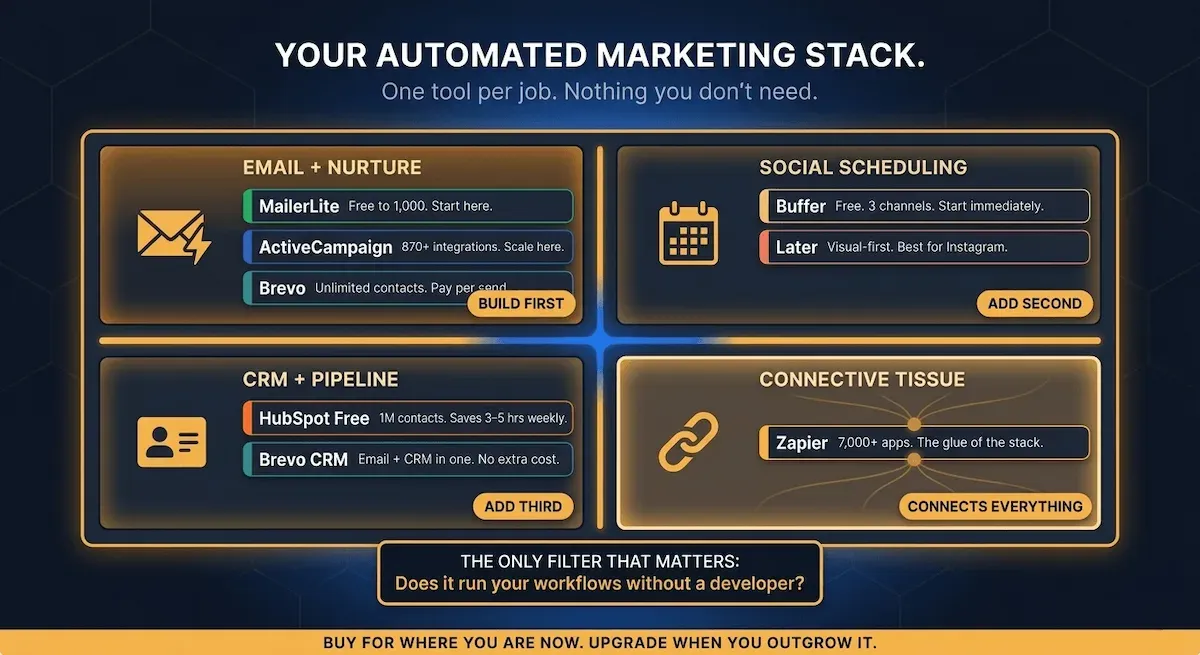
It does not. The selection process becomes straightforward the moment you apply one filter before any other: does this tool support the workflows from the build sequence in Section 3 — and can I set those workflows up without hiring someone to configure them?
That is the entire evaluation. Everything else is secondary.
Here is how I break the tool landscape down for a small business in 2026 — by job to be done, not by feature count.
For Email Automation and Lead Nurturing
This is the most critical tool decision in your entire stack. Everything else connects to it or depends on it.
MailerLite remains the best starting point for a small business under 1,000 subscribers. The free plan covers 1,000 subscribers and 12,000 emails per month, and the automation editor is straightforward enough for beginners to build multi-trigger workflows without technical expertise. Brevo For the welcome sequence and basic nurture track from Section 4, MailerLite is fully capable and costs nothing until your list grows past the free tier threshold.
ActiveCampaign is the tool I recommend the moment a small business starts building behaviour-triggered sequences that need conditional logic — lead scoring, dynamic branching based on what a subscriber clicks, CRM tagging that connects marketing actions to sales follow-up. ActiveCampaign supports 870+ integrations and delivers some of the highest inbox placement rates of any platform tested independently in 2025–2026, consistently above 93%. La Growth Machine The learning curve is real — expect two to three weeks before it feels natural — but the capability ceiling is high enough that most small businesses will never hit it.
Brevo is the alternative for businesses that want email, SMS, and a basic CRM in a single tool without ActiveCampaign's price tag. Brevo's unlimited contact storage with pay-per-email pricing is a significant advantage for businesses with large but infrequently-contacted lists La Growth Machine — a common situation for service businesses with a database of past clients they want to re-engage periodically.
For Social Media Scheduling
The tool decision here is genuinely simple because the category does not require sophisticated automation — it requires consistency and ease of batching.
Buffer is the tool I point most small businesses toward first. Free for up to three social channels, clean interface, no learning curve whatsoever — you connect your accounts, write your posts, pick a time, and walk away. The paid plan at $6 per month adds additional channels and analytics that most small businesses do not need until they are well into Stage Two of the build sequence.
Later is the better alternative for businesses where visual content — particularly Instagram and Pinterest — is a primary channel. The content calendar layout makes visual planning intuitive, and the link-in-bio tool means your social scheduling and website traffic are managed from the same interface.
For CRM and Lead Management
HubSpot's free CRM covers up to one million contacts with deal tracking, email logging, and form submissions captured automatically — and manual CRM management through spreadsheets typically consumes three to five hours weekly for a small business, which HubSpot reduces to thirty to sixty minutes of data review. Swydo
I use HubSpot Free as the default CRM recommendation for small businesses at Stages One and Two of the build sequence for one reason above all others: it integrates natively with almost every email platform, social tool, and content management system a small business is likely to be using. You do not need to export CSVs and import them manually. You connect the tools, and the data flows automatically.
For businesses that want CRM and email automation in a single platform — removing the need to connect separate tools — Brevo and ActiveCampaign both include CRM functionality within their email platforms. If you are starting fresh with no existing tool commitments, either of these removes one integration point from the stack entirely.
For Connecting Everything Together
Zapier is the connective tissue for any automated marketing stack that spans more than one platform. Zapier connects over 7,000 business apps so marketing teams can automate tasks across web forms, CRMs, email tools, and social platforms without writing code. Guideflow The free tier covers 100 automated tasks per month — sufficient for a small business in the early stages of the build sequence. Once you are connecting multiple platforms and triggering cross-channel automations, the paid tier at $19.99 per month becomes worth every cent.
The key principle with Zapier: use it to connect tools, not to replace them. It is not an automation platform in itself — it is the infrastructure that makes your separate tools behave as a single system. That is exactly what Stage Four of the build sequence requires.
💜 AUTOMATED MARKETING STACK — SMALL BUSINESS TOOL GUIDE 2026
| Job to Be Done | Best Pick | Alternative | Entry Price | When to Upgrade |
|---|---|---|---|---|
| Email + Nurture (starting out) | MailerLite | Kit | Free to 1,000 | When you need behaviour-triggered branching |
| Email + Nurture (scaling) | ActiveCampaign | Brevo | $15–$25/mo | You are already here — this is the growth platform |
| Social Scheduling | Buffer | Later | Free / $6/mo | When you need analytics or more channels |
| CRM + Lead Management | HubSpot Free | Brevo CRM | Free | When you need lead scoring or sales pipeline depth |
| Cross-Channel Connections | Zapier | Make (Integromat) | Free / $19.99/mo | When free tier task limit is regularly hit |
One final note on tools that I think saves a lot of small business owners from a costly mistake: do not buy the most powerful platform available on the assumption that you will grow into it. Buy the platform that supports your current build stage. A tool you use at 30% capacity for eighteen months is not a good investment. A tool you use at 90% capacity and outgrow in twelve months — prompting a deliberate, informed upgrade — is exactly how this should work.
The automation and ai post covers how AI-powered features within these platforms are changing what small businesses can automate in 2026 — worth reading once your core stack is running. For now, Section 6 covers the four numbers that tell you whether the system you have built is actually working.
6) How to Know Whether Your Automated Marketing Is Actually Working
Here is the thing about automated marketing that nobody tells you clearly enough upfront: once it is running, it becomes invisible.
The sequences fire. The social posts go out. The lead nurturing emails arrive in inboxes at 2am without you touching anything. And because it all happens in the background, it is entirely possible to have a working automated marketing system generating real results — and have no idea it is doing so, because you have not set up the four numbers that confirm it.
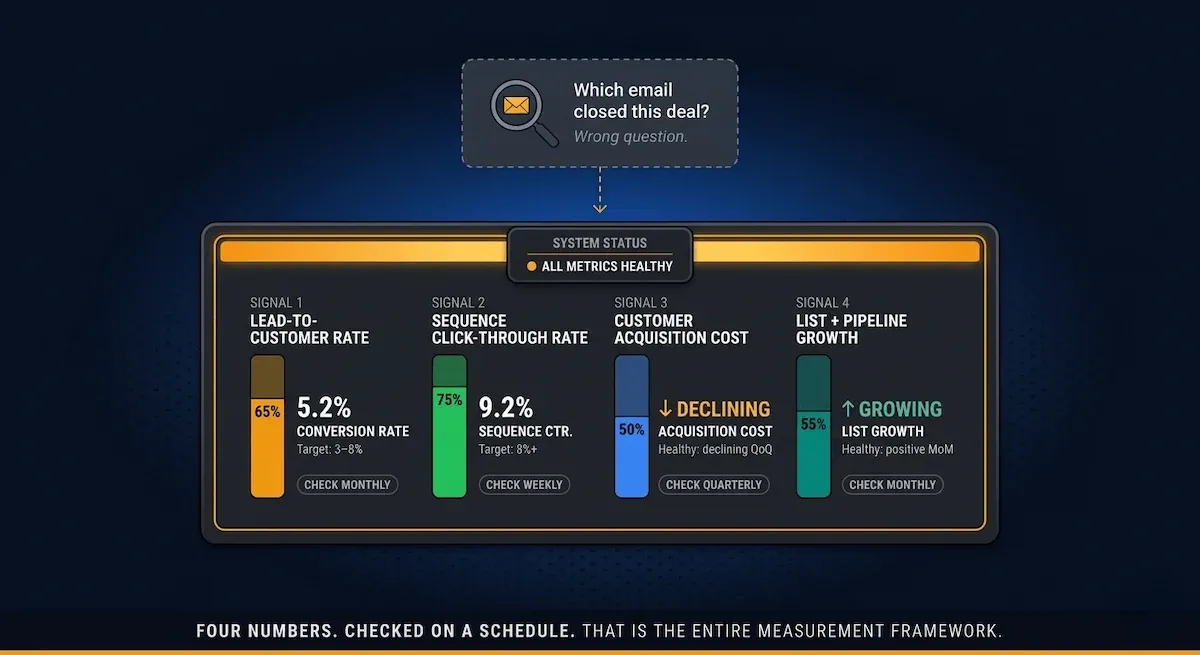
I have watched small business owners assume their automation is not working because they have not seen a direct connection between a specific email and a specific sale. That is the wrong frame entirely. Automated marketing compounds quietly over weeks and months. The question is never "which email closed this deal?" The question is "are my lead quality, my conversion rate, my revenue per contact, and my list growth all moving in the right direction over the past thirty days?"
Four numbers. Checked on a fixed schedule. That is the entire measurement framework.
Metric 1 — Lead-to-Customer Conversion Rate
This is the metric that tells you whether your automated marketing system is actually converting the leads it touches into paying customers — not just engaging them.
Firms that excel at lead nurturing generate 50% more sales-ready leads at a 33% lower cost Martal Group — but the only way to know whether your nurturing is producing that result is to track what percentage of leads entering your sequences ultimately become customers. For a service business, this means counting the enquiries that convert to booked clients. For an e-commerce business, it means counting the subscribers who make a purchase.
A healthy lead-to-customer conversion rate for an automated email nurture sequence sits between 3% and 8% depending on industry and price point. Nurtured leads make 47% larger purchases than non-nurtured ones Saffronedge — which means the conversion rate alone does not tell the whole story. Track both the rate and the average transaction value for leads who entered your automated sequences vs those who did not.
If your conversion rate drops below 2% consistently, the issue is almost always one of three things: the wrong leads entering the sequence (a lead magnet problem), the wrong content in the sequence (a relevance problem), or the wrong offer at the conversion point (a timing problem). Each diagnosis points to a different fix.
Metric 2 — Sequence Engagement Rate
This is the metric that tells you whether your automation content is actually being read and acted on — or being opened and ignored.
Sequence engagement rate combines your open rate and click-through rate into a single directional signal. For the purposes of a small business health check, I focus on click-through rate specifically, because lead nurturing emails generate an 8% click-through rate compared to 3% for general email sends Revenue Memo — meaning your automated sequences should be outperforming your broadcasts by a significant margin. If they are not, the automation is running but the content is not doing its job.
When sequence engagement drops, the fix is almost always content relevance — the email is arriving at the right time but saying the wrong thing for where the subscriber actually is. Go back to the email where engagement drops off and ask: does the content of this email match what this person is likely thinking and feeling at this point in their relationship with my business?
Metric 3 — Customer Acquisition Cost
Automated marketing is supposed to make acquiring customers cheaper over time — because the system is doing work that would otherwise require either your hours or a team member's salary.
Customer acquisition cost (CAC) is your total marketing spend divided by the number of new customers acquired in the same period. Automation should help lower this over time — and tracking it directly confirms whether your automated marketing investment is producing the efficiency gains the system promises. Madgicx
For most small businesses starting with automated marketing, I suggest establishing your current CAC before any automation is running — your baseline — and then rechecking it every quarter once your sequences are live. A meaningful CAC reduction over six to twelve months is the clearest financial proof that your automated marketing system is working structurally, not just tactically.
Metric 4 — List and Pipeline Growth Rate
This metric is the fuel gauge of your entire automated marketing system. Every other metric in this section depends on a healthy, growing pipeline of new contacts entering your sequences. If your list is shrinking — more unsubscribes than new opt-ins — or your lead pipeline is flat, your automations will eventually run out of people to convert.
List growth rate measures new subscribers minus unsubscribes as a percentage of your total list size, month on month. Pipeline growth rate measures new leads entering your CRM each month. Both should be trending positively. If either goes flat, the fix sits upstream of your automation — in your lead magnet, your opt-in placement, or your content strategy driving traffic in the first place.
Avoid vanity metrics like impressions, likes, or page views — they do not show real impact. Focus on KPIs tied directly to business outcomes: conversions, customer acquisition cost, customer lifetime value, and return on marketing investment.
✅ AUTOMATED MARKETING HEALTH CHECK — 4 METRICS FOR SMALL BUSINESS
| Metric | What It Measures | Healthy Range | Warning Sign | Check When |
|---|---|---|---|---|
| Lead-to-Customer Rate | How well sequences convert leads to paying customers | 3–8% (varies by industry) | Below 2% consistently | Monthly |
| Sequence Click-Through Rate | Whether automation content is being acted on | 8%+ (automated sequences) | Below 3% — same as broadcast | Weekly |
| Customer Acquisition Cost | Whether automation is making growth cheaper over time | Declining quarter-on-quarter | Flat or rising after 6 months | Quarterly |
| List + Pipeline Growth | Whether the system has enough fuel to keep running | Positive month-on-month | Flat or declining for 2+ months | Monthly |
The most important thing I can say about measuring automated marketing is this: you do not need a sophisticated analytics setup to track these four numbers. Your email platform gives you click-through rates. Your CRM gives you lead and conversion counts. Basic arithmetic gives you CAC. A thirty-minute monthly review against your previous month's numbers tells you everything you need to know about whether the system is performing or whether something needs attention.
Automated marketing should feel quieter than manual marketing, not louder. If your four metrics are trending in the right direction, the right response is to leave the system running and direct your energy into growing the pipeline feeding it — not into tweaking workflows that are already working.
The conclusion pulls the full picture together and shows you exactly what separates the small businesses that read about automated marketing from the ones who actually have it running.
The Small Business That Stopped Starting From Scratch
There is a version of this that plays out the same way for thousands of small business owners every year.
It is 9pm on a Tuesday. The client work is done. The inbox is quiet for once. You open a blank document with every intention of writing the email you have been meaning to send for three weeks — the follow-up to the people who downloaded your lead magnet, the nurture sequence for the enquiries sitting cold in your CRM, the welcome email for the subscribers who signed up last month and have heard nothing since.
You stare at the blank screen for eleven minutes. Then you close the laptop and tell yourself you will get to it tomorrow.
Tomorrow becomes next week. Next week becomes next month. And those leads — the people who were genuinely interested, who raised their hand, who gave you their email address — quietly forget you exist. Not because they stopped needing what you offer. Because someone else stayed in touch and you did not.
That is not a motivation problem. That is a systems problem. And it has a direct, buildable solution.
What Changes When the System Is Running
Every section of this post has described one layer of that solution.
Section 1 defined what automated marketing for small business actually means — behaviour-triggered systems that respond to what your leads do, not just when you remember to send something. Section 2 gave you the five channels to build first, in the sequence that produces results without overwhelm. Section 3 walked you through the four-stage build order so you start with one working automation instead of five half-finished ones.
Section 4 showed you the five-email lead nurturing workflow that replaces the follow-up you never get around to — the one that converts at eight times the rate of a cold contact. Section 5 gave you a tool stack you can start building today, most of it free or close to it. And Section 6 gave you four numbers to check monthly so you always know whether the system is earning its keep.
Put it together and you have something most small business owners never actually build: an automated marketing system that runs consistently whether you are in back-to-back client calls, on holiday, or staring at a blank screen at 9pm on a Tuesday.
The gap between knowing all of this and having it running is not knowledge. You now have the knowledge. The gap is time — specifically, the hours it takes to write the sequences, build the workflows, configure the tools, and set up the measurement framework from scratch.
What Vault AI Pro Members Skip Entirely
That is the part Vault AI Pro was built to eliminate.
Inside the membership, every workflow described in this post already exists as a done-for-you resource. The five-email lead nurturing sequence is written, structured, and ready to drop into your platform of choice. The welcome sequence is built. The social batching framework is templated. The four-metric health check tracker is set up. The stage-by-stage build guide is waiting for you to open it and start.
You are not reading about what to build and then going away to build it alone. You are opening a resource, copying it into your tool, editing it for your business, and having it live inside an afternoon.
That is the difference between a system that exists in a browser tab and one that is actually running in your business tonight.
Your Automated Marketing System.
Built. Written. Ready to Deploy.
Stop building from scratch at 9pm. Everything in this post — the sequences, workflows, templates, and trackers — is already done for you inside the Vault.
- ✦Done-for-you lead nurturing sequences — ready to paste into any email platform
- ✦Stage-by-stage automation build guide — no guesswork, no tech overwhelm
- ✦Welcome sequence, social batching templates, and CRM setup playbooks
- ✦4-metric marketing health check tracker — pre-built and ready to use
- ✦1,000+ AI resources across every area of your business — updated every single week
Get Instant Access to Vault AI Pro ➔
See everything included in the membership
Replaces $50/hr freelancer work · Saves 3 - 5 hours every day · Instant ROI · No contracts