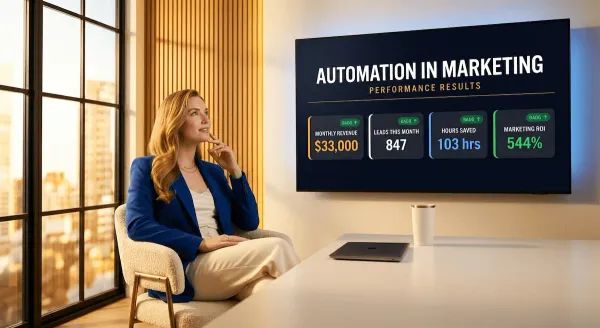
Automated Sales and Marketing: 15 Workflows to Triple Revenue While Saving 20 Hours Weekly
Still running your sales and marketing manually? Discover 15 proven automated sales and marketing workflows for busy entrepreneurs. Generate leads, nurture prospects, and close more deals on autopilot. Real tools, real results. No agency, no code, no guesswork.

If you're running your automated sales and marketing manually right now — writing every follow-up email yourself, posting content by hand, chasing leads one by one — I want you to do a quick gut-check: how many hours did that cost you last week?
For most entrepreneurs, the honest answer is somewhere between 15 and 25 hours. Every week. On tasks that a well-built automation workflow could handle while you sleep.
Here's a stat that should stop you in your tracks: according to McKinsey, early adopters of sales automation consistently report efficiency improvements of 10 to 15 percent and a sales uplift potential of up to 10 percent — and that's before you factor in the hours clawed back from manual admin every single week. And more than 30% of sales-related activities can already be automated with tools available today.
The problem isn't that automation is complicated. The problem is that nobody ever laid it out in plain English, with real marketing automation workflows you can actually copy and use today.
That's exactly what this post does.
You're about to get 15 battle-tested workflows — covering everything from automated lead generation to sales pipeline management to post-sale follow-up. Each one is built specifically for busy entrepreneurs and solopreneurs who need results without hiring an agency or learning to code.
No fluff. No theory. Just 15 workflows, the tools to run them, and the exact triggers and actions that make them work.
By the time you finish reading, you'll have a clear roadmap to build a system that markets, sells, and follows up on autopilot — while you focus on the work only you can do.
Let's get into it.
1) What Is Automated Sales and Marketing — And Why Most Entrepreneurs Get It Wrong
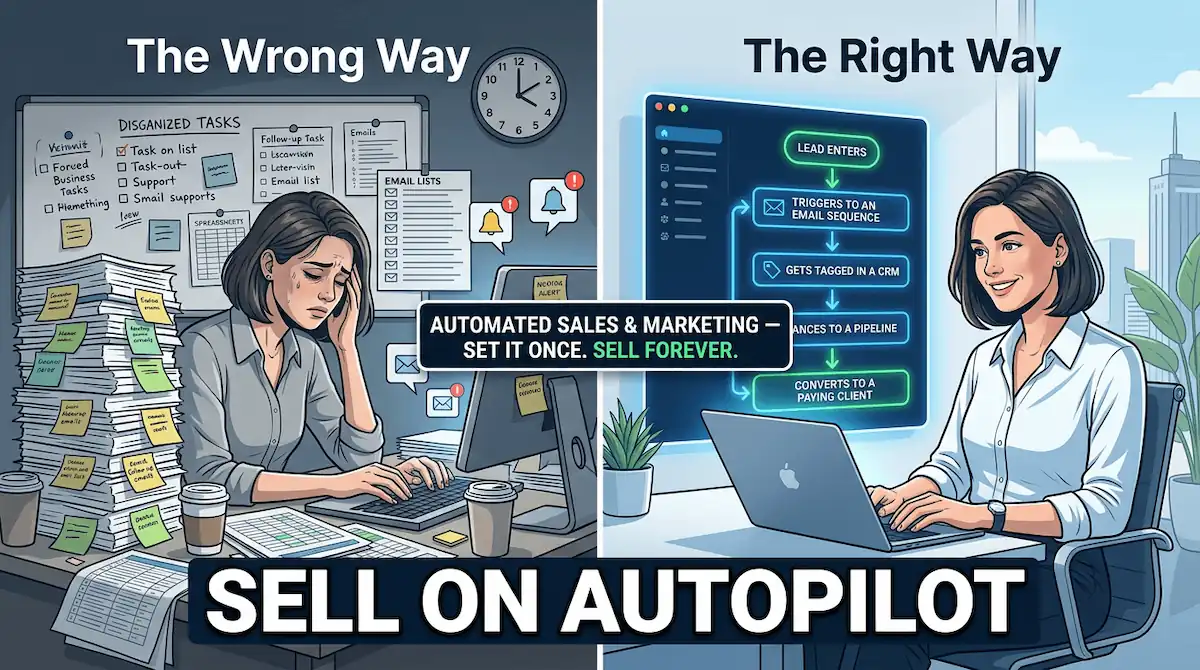
Let's clear something up right away. Most entrepreneurs hear "automated sales and marketing" and picture a massive tech stack, a developer on speed dial, and a $2,000/month software bill. That's not what this is.
Real automation — the kind that actually moves the needle for a solopreneur or small business owner — is far simpler than the software companies want you to believe. And the cost of not doing it? That's where things get expensive.
Here's a stat that should stop you in your tracks: according to Salesforce's 2024 State of Sales Report, sales professionals spend just 29% of their working week actually selling — the remaining 71% disappears into admin tasks, data entry, and follow-ups. And separately, according to a Constant Contact survey reported by Small Business Trends, small business owners spend an average of 20 hours per week on marketing alone — most of it manual, repetitive, and entirely automatable.
That's 20 hours. Every week. Gone.
The Difference Between Automation and Just "Scheduling Stuff"
Here's where most entrepreneurs go wrong. They set up a social media scheduler, maybe a basic email welcome sequence, and call it "automation." That's not a system — that's just delayed manual work.
True marketing automation workflows operate on a completely different level. They're built around three elements:
| Element | What It Means |
|---|---|
| Trigger | An action the prospect takes — visits a page, fills a form, clicks an email |
| Action | What your system does automatically in response — sends an email, tags a contact, alerts you |
| Outcome | The business result — a booked call, a closed sale, a nurtured lead |
When these three elements work together, you're not just scheduling — you're building a system that responds to prospect behavior in real time, 24 hours a day, without you lifting a finger.
Why Solopreneurs Overcomplicate It — And the Fix
The most common mistake? Trying to automate everything at once. One entrepreneur I know spent three weeks mapping out a 47-step automation sequence before a single lead had ever entered it. Three weeks. No leads. No revenue.
The fix is simpler than you think: start with your single most painful manual task and automate just that. One trigger. One action. One outcome. Once it runs for a week without you touching it, add the next one.
That's the framework behind every one of the 15 workflows in this post. Each one is a standalone system you can build in an afternoon — no code, no agency, no overwhelm. And if you want to go deeper on how automation in marketing fits into your overall business strategy, the full picture is waiting for you in our pillar guide.
The bottom line: automated sales and marketing isn't a luxury for businesses with big budgets. It's the great equalizer — the thing that lets a one-person operation compete with a team of ten.
2) The 5 Core Areas Where Automated Sales and Marketing Saves the Most Time
Here's the thing about time: you can't make more of it. But you can stop wasting it on tasks that a $50/month tool can handle better than you.
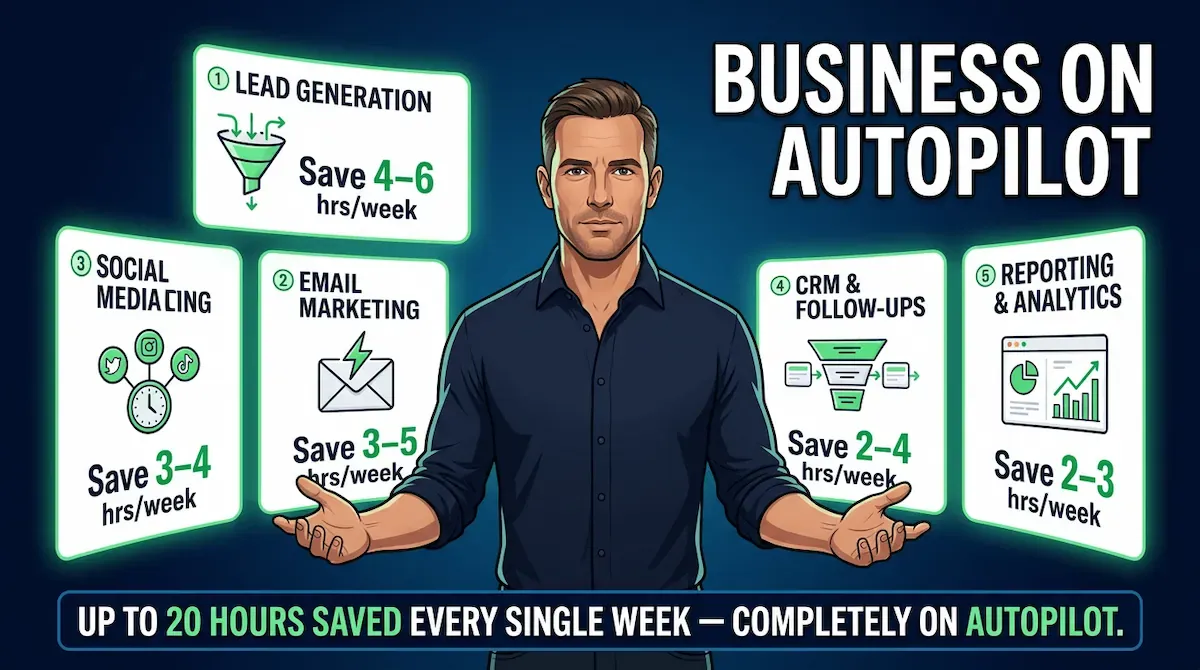
Before we get into the 15 workflows, let's zoom out and look at the five areas of your business where small business automation tools deliver the biggest time savings. Think of this as your automation map — the places where the hours are bleeding out every week without you even noticing.
And the numbers back this up. According to Nucleus Research, marketing automation drives a 14.5% increase in sales productivity and a 12.2% reduction in marketing overhead. Not bad for a system you set up once and let run.
1. Lead Capture and Qualification
Most entrepreneurs are still capturing leads manually — downloading CSV files from Facebook ads, copying emails from inquiry forms into spreadsheets, chasing down half-completed contact details. Every one of those steps is a leak in your pipeline.
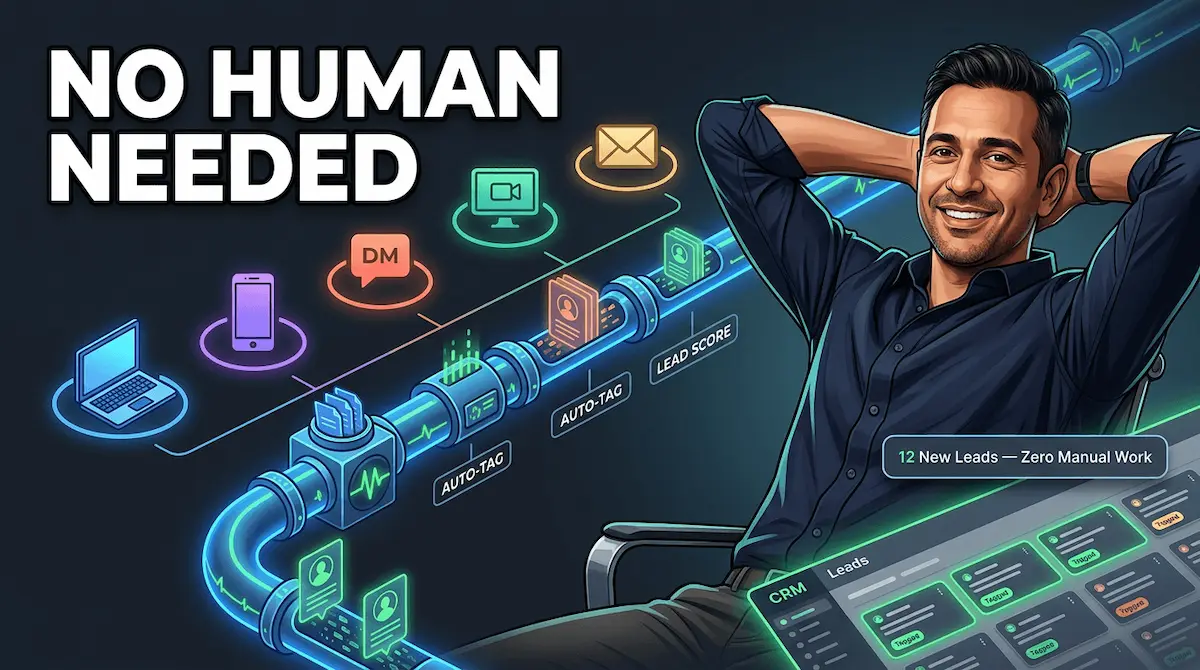
Automated lead generation fixes this by connecting your lead sources directly to your CRM, tagging contacts automatically based on where they came from and what they expressed interest in, and routing hot leads to the top of your list — all without you touching a keyboard.
2. Email Nurture and Follow-Up
This is where most solopreneurs lose the most money. A lead comes in, you send one email, life gets busy, and three weeks later that lead has bought from your competitor.
Email automation for entrepreneurs solves this permanently. Automated sequences keep your leads warm with relevant, timely messages — triggered by their behavior, not your availability. According to Salesforce, companies using marketing automation to nurture prospects see a 451% increase in qualified leads. That's not a typo.
3. Sales Pipeline and CRM Updates
Manual CRM updates are the silent productivity killer. A rep — or in a solopreneur's case, you — finishes a call and then spends 20 minutes logging notes, updating deal stages, and setting follow-up reminders. Multiply that across every prospect in your pipeline and you're losing hours every week to data entry.
AI-powered sales automation handles this in real time. Calls get logged. Deal stages update automatically based on email replies. Follow-up tasks get created without you thinking about it.
4. Content Distribution and Social Scheduling
You wrote the blog post. Now you have to turn it into three social captions, a newsletter blurb, and a LinkedIn article — then schedule all of it across four platforms. That's another two hours gone.
Automated marketing workflows can distribute a single piece of content across every channel the moment it publishes — no manual posting, no missed platforms, no forgotten newsletters.
5. Post-Sale Onboarding and Retention
Most entrepreneurs put all their energy into getting the sale and then go quiet. That silence after purchase is where churn lives. Automated onboarding sequences, check-in emails, and review requests keep customers engaged — and coming back — without you manually tracking who bought what and when.
Each of these five areas has dedicated workflows built for them in this post. And if you want to see how all five fit into a complete automation in marketing strategy, our pillar guide covers the full picture.
Here's a quick reference to keep nearby as you read through the workflows:
| Area | Manual Time Lost/Week | Automation Fix |
|---|---|---|
| Lead capture & qualification | 3–5 hours | CRM auto-tagging + routing |
| Email nurture & follow-up | 4–6 hours | Triggered sequences |
| Sales pipeline & CRM updates | 2–4 hours | Auto-logging + deal stage triggers |
| Content distribution & social | 2–3 hours | Publish-to-distribute workflows |
| Post-sale onboarding & retention | 2–3 hours | Automated check-ins + review requests |
| Total recoverable time | 13–21 hours/week | Your 15 workflows |
That's essentially half a full-time work week — handed back to you every single week.
Now let's get into the actual workflows. We're starting with the ones that fill your pipeline: the five automated lead generation systems that work while you sleep.
3) Workflows 1–5: Automated Lead Generation and Capture
Let's talk about the most expensive problem in your business right now: the leads you're losing before you even know they exist.
Here's the brutal reality. According to research compiled by Harvard Business Review, lead quality drops by 80% after the first five minutes of a prospect showing interest. And the average business takes 42 hours to respond to a new inbound lead. By then, your prospect has already bought from someone else.
The fix isn't hiring a full-time sales person. It's building an automated lead generation system that responds instantly, tags and qualifies every contact, and routes hot leads to the top of your list — without you touching a thing.
Here are the first five workflows that make that happen.
Workflow 1 — Lead Magnet Delivery + CRM Auto-Tag
The problem it solves: Someone downloads your free resource. You manually email it to them, then forget to follow up. Three weeks later you find their email in your drafts folder.
How it works:
TRIGGER: Prospect submits opt-in form to download lead magnet
ACTION 1: Lead magnet PDF delivered automatically via email (within seconds)
ACTION 2: Contact created in CRM with source tag (e.g., "Lead Magnet – [Name]")
ACTION 3: Contact enrolled in 5-email nurture sequence
OUTCOME: Every lead captured, tagged, and nurtured — zero manual handling
Tools: Mailchimp, ConvertKit, or ActiveCampaign + your CRM (HubSpot free tier works perfectly here)
Workflow 2 — Website Behavior Trigger → Email Opt-In Sequence
The problem it solves: Visitors land on your pricing or services page and leave without converting. You never know they were there.
How it works:
TRIGGER: Visitor spends 60+ seconds on pricing/services page
ACTION 1: Exit-intent popup fires with a relevant lead magnet offer
ACTION 2: On opt-in, contact is tagged "High Intent – Pricing Page"
ACTION 3: Specific high-intent nurture sequence begins immediately
OUTCOME: Anonymous browsers become tagged, nurtured leads automatically
Tools: OptinMonster or ConvertBox for triggers + your email platform
Workflow 3 — Social DM Auto-Response + Lead Qualification
The problem it solves: Someone DMs you on Instagram or Facebook asking about your services. You see it six hours later. They've moved on.
How it works:
TRIGGER: New DM received containing keyword (e.g., "pricing", "how does this work")
ACTION 1: Instant automated reply sent with qualifying question
ACTION 2: Based on response, contact either gets booking link or is tagged for follow-up
ACTION 3: You get a notification only for qualified, ready-to-buy leads
OUTCOME: Every DM answered instantly, unqualified leads filtered out automatically
Tools: ManyChat (Instagram + Facebook), paired with Zapier to push qualified leads to your CRM
Workflow 4 — Webinar or Event Registration → Automated Nurture Sequence
The problem it solves: People register for your webinar and never hear from you again until the day before. Half of them forget. Half don't show up.
How it works:
TRIGGER: Prospect registers for webinar or live event
ACTION 1: Confirmation email sent immediately with calendar invite
ACTION 2: Reminder sequence fires at 7 days, 1 day, and 1 hour before event
ACTION 3: Post-event email sequence begins within 1 hour of event ending
OUTCOME: Higher show-up rates, faster post-event conversions, zero manual follow-up
Tools: Zoom Webinars or Demio + ActiveCampaign or ConvertKit
Workflow 5 — Post-Purchase Referral Request Automation
The problem it solves: Your happiest customers would refer you in a heartbeat — but you never ask. Timing is everything, and you're always too busy.
How it works:
TRIGGER: Purchase confirmed / project marked complete in CRM
ACTION 1: Thank-you email sent at Day 1 with onboarding info
ACTION 2: Check-in email sent at Day 7 asking how things are going
ACTION 3: Referral request email sent at Day 14 with referral incentive
OUTCOME: Referrals generated on autopilot from your warmest audience
Tools: Your CRM (HubSpot, Dubsado, or Honeybook) + email platform
Quick Reference — Workflows 1–5 at a Glance
| # | Workflow | Trigger | Key Outcome |
|---|---|---|---|
| 1 | Lead magnet delivery | Form submit | Tagged lead + nurture sequence |
| 2 | Website behavior | 60s on pricing page | High-intent leads captured |
| 3 | Social DM response | Keyword in DM | Instant reply + qualification |
| 4 | Webinar registration | Sign-up | Higher attendance + post-event conversion |
| 5 | Referral request | Purchase complete | Automated referral pipeline |
These five workflows alone can reclaim 3–5 hours every week — and more importantly, they stop the silent revenue leak of leads going cold before you even notice them. For the complete picture of how automation in marketing ties all of this together into a full-funnel system, our pillar guide breaks it down step by step. And for a deeper look at how automated marketing for small business applies specifically to your size of operation, that guide has you covered too.
Now that your pipeline is filling itself, the next challenge is keeping those leads warm — and that's where email automation takes over.
4) Workflows 6–10: Automated Email Marketing and Sales Follow-Up
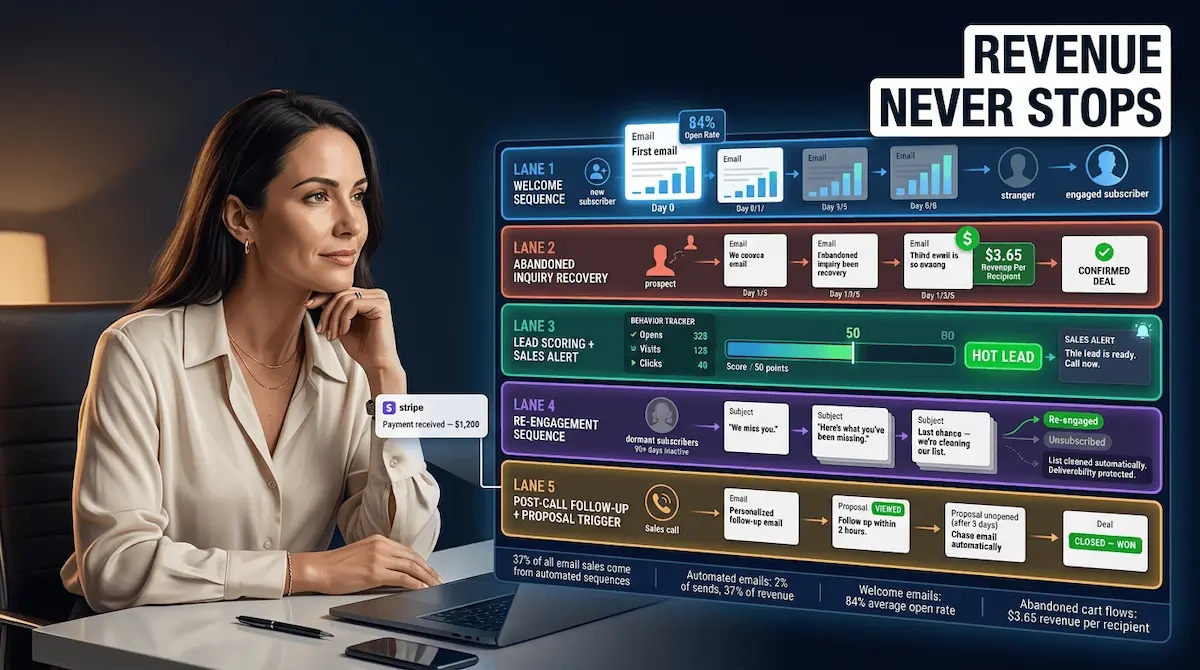
Here's something that should make every entrepreneur uncomfortable: according to Omnisend's 2024 research, automated emails drive 37% of all sales from just 2% of total email volume. Read that again. Two percent of emails. Thirty-seven percent of sales.
That's the power of triggered, behavior-based email automation for entrepreneurs — emails that go out at exactly the right moment, to exactly the right person, based on what they just did. Not what you had time to write this morning.
The five workflows in this section cover the email and follow-up moments where most entrepreneurs hemorrhage revenue — and show you exactly how to plug every leak.
Workflow 6 — Welcome Sequence for New Subscribers
Your welcome email is the single highest-performing email you will ever send. Research shows welcome emails generate open rates of up to 84% — more than double the average campaign. Most entrepreneurs send one generic "thanks for signing up" email and call it done. That's leaving serious money on the table.
How it works:
TRIGGER: New subscriber joins your email list
EMAIL 1 (Immediate): Deliver promised lead magnet + warm welcome +
                      what to expect next
EMAIL 2 (Day 2): Your story — who you are, why you do this,
                 what makes you different
EMAIL 3 (Day 4): Your best free resource or most-read blog post
EMAIL 4 (Day 6): Social proof — a client win, testimonial, or case study
EMAIL 5 (Day 8): Soft pitch — introduce your core offer with a
                 clear, low-pressure CTA
OUTCOME: New subscribers go from cold to warm in 8 days,
         automatically, every time
Tools: ConvertKit, ActiveCampaign, or Klaviyo
Workflow 7 — Abandoned Inquiry or Cart Recovery
Someone visited your services page, clicked "Book a call," and then... nothing. Or they added something to their cart and disappeared. This happens constantly — and most entrepreneurs never follow up.
According to Klaviyo's 2024 Benchmark Report, abandoned cart flows generate the highest revenue per recipient ($3.65) of any automated email flow — outperforming every other sequence type. For service businesses, the principle is identical: a timed follow-up sequence to prospects who showed buying intent but didn't convert.
How it works:
TRIGGER: Prospect visits booking/checkout page but doesn't complete action
EMAIL 1 (1 hour later): Gentle reminder — "Did something come up?"
EMAIL 2 (24 hours later): Address the most common objection
                          + add social proof
EMAIL 3 (72 hours later): Create urgency — limited availability,
                           bonus, or expiring offer
OUTCOME: Recover 10–15% of prospects who would otherwise
         have gone cold permanently
Tools: Klaviyo (ecommerce), ActiveCampaign or HubSpot (service businesses)
Workflow 8 — Lead Scoring + Sales Alert When Prospect Hits Threshold
Not every lead on your list is ready to buy. The mistake most entrepreneurs make is treating a brand-new subscriber the same as someone who has opened 12 emails, clicked your pricing page three times, and downloaded two resources. Those are completely different buying signals.
How it works:
TRIGGER: Contact accumulates points based on behavior:
         • Opens email = +2 points
         • Clicks link = +5 points
         • Visits pricing page = +10 points
         • Downloads resource = +8 points
         • Watches webinar = +15 points
ACTION: When contact hits 40+ points, you get an
        immediate Slack/email alert
OUTCOME: You only reach out to hot, sales-ready leads —
         zero time wasted on unqualified prospects
Tools: HubSpot (free lead scoring) or ActiveCampaign with tag-based scoring
Workflow 9 — Re-Engagement Sequence for Cold Leads (90+ Days Inactive)
Every email list has a graveyard — subscribers who went quiet months ago. Most entrepreneurs ignore them. That's a mistake. These people already raised their hand once. They just need the right nudge at the right moment.
How it works:
TRIGGER: Contact has not opened any email in 90+ days
EMAIL 1: "Are we boring you?" — honest, direct,
          pattern-interrupting subject line
EMAIL 2 (3 days later): Your single best piece of content
                         or most valuable free resource
EMAIL 3 (5 days later): The break-up email —
                         "We'll remove you unless you want to stay"
ACTION: Engaged contacts get re-tagged as active and
        re-enter the main nurture sequence.
        Unengaged contacts are removed to protect deliverability.
OUTCOME: Reactivate 5–10% of dormant leads +
         clean list = better open rates for everyone else
Tools: Mailchimp, ActiveCampaign, or ConvertKit — all support inactivity triggers natively
Workflow 10 — Post-Call Follow-Up Email With Proposal Trigger
You had a great discovery call. You said you'd send a proposal. Three days later you still haven't sent it because twelve other things happened. Sound familiar? This is where deals die most often — not in the pitch, but in the silence after it.
How it works:
TRIGGER: Call marked as "Completed" in CRM / calendar event ends
EMAIL 1 (Within 30 minutes): Personalised thank-you +
                              summary of what was discussed
ACTION: CRM task created automatically: "Send proposal within 24 hours"
EMAIL 2 (If no response in 3 days): Polite follow-up checking if
                                     they have questions
EMAIL 3 (If no response in 7 days): Final follow-up with
                                     a soft deadline
OUTCOME: Every call followed up within 30 minutes,
         every proposal tracked, zero deals lost to silence
Tools: Calendly + Zapier + your CRM + email platform (all connect natively)
Quick Reference — Workflows 6–10 at a Glance
| # | Workflow | Trigger | Key Outcome |
|---|---|---|---|
| 6 | Welcome sequence | New subscriber | Warm leads in 8 days |
| 7 | Abandoned inquiry/cart | Incomplete booking or checkout | Recover 10–15% of lost prospects |
| 8 | Lead scoring + alert | Behaviour threshold reached | Only engage sales-ready leads |
| 9 | Re-engagement sequence | 90 days inactive | Reactivate dormant list |
| 10 | Post-call follow-up | Call completed in CRM | Zero deals lost to silence |
Together, these five workflows handle the most expensive part of your pipeline — the middle, where leads go warm, get distracted, and quietly disappear. Pair them with the automation in marketing strategies in our pillar post, and you have a full-funnel system that nurtures every lead from first touch to signed contract, without you manually chasing anyone. For more on how email marketing marketing automation works specifically as a standalone strategy, that guide goes deep on the technical setup.
Now that your leads are nurtured and your pipeline is moving, the next step is making sure content keeps flowing into the top of that funnel — on autopilot.
5) Workflows 11–13: Automated Content and Social Media Marketing
Let's be honest about something. Content marketing for a solopreneur often looks like this: you write a great blog post, share it once on LinkedIn, maybe post a story about it, and then it disappears forever into the internet void. That piece of content — the one that took you three hours to write — gets seen by maybe 200 people and then never works for you again.
That's not a content strategy. That's a content hamster wheel.
The workflows in this section break that cycle entirely. According to research cited by HubSpot's 2024 Social Media Trends Report, businesses that manually manage posts across just four or five platforms spend 40+ hours per month on social media alone. With automated marketing workflows, that workload can be cut by up to 70% — freeing up to 30 hours every single month.
Here's how to build a content machine that runs itself.
Workflow 11 — Blog Publish → Auto-Distribute to Email List + Social Channels
This is the workflow that turns one piece of content into a week's worth of marketing — automatically, the moment you hit publish.
Most entrepreneurs treat publishing and distributing as two separate manual jobs. This workflow collapses them into one trigger.
How it works:
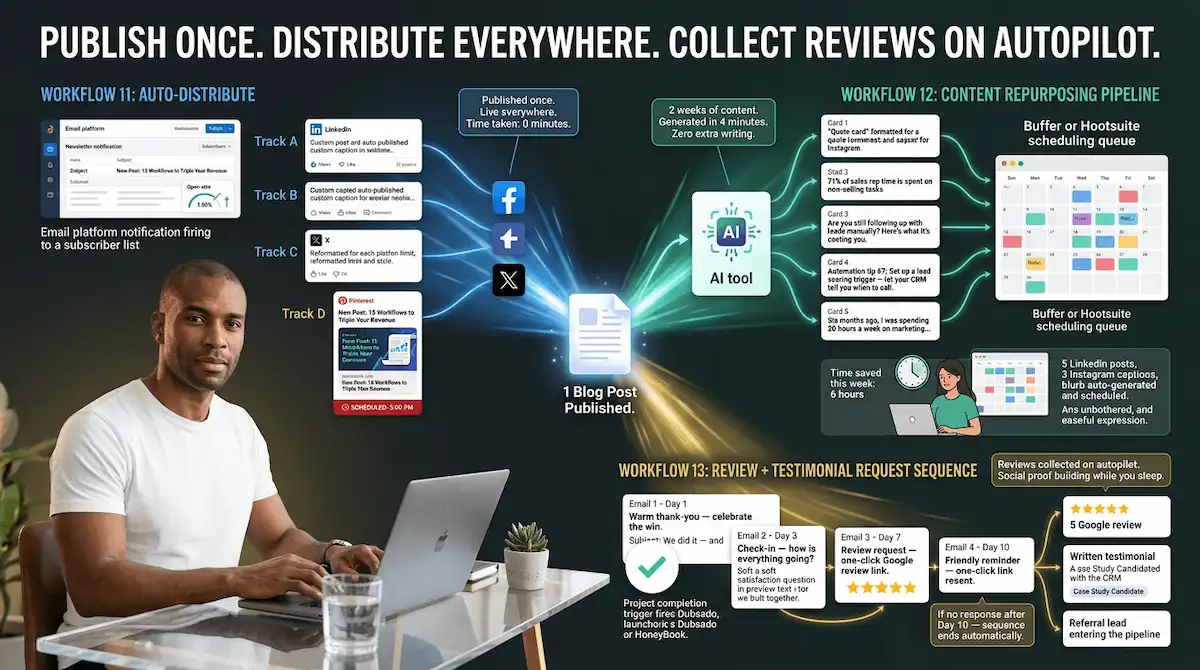
TRIGGER: New blog post published on your website (via RSS feed)
ACTION 1: Email notification sent automatically to your subscriber
          list with post title, intro paragraph, and "Read More" CTA
ACTION 2: Post summary auto-published to LinkedIn with custom caption
ACTION 3: Short-form version auto-posted to Facebook and X (Twitter)
ACTION 4: Pinterest pin created and scheduled automatically
OUTCOME: Every post reaches your full audience across every channel
         within minutes of publishing — zero manual distribution
Tools: Zapier + Mailchimp/ConvertKit + Buffer or Hootsuite Setup time: 2–3 hours once. Runs forever after that.
Workflow 12 — Content Repurposing Pipeline (Blog → Social Snippets → Newsletter)
A single blog post contains enough raw material for 10–15 pieces of social content. Most entrepreneurs extract none of it. This workflow automates the repurposing process so your best content keeps working for weeks after it's published.
Think of it this way: you wrote the blog post once. This workflow makes it work for you fifteen times.
How it works:
TRIGGER: Blog post published or flagged as "repurpose" in
         content calendar
ACTION 1: AI tool (Claude, ChatGPT, or Jasper) generates 5 social
          captions in different formats — quote card, stat callout,
          question, tip, and mini-story
ACTION 2: Captions loaded into Buffer/Hootsuite queue,
          spread across 2 weeks
ACTION 3: Key insights from post extracted and formatted
          as newsletter section
ACTION 4: Newsletter section added to next scheduled
          email send automatically
OUTCOME: One blog post generates 2 weeks of social content
         + one newsletter section — no extra writing required
Tools: Claude or ChatGPT + Zapier + Buffer + your email platform
Real example: A business coach publishes one weekly blog post on entrepreneurship. Her repurposing workflow automatically generates 5 LinkedIn posts, 3 Instagram captions, and a newsletter blurb — all scheduled and sent without her touching them. She reclaims 6 hours every week and her content output quadrupled.
Workflow 13 — Review and Testimonial Request Sequence Post-Delivery
Your best marketing asset isn't your website copy or your ads. It's what your happy clients say about you. And the #1 reason most entrepreneurs don't have enough testimonials is simple: they never ask at the right time.
Timing is everything here. Research from Trustpilot confirms that sending a review request closer to the last interaction leads to significantly higher conversion rates. Automated review sequences lock in that perfect timing — every single time, for every single client.
How it works:
TRIGGER: Project marked complete OR final deliverable sent
         in CRM/project management tool
EMAIL 1 (Day 1): Warm thank-you email — celebrate the win together,
                 no ask yet
EMAIL 2 (Day 3): Check-in — "How is everything going?"
                 + soft satisfaction question
EMAIL 3 (Day 7): Review request — direct link to Google review,
                 Trustpilot, or testimonial form
EMAIL 4 (Day 10): If no response — friendly reminder with
                  one-click review link
ACTION: Positive responses tagged in CRM as "Testimonial"
        and flagged for case study follow-up
OUTCOME: Consistent stream of reviews and testimonials
         generated automatically after every project
Tools: HubSpot, Dubsado, or Honeybook + your email platform + Google Review link
Quick Reference — Workflows 11–13 at a Glance
| # | Workflow | Trigger | Key Outcome |
|---|---|---|---|
| 11 | Blog → multi-channel distribution | Post published | Full audience reached in minutes |
| 12 | Content repurposing pipeline | Post published or flagged | 2 weeks of content from 1 blog post |
| 13 | Review + testimonial request | Project complete | Consistent reviews on autopilot |
These three workflows handle something most entrepreneurs never systematize: the top of the funnel. Consistent content keeps new leads flowing in, while automated review requests build the social proof that converts them. For a deeper look at how automation and AI are transforming content marketing specifically, that guide goes into the tools and strategies reshaping how small businesses create and distribute content in 2026. And for the full strategic framework, our automation in marketing pillar post ties it all together.
Two workflows left. They're the ones most directly tied to your revenue — and the ones most entrepreneurs completely overlook.
6) Workflows 14–15: Automated Sales Pipeline and Revenue Operations
Here's a truth most solopreneurs don't want to admit: the deals you're losing aren't going to your competitors because of price. They're going cold because you forgot to follow up.
It's not a discipline problem. It's a systems problem.
Sales reps spend an average of 71% of their time on non-selling activities — manual CRM updates, scheduling follow-ups, and hunting for deal context Digital Applied — and that figure applies just as painfully to solo operators juggling sales alongside every other function in their business. When you're also the marketer, the service deliverer, and the bookkeeper, your pipeline doesn't just get neglected. It collapses.
The two workflows in this section fix that. They automate the mechanics of your sales pipeline so that every lead gets followed up, every stalled deal gets flagged, and every won deal triggers the next steps automatically — without you touching any of it.
Workflow 14 — Automated CRM Pipeline Management and Deal Progression
Most solopreneurs use their CRM the same way they use a parking lot: leads go in, and nothing moves until they manually drag something from one column to the next. This workflow turns your pipeline into a live, self-updating revenue engine.
How it works:
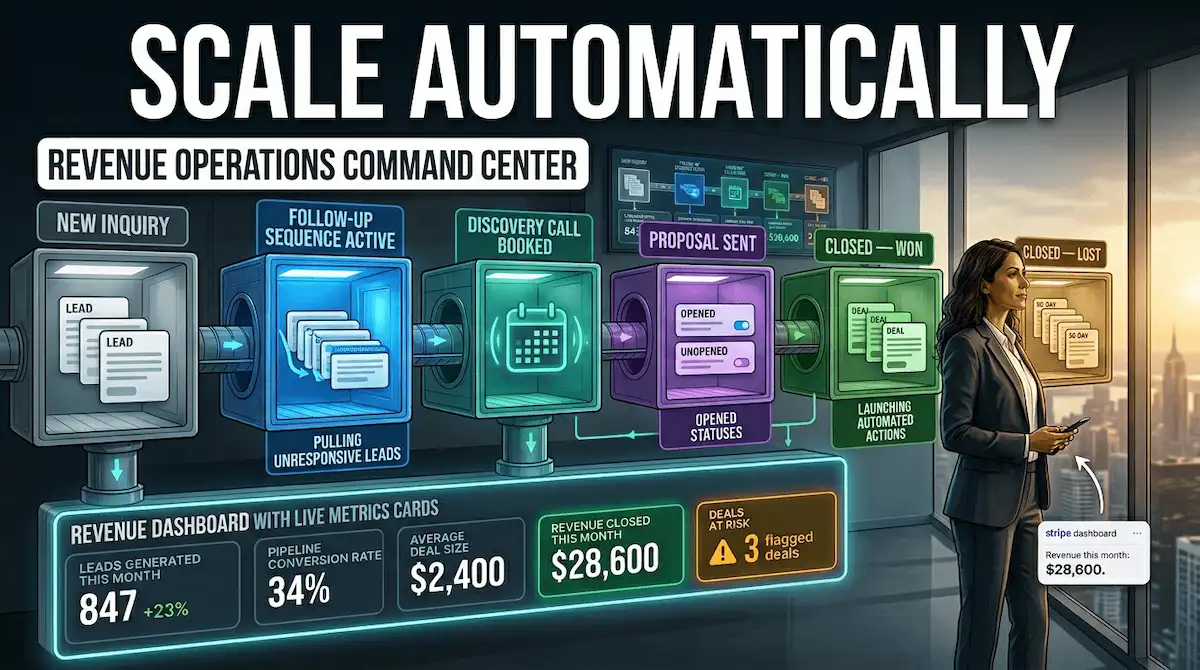
TRIGGER: New lead created in CRM (from website form,
         social DM, or email inquiry)
ACTION 1: Lead auto-assigned to pipeline stage "New Inquiry"
          + welcome email sent within 5 minutes
ACTION 2: If no reply within 48 hours → follow-up email
          triggered automatically
ACTION 3: If prospect books a discovery call → deal moves
          to "Qualified" stage + pre-call prep email sent
          to prospect with agenda and Zoom link
ACTION 4: If proposal sent and unopened after 3 days →
          "Chase" task auto-created with reminder notification
ACTION 5: If deal marked "Closed–Won" → onboarding
          sequence triggered automatically
ACTION 6: If deal marked "Closed–Lost" → 90-day
          re-engagement sequence initiated
OUTCOME:  Every lead is followed up. Every deal moves
          forward. Nothing falls through the cracks.
Tools: HubSpot (free tier) or Pipedrive + Zapier + your email platform Time to set up: 3–4 hours. Recovers 5–8 hours every week indefinitely.
A real-estate consultant I know set this up on a Friday afternoon. By Monday, three leads she'd forgotten about had replied to the automated follow-up — two of them became clients. She hadn't touched the pipeline all weekend.
Workflow 15 — Automated Revenue Reporting and Business Intelligence Dashboard
You can't grow what you don't measure. But manually pulling revenue reports, calculating conversion rates, and tracking which lead sources are actually working is the kind of admin task that eats entire Friday afternoons — and still produces data that's already a week old by the time you read it.
This workflow automates your revenue reporting so you always have a live, accurate picture of your business performance without spending a minute compiling it.
Weighted pipeline forecasting based on actual historical win rates produces more accurate revenue forecasts than generic probability estimates Digital Applied — and the tools available to solopreneurs today make this kind of reporting completely achievable without a data analyst or a six-figure tech stack.
How it works:
TRIGGER: Ongoing — data pulled automatically on a
         set schedule (daily or weekly)
ACTION 1: CRM data synced to reporting dashboard
          (Google Looker Studio or HubSpot Reports)
ACTION 2: Key metrics auto-calculated:
          leads generated, conversion rate by stage,
          average deal size, revenue closed this month
ACTION 3: Lead source attribution tracked automatically —
          which channels (organic, social, referral,
          email) are producing actual revenue
ACTION 4: Weekly revenue summary email sent to you
          every Monday morning, auto-generated from live data
ACTION 5: Deals with no activity in 14+ days auto-flagged
          as "At Risk" and surfaced in your dashboard
OUTCOME: You start every week with a clear, accurate
         picture of your revenue — built automatically
         overnight while you were sleeping
Tools: HubSpot CRM + Google Looker Studio (free) or Pipedrive Reports + Zapier Setup time: 2–3 hours. Replaces 3–4 hours of manual reporting every week.
Quick Reference — Workflows 14–15 at a Glance
| # | Workflow | Trigger | Key Outcome |
|---|---|---|---|
| 14 | CRM pipeline automation | New lead created | Every deal followed up, nothing lost |
| 15 | Revenue reporting dashboard | Scheduled / ongoing | Live performance data, zero manual work |
Together, these two workflows close the loop on your entire automated sales and marketing system. You've built lead generation that runs itself (Workflows 1–5), email nurture that converts on autopilot (Workflows 6–10), content that distributes without you (Workflows 11–13), and now a pipeline that moves deals forward and reports on revenue — automatically. For a deeper look at how automation business process design fits into a scalable business model, that guide walks through the strategic layer behind everything you've built here. And for the complete picture, the automation in marketing pillar post ties every cluster together.
There's one section left — and it's where everything you've just built gets packaged into a single action plan you can start implementing today.
The Business That Runs While You Sleep
Most entrepreneurs start their journey with a specific dream. Not just financial freedom — but time freedom. The ability to build something that works without them being present for every single moving part.
Somewhere between the hustle and the to-do lists, that dream gets buried under manual follow-ups, content calendars that need constant feeding, and sales pipelines that stall the moment you look away.
That stops today.
The 15 automated sales and marketing workflows in this guide aren't theory. They're the exact systems that separate entrepreneurs who are always busy from entrepreneurs who are actually growing. Lead generation that captures and qualifies prospects while you sleep. Email sequences that nurture relationships and close deals without a single manual send. Content that distributes itself across every channel the moment you publish. A CRM pipeline that follows up, flags stalled deals, and reports on your revenue — automatically, every single day.
Set these up once. Let them run forever.
You don't need a marketing team. You don't need a six-figure tech stack. You need the right systems, the right triggers, and the discipline to invest a few hours building something that saves you hundreds of hours every year.
The entrepreneurs winning in 2026 aren't working harder than you. They've just stopped doing manually what a well-built automation can do better, faster, and without ever burning out.
Now you have the blueprint.
The only question is how quickly you implement it — and whether you build it from scratch or start with tools that are already done for you.
For more on how to build a fully automated business engine, start with the complete automation in marketing guide — it's the strategic foundation everything here is built on.
You've read the blueprint. Now go build the business. Everything you need is already inside Vault AI Pro →
🔓 READY TO STOP STARTING FROM SCRATCH?
Join thousands of entrepreneurs who've replaced guesswork with a vault of 1,000+ ready-to-use
AI prompts, automation workflows, templates, checklists, and playbooks — updated every week.
1,000+ resources. Done for you. Waiting right now.