Automation and AI in 2026: What Works, What Wastes Your Time, and the Build Order That Changes Everything
Most small business owners treat automation and AI as the same thing. That mistake is why their stack costs more time than it saves. Here is the exact difference, what works in 2026, and the build order that changes everything.

The conversation that convinced me to write this post happened in a coaching call in late 2025. A solopreneur — running a consulting business alone, genuinely smart, genuinely motivated — had spent the previous three months buying AI tools. Six of them. She had ChatGPT for writing, Zapier for connecting apps, a chatbot for her website, an AI scheduling assistant, an email tool, and something she described as "a workflow thing I set up but never finished."
She was spending more time managing her tools than she had been spending doing the work manually.
Automation and AI are the two most discussed topics in small business right now — and the two most consistently misunderstood. I see the same mistake on repeat: entrepreneurs treat them as interchangeable, buy tools in the wrong order, stack AI on top of chaos, and then conclude the technology does not work. The technology works. The build order is broken.
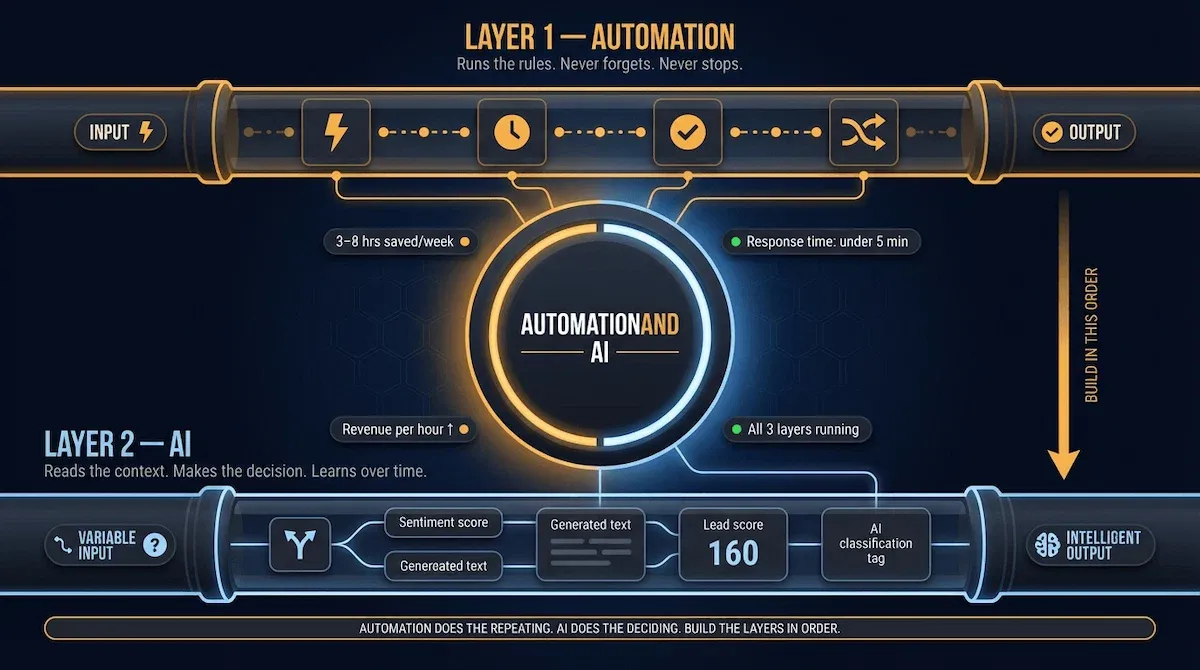
Here is the distinction that changes everything. Automation follows rules you define — if this happens, do that. It is reliable, predictable, and requires no intelligence. It just runs. AI makes decisions — it analyses what it receives and produces an output that varies based on context. It is powerful, flexible, and fundamentally unpredictable without structure underneath it. Put automation first and AI becomes a precision instrument. Put AI first and you have a powerful engine with no road to drive on.
According to recent small business research, 66% of small businesses using AI save between $500 and $2,000 monthly, while 58% free up over 20 hours each month. Uplyftcapital Those are the businesses that built their stack in the right order. The ones that did not are still answering emails at midnight and wondering why the tools are not delivering.
This post gives you the exact distinction, the honest picture of what works and what wastes your time, and the three-layer build order that connects automation and AI into one system that runs your business while you focus on everything else.
Section 1 starts where every small business owner I know needed to start — with the plain-English difference between automation and AI, and why confusing the two is the single most expensive mistake on this list.
1) What Automation and AI Actually Mean — and Why Most Small Business Owners Confuse the Two
I want to start with a scenario that will feel familiar.
You set up an automation that sends a welcome email every time someone joins your mailing list. It fires perfectly, every time, without you touching anything. That is automation working exactly as it should. Then a subscriber replies to that welcome email with a question. The automation has no idea what to do with a reply — it was never told what to do with one — so it does nothing. The subscriber waits. You miss the follow-up. A warm lead goes cold.
That is not an automation failure. That is the boundary where automation ends and AI begins. Understanding where that boundary sits is the single most important thing a small business owner can do before spending another hour building workflows or another dollar on tools.
Automation: The Part That Follows Rules
Automation executes predefined instructions. Give it a trigger and an action, and it will run that trigger-action sequence indefinitely, identically, without variation. New lead fills in your contact form? CRM gets updated. Invoice reaches thirty days overdue? Payment reminder goes out. New subscriber joins your list? Welcome email fires in under five minutes.
The reliability of automation is also its limitation. Automation is execution-focused — it answers the question of how a task should be performed once the rules are known. It operates best in stable environments with clearly defined processes and produces the same output for the same input. Domo The moment inputs vary, conditions change, or a decision requires any form of judgement, a rules-based automation either produces the wrong output or stops entirely and waits for a human.
This is not a flaw. It is a feature — if you understand it. Automation is the most reliable, lowest-maintenance system you can build. It never forgets. It never gets tired. It never has a bad Tuesday. For every task in your business that has a consistent input and a known correct output, automation is the right tool and AI is overkill.
AI: The Part That Makes Decisions
AI is fundamentally different from automation in one respect: it does not need to know the rules in advance. Unlike rule-based automation, AI can learn from data patterns and experience to perform more complex tasks — it can recognise patterns, problem-solve, and make decisions based on new information rather than predefined instructions.
In practical terms for a small business: AI reads the reply to your welcome email, determines whether it is a buying question, a support question, or a complaint, drafts an appropriate response, and routes it correctly — without you writing a rule for every possible type of reply. That is not something any rules-based system can do. The input varies too much. The decision requires context.
I think about AI as the judgement layer and automation as the execution layer. AI figures out what should happen. Automation makes sure it does. Neither works as well without the other.
Why the Distinction Changes Everything You Build
Here is where this gets immediately practical. Most small business owners I work with have built their stack in the wrong order — they added AI tools before their automation in marketing foundation was solid, which is roughly equivalent to hiring a strategist before you have a functioning business to strategise about.
Organisations applying hyperautomation — combining rules-based automation with AI — achieved 42% faster process execution and up to 25% productivity gains, according to UiPath's Automation Trends Report 2025. WeAreBrain The gains come from the combination, not from either technology in isolation. Rules-based automation alone is rigid and limited. AI alone is powerful but inconsistent without structure underneath it. Together, they produce a system where the automation handles the volume and the AI handles the variation — and a small business owner can run both without a technical team.
The build sequence that follows from this distinction is straightforward: build your automation layer first on the highest-volume repetitive tasks in your business. Once those are stable and running, add AI to the specific points in each workflow where the input varies or a decision is required. That sequencing is the entire argument of this post — and the reason businesses that get it right save hours every week while businesses that get it wrong end up managing six tools that collectively cost more time than they save. If you want to see exactly what this looks like in practice for marketing specifically, the post on automated marketing for small business covers the full channel-by-channel build.
🎯 PRO TIP — THE ONE-SENTENCE TEST
Before adding any tool to your stack, ask one question: does this task have a consistent input and a predictable correct output? If yes — automate it with a rules-based tool. If the input varies or the correct output depends on context — that is where AI earns its place. This single question will save you more time than any tool you have ever bought.
Section 2 moves from the distinction to the application — the specific automation and AI tasks that actually move the needle for a small business in 2026, and the ones that sound good in a product demo but rarely survive contact with how your week actually works.
2) The Automation and AI Tasks That Actually Save Small Business Owners Time in 2026
Here is the version of this conversation I do not want to have with you. The one where I list fifteen AI tools with a paragraph about each, you feel informed for about four minutes, and then you close the tab no closer to knowing what to actually do on Monday morning.
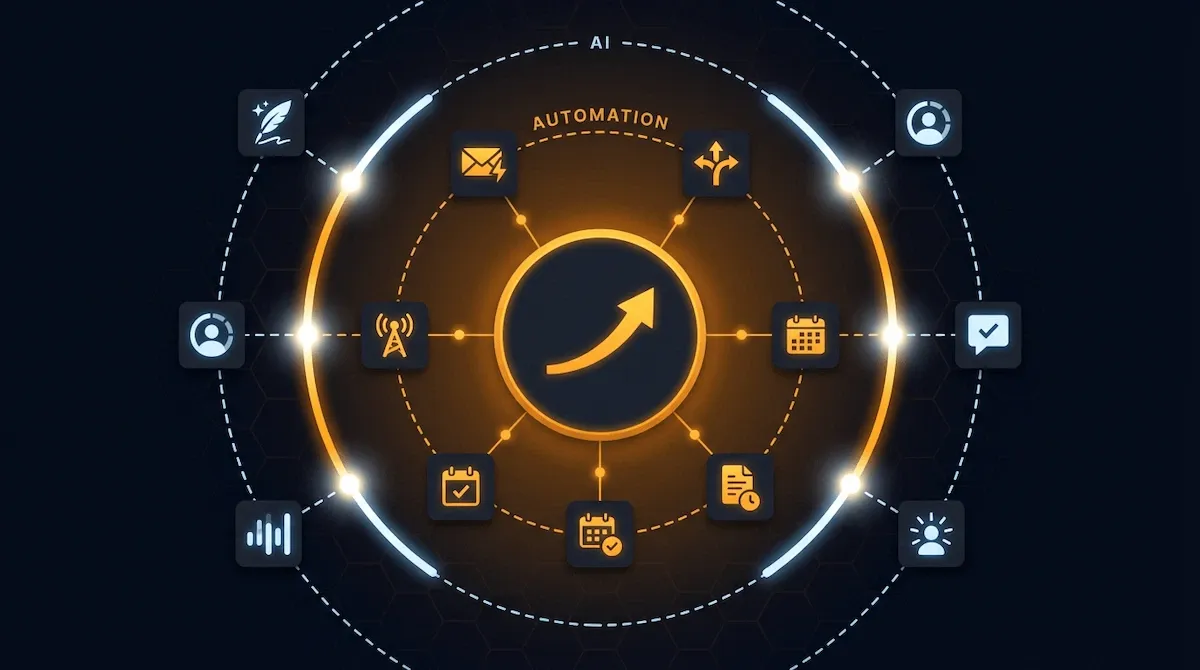
I am going to do something more useful than that. I am going to tell you which specific tasks produce real time savings when automated, which tasks AI genuinely transforms, and — most importantly — where the two work together to create results neither achieves alone. This is not a tool list. This is a task list. Pick your tasks first. The tools follow.
Where Automation Wins: The Six Tasks Worth Building First
These are the tasks where rules-based automation delivers immediate, measurable returns for a small business owner operating alone or with a small team. They share one characteristic: consistent inputs and predictable correct outputs.
Email sequences. Welcome emails, lead nurture tracks, post-purchase follow-ups, re-engagement flows. Every one of these has a known trigger and a known desired output. Automate them first. They are the single highest-ROI automation category for any small business with an email list.
Lead routing and CRM tagging. Every new enquiry entered into your CRM should be tagged, scored, and routed to the correct pipeline stage automatically — without anyone manually updating a spreadsheet. This takes thirty minutes to set up once and saves thirty minutes every single day.
Social media scheduling. Batching and scheduling posts is pure execution — the same input produces the same output every time. There is no decision to be made. Automate it and never spend a Tuesday afternoon manually posting again.
Invoice and payment follow-ups. Payment automation frees up over 500 hours annually in finance departments, averaging 9.9 hours per week. Vena For a small business owner doing this manually, a single overdue invoice workflow running automatically is the kind of change that pays for itself the first time it fires.
Appointment confirmation and reminders. Confirmation emails, reminder sequences, cancellation handling. Every step is predictable. Every step can run without you.
Content distribution. When a new blog post publishes, it should automatically appear in your email newsletter queue, post to your social channels, and update your content calendar — without anyone touching it manually after the initial publish.
Where AI Wins: The Five Jobs It Does Better Than Any Human
These are the tasks where the input varies, the correct output requires judgement, and rules-based automation alone produces results that are either wrong or so generic they create more work than they save.
Email copy and content drafting. An AI tool given a clear brief produces a first draft in minutes that a human would take an hour to write. The key word is brief — the quality of the output is entirely determined by the quality of the instruction. Get the prompt right and AI drafts at a standard that needs light editing, not a full rewrite.
Lead scoring and qualification. When a new enquiry arrives, AI can read the message, assess buying intent, identify the most relevant service or product, and assign a priority score — in seconds, with no rules written in advance. This is a decision task, not an execution task. Automation cannot do it. AI can.
Customer service response drafting. AI-powered chatbots can handle 40 to 60 percent of routine customer enquiries without human intervention — and for the remainder, AI drafts a suggested response that a human reviews and sends. Small businesses report saving 5 to 15 hours per week on marketing tasks alone when AI is applied strategically, according to HubSpot's 2025 State of Marketing report. Digital Applied
Data summarisation and reporting. Pulling numbers from your CRM, your email platform, and your analytics tools and synthesising them into a weekly performance summary is a task that takes a human forty-five minutes. It takes AI thirty seconds.
Personalising outreach at scale. Sending a hundred follow-up emails that each feel individually written is not something a rules-based automation can do — every output is identical. AI can vary the tone, reference specific context from each lead's history, and produce outputs that read as if written one at a time.
Where They Work Together: The Combinations That Compound
This is the section no post currently ranking on this keyword writes — and it is the most valuable part.
The combinations that produce the greatest returns are not automation OR AI. They are automation that triggers AI, and AI outputs that feed back into automation. I think of this as the feedback loop — the point where the two technologies stop being separate tools and start behaving as one system.
Three combinations I see work consistently for small businesses:
- Enquiry arrives ➔ automation routes it ➔ AI drafts the response ➔ automation sends it within five minutes. The human reviews the sent message the next morning. Nothing fell through. Nothing waited until someone was available.
- Lead downloads a resource ➔ automation tags them ➔ AI scores their buying intent ➔ automation routes high-intent leads to a priority follow-up sequence. The leads most likely to convert get the fastest, most relevant follow-up — automatically.
- Content is published ➔ automation distributes it ➔ AI generates five social captions from the post ➔ automation schedules them across channels. One piece of content. Five distribution touchpoints. Zero additional manual work after the original publish.
Each of these is a working system, not a theoretical one. And each one is built on the same principle from Section 1: automation handles the execution, AI handles the decision points inside it. The automation in marketing post covers how this plays out specifically across your marketing channels — worth reading once you have the foundation in place.
✅ APPLY IT — YOUR QUICK-START TASK AUDIT
| Task | Right tool | Why | Build order |
|---|---|---|---|
| Email sequences | Automation | Consistent trigger, predictable output | ① First |
| CRM tagging + routing | Automation | Rules-based, no judgement needed | ② First |
| Lead scoring | AI | Input varies — decision requires context | ③ After automation stable |
| Email copy drafting | AI | Output varies by context and audience | ③ After automation stable |
| Enquiry response | Automation + AI | Automation routes, AI drafts | ④ Combination layer |
| Content distribution | Automation + AI | Automation publishes, AI generates captions | ④ Combination layer |
Knowing what works is only half the picture. Section 3 covers the other half — the specific automation and AI approaches that consistently waste small business owners' time, sound compelling in every product demo, and rarely survive contact with how a real week actually runs.
3) What Wastes Small Business Owners' Time — The Automation and AI Mistakes That Cost More Than They Save
I want to be honest with you about something before we go any further.
Most posts about automation and AI are written by people who want to sell you tools. That means they have a structural incentive to tell you what is possible, not what is likely. They show you the best-case demo, describe the most optimistic outcome, and leave out the part where you spend three weekends building something that makes your week worse, not better.
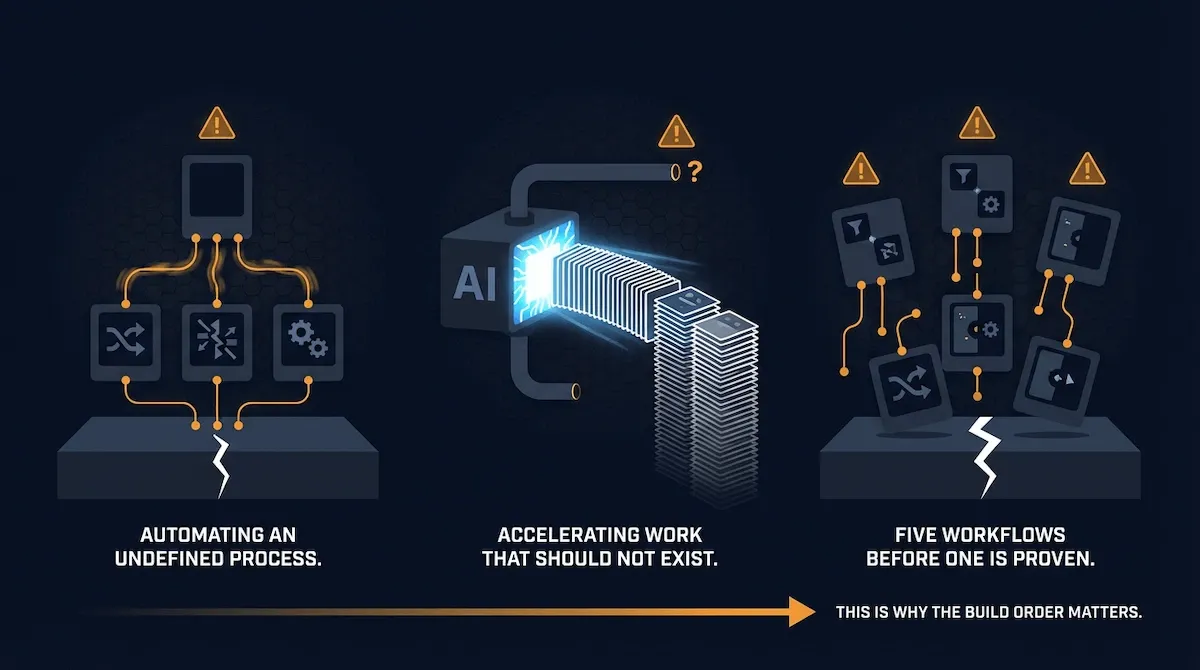
This section exists to correct that. These are the three mistakes I see small business owners make most consistently — not occasionally, not in edge cases, but repeatedly, across different industries, different business models, and different technical skill levels. Each one costs real time. Each one has a specific, buildable fix.
Mistake 1 — Automating a Process You Have Not Defined Yet
This is the most common mistake and the most expensive one. The thinking goes: my onboarding process is chaotic, so I will automate it and the automation will make it organised. It will not. A Kaizen Institute poll found that 55% of companies cite outdated systems and processes as their biggest hurdle to AI implementation — yet a significant number continue to focus primarily on the technology itself rather than the underlying operations it will automate. World Economic Forum
Automating a broken process does not fix it. It scales the breakage.
I worked with a service business owner who had built an elaborate Zapier sequence to onboard new clients. It sent welcome emails, created folders, added contacts to their CRM, and triggered three follow-up messages. The problem: the underlying onboarding process had never been clearly defined. Different clients received different things depending on when they signed up and who handled the intake. The automation made the inconsistency faster. Clients started noticing. Complaints went up.
The fix is always the same and it always comes first: write the process out manually, step by step, before you build a single automation. Do it manually for five clients. Fix the inconsistencies you find. Then automate the version that works. A rule of thumb I rely on: if you cannot explain the process to a new employee in under ten minutes, you are not ready to automate it yet.
Mistake 2 — Using AI to Speed Up Work That Should Not Exist
This one is subtler and I find it harder to talk people out of because it feels productive while it is happening.
The scenario: a small business owner discovers that AI can generate social media captions, blog outlines, email subject line variations, and newsletter introductions in seconds. So they start producing significantly more content — more posts, more emails, more updates, more variations — because the cost of production has dropped close to zero. Six weeks later they are managing more content than they have ever produced, their open rates are declining, their social engagement is flat, and they are spending more time reviewing and editing AI outputs than they saved by generating them.
More output is not better output. According to a 2025 Edelman study cited by industry researchers, 61% of consumers trust brands that clearly disclose and humanise their AI use Geek Metaverse — meaning the quality and authenticity of what you publish matters more in 2026, not less, even as the volume of AI-generated content across the internet grows. The businesses winning with AI content are not producing more. They are producing the same amount, faster, and using the time saved to make each piece better — sharper angle, more specific example, stronger call to action.
Before using AI to accelerate any content task, ask one question first: would I be better off producing twice as much of this, or producing the same amount and making it twice as good? Almost always, the answer is the second option.
Mistake 3 — Building Five Workflows Before One Is Proven
This is the mistake I described in the intro — the solopreneur with six tools, none of them working properly. It is also the most demoralising one, because it tends to end with an entrepreneur concluding that automation and AI simply do not work for businesses their size. They do. The build order was wrong.
The pattern is predictable: a business owner reads a post about automation, feels the urgency of falling behind, and spends a weekend trying to build an email welcome sequence, a social scheduling system, a lead scoring setup, a content distribution workflow, and a CRM tagging automation simultaneously. By Sunday night, three of the five are half-built, two have not been started, and the one that is closest to complete has a configuration error they cannot diagnose. Nothing goes live. The weekend is gone.
I have one rule for building automation and AI systems in a small business: nothing new gets started until the previous workflow has been running correctly for two weeks. Two weeks is long enough to catch errors, identify gaps in the logic, and confirm the output is actually being used downstream. It is short enough that the build sequence still moves at a reasonable pace. One workflow proven is worth five workflows started.
The automation business process post goes deeper on how to structure your build process so nothing gets abandoned half-finished — worth reading before you open Zapier.
⚡ AUTOMATE IT — THE PRE-BUILD CHECKLIST
Before building any automation or AI workflow, run through these four questions. If you cannot answer yes to all four, stop and fix the gap first — or you are building on a broken foundation.
- Is the process already working manually? If not — define it first, automate it second.
- Does this task need to happen more, or just better? If better — AI quality, not AI volume.
- Is the previous workflow proven and running? If not — finish that one before starting this one.
- Do I know what a successful output looks like? If not — you cannot measure whether the automation is working.
Section 4 moves from what to avoid to what to build — the specific three-layer sequence that connects automation and AI in the right order, so the system you end up with actually compounds over time instead of creating more work every time you add a new tool.
4) The Build Order: How to Connect Automation and AI in Your Small Business Without Starting Over Twice

A consultant I know spent two months building what she called her "AI-powered client system." She used an AI tool to draft her onboarding emails, another to score inbound leads, a third to generate weekly performance summaries, and a fourth to personalise her follow-up sequences. None of these tools talked to each other. Every output had to be manually copied from one place to the next. She was spending forty-five minutes a day moving AI-generated content between tabs.
When I looked at what she had built, the problem was immediately visible. She had built the AI layer first — all the intelligence, all the decision-making, all the content generation — with no automation underneath it to handle the execution. Every AI output required a human to carry it to the next step. The AI was doing its job. The system had no way to use what it produced.
She rebuilt in three weeks using the sequence I am about to give you. Everything she had built still exists — it just runs automatically now, with the automation layer underneath it doing the carrying.
The sequence has three layers. Build them in order. Do not jump ahead.
Layer 1 — Pure Automation First (No AI Yet)
This is the foundation. Before a single AI tool gets added to your business, you need rules-based automation running cleanly on your highest-volume repetitive tasks. These are the workflows with consistent inputs and predictable outputs from Section 1 — email sequences, CRM tagging, social scheduling, invoice follow-ups, appointment reminders.
The reason Layer 1 comes first is not just philosophical. It is structural. Traditional automation is the reliable foundation upon which AI agents need to stand — because even the most intelligent AI cannot deliver ROI if it is built on quicksand. SS&C Blue Prism An AI tool that produces a perfectly written follow-up email is useless if there is no automation underneath it to send that email at the right moment, to the right person, triggered by the right event.
Layer 1 is also where you prove that your processes are defined well enough to be automated at all. If you cannot build a clean rules-based workflow for a task, it means the process is not yet clear enough to automate — and it is definitely not ready for AI. The manual process definition test from Section 3 applies here: if you cannot write the trigger and the desired output in two sentences, the process needs more definition before it needs any technology.
Build time for Layer 1: two to four weeks for a solo operator. Target: three to five workflows running cleanly with no manual intervention required. Measure: each workflow fires correctly at least ten consecutive times before you move to Layer 2.
Layer 2 — AI on Top of Proven Automation
Once your automation foundation is stable and producing consistent outputs, you add AI at the specific decision points inside each workflow where the input varies or the correct output depends on context.
This is the layer most entrepreneurs want to build first — and it is the layer that fails when built without Layer 1 underneath it. AI needs a pipeline to run inside. Give it one.
The practical application: your welcome email sequence is already automating in Layer 1 — it fires when a subscriber joins, delivers the email, waits three days, and fires again. In Layer 2, you add AI to the email copy step. Instead of the same fixed copy going to every subscriber, the AI reads the subscriber's source — which lead magnet they downloaded, which page they came from, which tag they received — and generates a personalised version of the email for that specific person. The automation still handles the timing, the triggers, and the sending. The AI handles the variation in the copy.
According to McKinsey's 2025 Superagency in the workplace report, AI could safely automate up to three hours of business processes per day — but the impact is only realised when AI is layered onto processes that already have clear structure underneath them. DevCom That structure is Layer 1. Without it, the three hours never materialises.
Build time for Layer 2: two to three weeks per workflow, adding AI to each proven automation one at a time. Target: AI is producing outputs that feed directly into the automation without manual copying. Measure: the number of manual hand-offs per day should drop to zero for each Layer 2 workflow before you move to the next one.
Layer 3 — Connecting Both Into One System
Layer 3 is where the compounding begins. This is the point where the outputs from your AI layer feed back into your automation triggers — creating a feedback loop where the system learns from what works and adjusts what it does next.
The practical example: a lead enters your nurture sequence in Layer 1. Layer 2 AI scores their engagement — did they open three emails in a row? Did they click the pricing link? Did they reply? The AI assigns a score. Layer 3 is the connection that takes that AI score and triggers a different automation — moving the high-intent lead into a faster-moving sequence, alerting you to follow up personally, or routing them directly to a booking page. The automation handles the routing. The AI makes the decision about which route to take. Neither could do this alone.
This is what I mean when I say automation and AI work as one system rather than two separate tools. The boundary between them disappears. By 2026, nearly 85% of executives believe employees will rely on AI recommendations to make real-time data-driven decisions — and the businesses capturing that value are the ones where AI outputs are connected directly into automated execution rather than sitting in a dashboard waiting for a human to act on them. Salesmate
Build time for Layer 3: one to two weeks per connection, once Layers 1 and 2 are stable. Target: at least one AI output per workflow is triggering an automation downstream without human intervention. Measure: the time between an AI making a decision and an action being taken should be under five minutes for every Layer 3 connection.
💜 STACK SNAPSHOT — THREE-LAYER BUILD TIMELINE
| Layer | What you build | Build time | Move to next when |
|---|---|---|---|
| Layer 1 — Automation | Rules-based workflows on highest-volume repetitive tasks | 2–4 weeks | 3–5 workflows firing correctly 10 consecutive times |
| Layer 2 — AI | AI at decision points inside proven automations | 2–3 weeks per workflow | Zero manual hand-offs between AI output and automation |
| Layer 3 — Connection | AI outputs triggering automation downstream | 1–2 weeks per connection | AI decisions trigger actions in under 5 minutes, zero human intervention |
Section 5 takes this build sequence and makes it concrete — the specific tools for each layer, the exact decision criteria for choosing between them, and the one connective tool that makes all three layers talk to each other as one system.
5) The Automation and AI Stack Every Small Business Should Be Running in 2026
The tool question is where I lose most people — not because the answer is complicated, but because everyone else's answer is a list of twenty products with a paragraph about each. You end up more confused than when you started, no closer to knowing what to actually open on Monday morning.
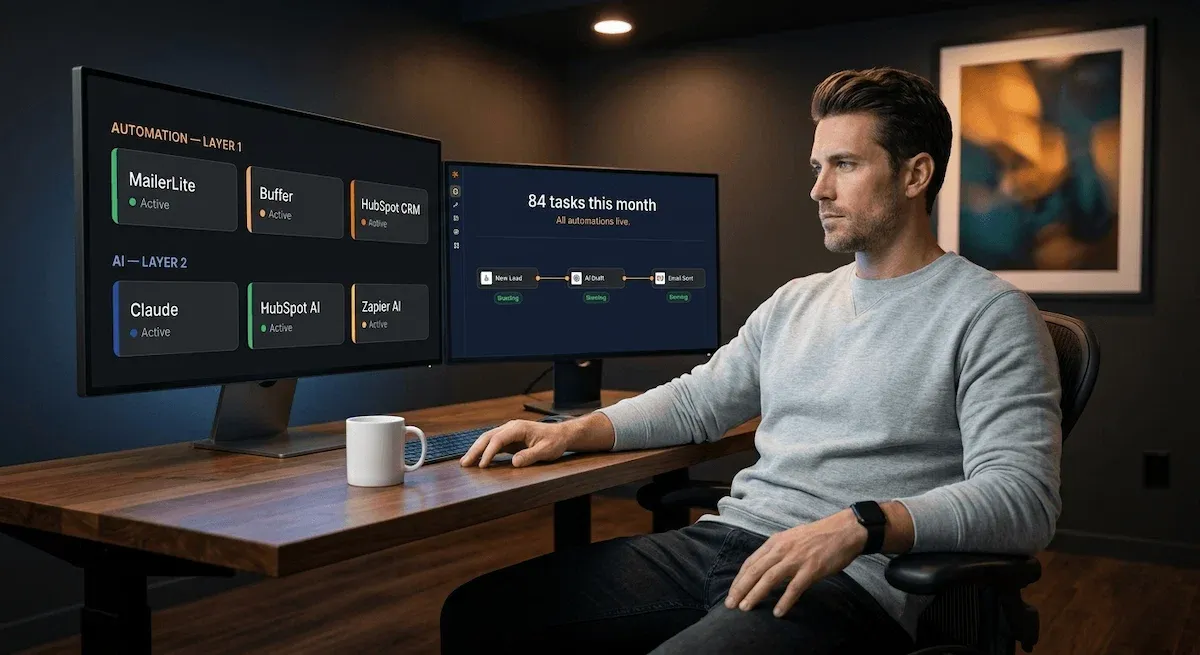
I am going to give you eight tools. That is the complete stack. Eight tools across three layers that cover every workflow from Section 4 — the automation foundation, the AI decision layer, and the connective tissue that ties both together. I have seen this exact combination work for solo operators and small teams repeatedly. It does not require a developer. It does not require a significant budget. And every tool in it earns its place by doing one specific job better than the alternatives at the same price point.
Here is how the stack maps to the three layers.
The Automation Layer: Three Tools That Handle the Rules
These are your Layer 1 tools — the rules-based execution foundation that everything else runs on.
MailerLite or ActiveCampaign — email sequences and lead nurturing. For a business under 1,000 subscribers building its first automation layer, MailerLite is the correct starting point. Free up to 1,000 contacts, full automation builder included, no technical knowledge required. Once your list grows past that threshold and your sequences require conditional logic — different paths based on what a subscriber clicks or how they engage — ActiveCampaign becomes the upgrade. It integrates directly with Zapier and Make, meaning the AI tools you add in Layer 2 can call directly into your email workflows without any manual step between them. AI Smart Ventures That integration is the entire reason it belongs in this stack rather than a cheaper alternative.
Buffer — social scheduling. Free for up to three channels. Clean interface. Posts on schedule without you touching them. There is no decision to be made here — pick it, connect your accounts, batch your content once a week, and move on. The time you spend researching social scheduling tools beyond this point is time that could be spent building your email automation instead.
HubSpot Free CRM — lead management and pipeline. The free tier covers everything a small business needs at Layer 1: contact management, deal tracking, form submissions captured automatically, email logging. Every new lead from every source flows in, gets tagged, and sits in a pipeline that shows you exactly where each relationship stands. In real-world deployments, small businesses reclaim three to eight hours per employee per week by automating inbox triage, lead routing, and document prep — and HubSpot's free CRM is the system that makes that routing automatic rather than manual. Cornell Design Group
The AI Layer: Three Tools That Handle the Decisions
These are your Layer 2 tools — the intelligence that sits on top of your proven automation foundation and handles the tasks where input varies or context is required.
Claude or ChatGPT — content drafting and copy. Both belong in this stack for different reasons. I use Claude for anything requiring a consistent, natural writing voice — email sequences, blog drafts, client communications, proposal copy. The output requires less editing and sounds less like a machine than most alternatives at the same price point. ChatGPT is the better choice when you need to process large amounts of data quickly — summarising a long document, analysing customer feedback at volume, generating structured outputs from messy inputs. For most small business owners, starting with one and learning it deeply produces better results than using both poorly.
HubSpot AI — CRM intelligence and lead scoring. Once your HubSpot CRM has three to four weeks of data flowing through it, the AI layer built into HubSpot starts doing something rules-based automation cannot: it scores lead quality based on behavioural patterns, surfaces which contacts are most likely to convert, and suggests next actions based on where each deal sits in the pipeline. This is Layer 2 operating exactly as intended — AI making decisions at the points inside your automation where the correct action depends on context.
Zapier AI steps — workflow intelligence. Zapier's AI actions allow you to insert a Claude or ChatGPT step directly inside any Zap — so a new lead arrives, Zapier routes it to your CRM, and an AI step drafts the personalised follow-up email before the automation sends it. No manual copying. No separate tool to open. The AI output feeds directly into the automation's next action. This is the Layer 2 and Layer 3 connection point in one tool.
The Connective Layer: One Tool That Ties Everything Together
Zapier — the system spine. Every tool in the stack above connects through Zapier. New HubSpot contact triggers an email sequence in ActiveCampaign. A published blog post triggers a social caption generation in Claude, which feeds into Buffer's publishing queue. A lead scoring threshold in HubSpot triggers a priority follow-up sequence. In 2026, Zapier connects over 8,000 integrations and its AI Copilot builder allows you to describe a workflow in plain language and have it built automatically Primotly — meaning the technical barrier to connecting tools is lower than it has ever been. Free tier covers 100 tasks per month — enough to test every connection before committing to a paid plan.
The full stack costs between zero and approximately $80 per month depending on which paid tiers you need. For most small businesses at the start, the entire Layer 1 foundation runs for free. The AI layer adds cost only when you are actively using it. No enterprise contract. No developer. No six-week implementation project.
The post on automation in email marketing covers how to build the email automation layer of this stack in specific detail — worth reading alongside this section if email sequences are your first Layer 1 priority. And if you want to see the full marketing channel build that uses this exact stack, the automated marketing for small business post maps the complete channel-by-channel sequence.
💜 STACK SNAPSHOT — COMPLETE AUTOMATION AND AI STACK 2026
| Layer | Tool | Job | Entry price | Upgrade trigger |
|---|---|---|---|---|
| Layer 1 | MailerLite | Email sequences + nurture | Free to 1,000 | List exceeds 1,000 or conditional logic needed |
| Layer 1 | Buffer | Social scheduling | Free — 3 channels | More than 3 channels or analytics needed |
| Layer 1 | HubSpot Free CRM | Lead management + pipeline | Free | Lead scoring or sales sequences needed |
| Layer 2 | Claude or ChatGPT | Content drafting + copy | $20/mo | You are already here — this is the starting point |
| Layer 2 | HubSpot AI | Lead scoring + CRM intelligence | Included in CRM free tier | Needs 3–4 weeks of CRM data to activate |
| Layer 2 | Zapier AI steps | AI inside automation workflows | Included in paid Zapier plan | When AI outputs need to feed directly into automations |
| Layer 3 | Zapier | Connects all tools — system spine | Free — 100 tasks/mo | Free tier task limit regularly hit |
Having the right tools is one thing. Knowing whether the system they form is actually producing results is another. Section 6 gives you the three numbers that tell you everything — and the one monthly review that keeps the whole stack honest.
6) How to Know Whether Your Automation and AI System Is Actually Working

The most common thing I hear from small business owners six weeks after building their first automation layer is some version of this: "I think it is working, but I am not completely sure."
That uncertainty is not a technology problem. It is a measurement problem — and it is entirely avoidable. If you do not set a baseline before you build the system, every result you see afterwards is ambiguous. You cannot tell whether the time you saved came from the automation or from the fact that it was a quieter month. You cannot tell whether the leads converting at a higher rate converted because of the nurture sequence or because you ran a promotion. Without a before, the after means nothing.
I have one rule about measurement that I give every small business owner before they build anything: spend thirty minutes establishing your baseline before you activate a single workflow. How many hours per week does the task currently take? How many leads convert in a typical month without a nurture sequence? How long does it take from a new enquiry arriving to a follow-up being sent? Write those numbers down. They are the only honest reference point you have.
The Three Numbers That Tell You Everything
Measuring pre-AI baseline productivity for targeted workflows is the step organisations most often skip and most deeply regret — without it, every subsequent measurement is conjecture. Agility at Scale For a small business running the three-layer stack from Section 4, three numbers cover everything that matters.
Number 1 — Hours reclaimed per week. This is the most direct and fastest-moving indicator that your automation layer is working. Count the hours you spent on the automated tasks before the system was running. Count them again four weeks after. The difference is your automation dividend. For most small businesses building a full Layer 1 foundation, I expect to see between three and eight hours reclaimed per week within the first month — and that number should grow as each new workflow comes online. Workers spend an average of 4.5 hours weekly on tasks that could be automated — meaning even a partial automation layer produces a measurable return within the first week of operation. Latenode
If this number is not moving after four weeks, the issue is almost always one of two things: either the automation is not firing correctly and nobody noticed, or the automation is firing but the time it saves is being immediately filled with the same type of manual work rather than redirected to higher-value activity. Both diagnoses have direct fixes.
Number 2 — Lead response time. This is the metric where automation produces the most dramatic and most measurable improvement for any small business with an enquiry-based sales process. Before the system: a lead arrives, someone sees it when they next check email, a reply goes out hours later. After the system: a lead arrives, the automation routes it, an AI-drafted response goes out in under five minutes. The difference in conversion rate between these two scenarios is not marginal. Response time within the first five minutes of an enquiry produces conversion rates nine times higher than waiting longer — a figure from the Section 4 research that bears repeating because it is the single most underappreciated benefit of a well-built automation and AI system.
Track this number weekly. If your average lead response time is not under fifteen minutes after your automation layer is live, the trigger is misconfigured. Fix it before you add any AI layer on top.
Number 3 — Revenue per hour of work. This is the north star metric and the slowest to move — expect to measure it monthly, not weekly. The premise is simple: if your automation and AI system is genuinely working, your revenue should be growing while your hours of direct execution work stay flat or decrease. Revenue per hour worked goes up because the system is doing work that you were previously doing manually, freeing you to focus on the activities that generate the most value — client relationships, new business development, strategic decisions that cannot be delegated to a workflow.
This is also the metric that cuts through the most common measurement trap: confusing activity for impact. Your automation may be firing hundreds of emails per week, your AI may be generating content daily, your social scheduling may be running perfectly — and none of it matters if the revenue number is not responding over time. If after ninety days your revenue per hour has not improved, the workflows exist but something in the system is not connected to actual conversion. That diagnosis requires going back to Layer 3 from Section 4 and checking whether AI outputs are genuinely triggering downstream actions or sitting in a dashboard being ignored.
The Warning Signs That Mean Something Is Broken
Two warning signs warrant immediate attention — not because they indicate catastrophic failure but because they indicate silent failure, which is harder to catch and more expensive the longer it persists.
Warning sign 1 — Automation firing but outputs not being used. You check your Zapier history and the workflow fired 200 times last month. You check whether those 200 outputs produced any downstream action — a lead entered a sequence, an email was sent, a CRM record was updated — and the answer is fewer than half. The automation is running but the pipeline it feeds into is broken. This is a Layer 3 problem: the connection between automation outputs and the next step in the system has a gap. Audit every connection between tools and find the point where handoff stops.
Warning sign 2 — AI outputs requiring as much editing as writing from scratch. If the AI draft you receive needs forty-five minutes of editing before it is usable, the problem is not the AI — it is the prompt. A well-constructed prompt with clear context, specific instructions, and example outputs should produce a first draft requiring under ten minutes of editing for most small business writing tasks. If editing time is high, the prompt needs more specificity before the AI is worth embedding in your automation layer.
The One Review You Should Do Every Month
Thirty minutes. One standing appointment in your calendar. Three questions only.
Which automations fired correctly and produced outputs that were used? Which AI outputs were used without significant editing — and which required rewriting? What is the one thing that, if improved, would have the highest impact on this month's revenue per hour number?
The first question tells you what is working and should be left alone. The second tells you where your prompts need improvement. The third tells you where to direct the next two weeks of build effort.
That is the entire measurement system. AI delivers an average of $3.50 in returns for every $1 invested for small businesses that track its impact — the gap between that number and the businesses seeing no return is almost always the absence of a baseline and a consistent review process, not a problem with the technology itself.
✅ APPLY IT — YOUR MONTHLY AUTOMATION AND AI HEALTH CHECK
| Metric | What it measures | Healthy signal | Warning sign | Check |
|---|---|---|---|---|
| Hours reclaimed/week | Whether automation is actually saving time | 3–8 hrs growing month on month | Flat after 4 weeks — automation not firing or time not redirected | Weekly |
| Lead response time | Whether automation is converting enquiries faster | Under 15 minutes consistently | Over 1 hour — trigger misconfigured | Weekly |
| Revenue per hour worked | Whether the system is compounding over time | Increasing month on month | Flat after 90 days — Layer 3 connections broken | Monthly |
| Automation output usage rate | Whether workflow outputs are feeding the next step | Above 80% of outputs used downstream | Below 50% — pipeline gap, audit Layer 3 connections | Monthly |
| AI output editing time | Whether AI prompts are producing usable outputs | Under 10 minutes editing per output | Over 30 minutes — prompt needs more specificity | Monthly |
The conclusion pulls everything in this post into one place — the distinction, the tasks, the mistakes to avoid, the build order, the stack, and the measurement framework — and shows you exactly what changes the week you actually have it all running.
The Week Everything Changes
There is a specific Tuesday that small business owners describe to me after their automation and AI system has been running for three to four weeks. It does not announce itself. It arrives quietly.
The welcome emails went out overnight. The new leads from the weekend were already tagged and sitting in the correct pipeline stage when they opened their laptop. The social posts published at 8am without anyone scheduling them. Two nurture sequences fired for leads who had gone cold — one of them replied. The AI drafted the follow-up before they finished their first coffee.
Nothing dramatic happened. Nothing crashed. Nothing required their attention. The week that used to start with two hours of inbox triage and manual CRM updates started instead with a client call — because the system had already done everything else.
That Tuesday is available to every small business owner reading this post. It is not a function of budget, technical skill, or business size. It is a function of building in the right order.
What This Post Built
This post gave you six things in sequence.
Section 1 drew the distinction that most posts on this keyword never draw — automation does the repeating, AI does the deciding, and confusing the two is the single most expensive mistake a small business owner can make when building a productivity stack.
Section 2 gave you the specific tasks worth automating first and the five AI applications that genuinely save time — along with the three combinations where both technologies work together to produce results neither achieves alone.
Section 3 told you what wastes your time. The three mistakes — automating an undefined process, using AI to accelerate work that should not exist, and building five workflows before one is proven — are the reason most small business owners abandon their stack before it has a chance to work.
Section 4 gave you the build order. Layer 1 automation first, AI in Layer 2 on top of proven workflows, Layer 3 connections that turn both into one compounding system. In that sequence. Not the other way around.
Section 5 gave you eight specific tools across three layers — the complete automation and AI stack that covers every workflow without a developer, without an enterprise budget, and without a six-week implementation project.
Section 6 gave you the three numbers — hours reclaimed, lead response time, revenue per hour — and the thirty-minute monthly review that keeps the entire system honest.
The knowledge is not the gap. The gap is always time — specifically, the hours it takes to write the prompts, build the workflows, configure the connections, and set up the measurement framework from scratch when you are already running a business with everything else on your plate.
What Vault AI Pro Members Skip Entirely
Inside Vault AI Pro, every system described in this post exists as a done-for-you resource. The automation workflow templates are pre-built and mapped to the three-layer sequence — open the template, connect your tools, activate. The AI prompt library covers every writing and decision task from Section 2 — written, tested, and ready to drop into your Zapier AI steps or use directly. The baseline worksheet and monthly review tracker from Section 6 are pre-formatted — plug in your numbers and the health check runs itself.
Members do not spend weeks or months building what already exists. They spend one afternoon deploying it.
That is the difference between reading about the Tuesday and actually having it.
Your Automation and AI System.
Built. Layered. Ready to Run.
Everything in this post — the three-layer workflows, AI prompt library, measurement tracker, and tool connection templates — is already done for you inside the Vault. No blank screens. No starting from scratch.
🔒 Instant access · Cancel anytime · Saves 3–5 hours every day · Used by 10,000+ entrepreneurs
Replaces $50/hr freelancer work · Saves 3–5 hours every day · Instant ROI · No contracts