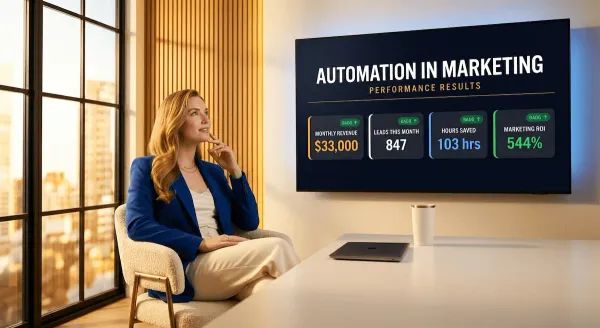
Automation in Email Marketing in 2026: The Exact Workflows, Tools, and Triggers That Print Consistent Revenue
Most small businesses treat email automation like a feature they'll get to eventually. The ones printing consistent revenue in 2026 built their workflows first and wrote their campaigns second. This is the exact playbook — triggers, sequences, tools, and the order that makes all of it work.
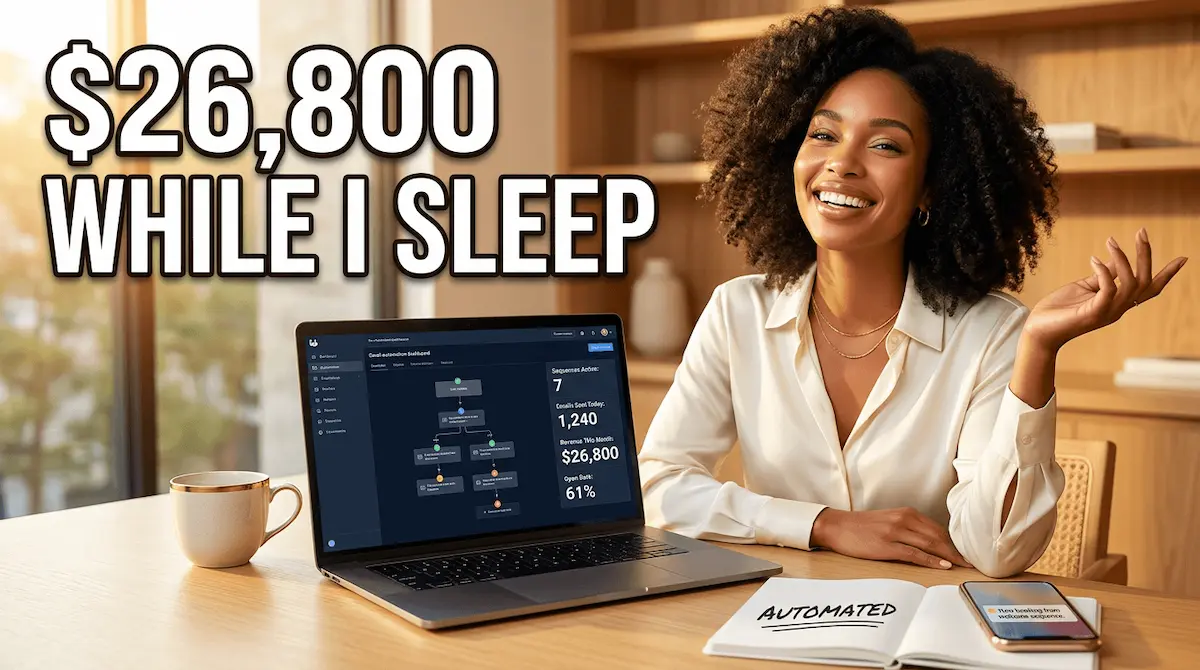
Here is a number worth sitting with for a moment. Automated emails generate 320% more revenue than non-automated emails. OptinMonster Not 20% more. Not double. 320%. And yet the majority of small business owners I speak to are still writing every email by hand, sending it manually, and wondering why their list feels like a leaky bucket rather than a revenue engine.
That is the gap that automation in email marketing was built to close.
I want to tell you about Marcus. He runs a one-person consulting business — leadership coaching for mid-level managers. Twelve months ago he had a list of 400 subscribers, a welcome email he'd written in 2022, and a newsletter he sent whenever he remembered to. Revenue from email: close to zero. He was good at what he did. His list just had no idea. Then he built four automated sequences — a welcome series, a nurture drip, a re-engagement flow, and an evergreen promotional sequence. He touched nothing after the setup weekend. Within eight months, his list had grown to 2,200 subscribers organically, his inbound enquiries had tripled, and email had become his single largest revenue channel. Same audience. Same offer. Different system.
That is what this guide is about. Not theory. Not platform comparisons. The exact workflows, triggers, and tools that turn a list — any size of list — into a machine that generates revenue while you sleep, coach, ship, or simply take a day off.
If you want the full strategic picture of how email fits into your broader marketing engine, start with automation in marketing — then come back here for the email-specific deep dive.
By the end of this post, you will know exactly which automations to build, in which order, and with which tools. Let's get into it.
1) What Is Automation in Email Marketing — And Why Most Small Businesses Are Still Doing It Manually
Let me describe a scene I have seen played out hundreds of times.
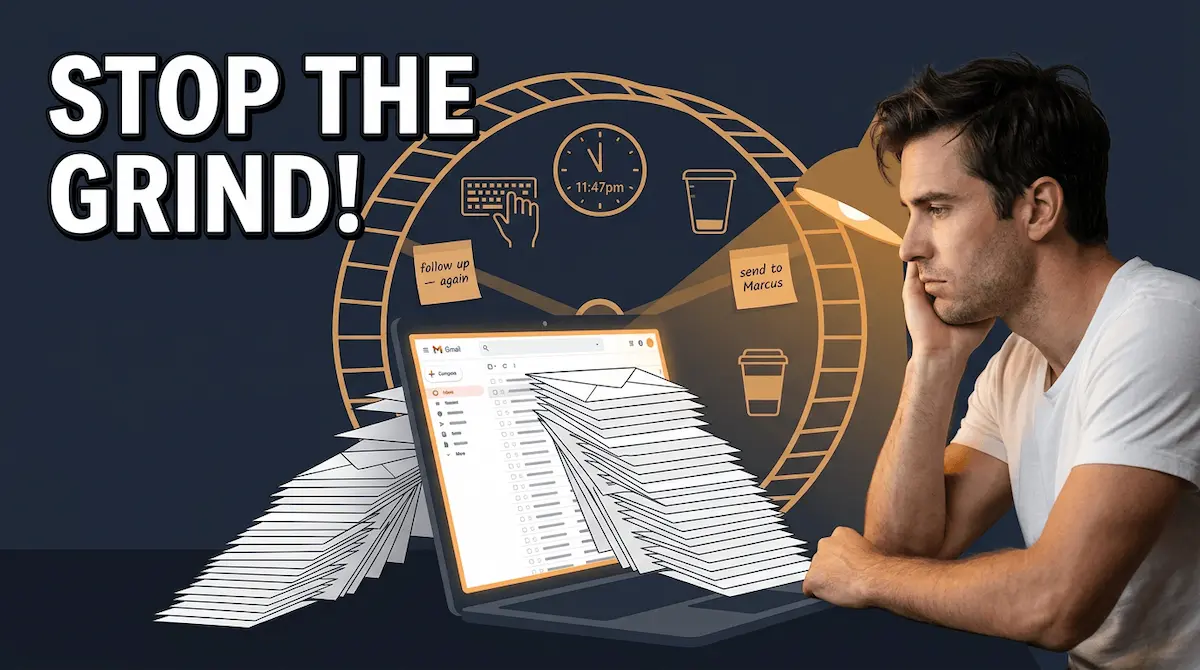
It is 9pm on a Tuesday. A solopreneur — let's call her Diana — is sitting at her kitchen table with her laptop open and a cold cup of tea beside it. She has been running her interior design business for three years. She has 600 people on her email list. She is staring at a blank email draft, trying to summon the energy to write something — anything — to send this week, because she knows she should be staying in touch and she feels guilty for the three weeks of silence since her last newsletter.
Diana is not lazy. She is exhausted. And she is doing email marketing the way most small business owners still do it: manually, inconsistently, reactively, and at the expense of the hours she could be using to actually design something or sign a new client.
This is not an email problem. It is a systems problem. And it is exactly what automation in email marketing was designed to solve.
The Definition That Actually Makes Sense
Most explanations of email automation start with the technology — triggers, workflows, sequences, platforms. I want to start somewhere more useful: with what it actually feels like when it is working.
Automation in email marketing means that a new subscriber joins your list at 2am on a Saturday and receives a warm, perfectly written welcome email within sixty seconds. It means that a lead who downloaded your free guide three days ago gets a follow-up that answers the exact question she is most likely asking right now — without you knowing she exists yet. It means that a customer who bought from you last month gets a check-in email that feels personal enough to generate a reply — while you are on holiday.
The technology is just a set of rules. If this happens, then send that. The result — when done properly — is a version of your business that runs its most important customer conversations without you being present for any of them.
The Manual Email Trap — Why Smart People Stay Stuck in It
Here is something I find genuinely baffling. Automated emails deliver 52% higher open rates, 332% higher click rates, and 2,361% better conversion rates compared to regular scheduled campaigns Omnisend — and yet the majority of small business owners are still writing emails by hand, one at a time, whenever they can find a spare hour.
The reason is not ignorance. It is friction. Setting up automation feels like a big technical project, and most entrepreneurs have trained themselves to avoid big technical projects because the last three they attempted never got finished. So they keep doing the manual version — which is slower, less effective, and completely dependent on them showing up consistently, which no human being can sustain indefinitely alongside running an actual business.
⚡ THE REAL COST OF MANUAL EMAIL
If you spend 90 minutes writing and sending one email to your list — and you send twice a month — that is 36 hours a year on a task that produces a fraction of what a properly automated sequence delivers. 36 hours. One sequence. Built once. Running forever. The math is not complicated. The decision is.
Why 2026 Is the Year You Cannot Afford to Keep Waiting
Companies using email marketing automation to nurture leads experience a 451% increase in qualified prospects DemandSage, according to HubSpot. That is not a marginal improvement. That is the difference between a list that sits there and a list that works.
The gap between businesses using email automation and those still sending manually is widening faster in 2026 than at any point in the previous decade. Platforms are cheaper, easier to use, and more powerful than they have ever been. The barrier to entry is now measured in hours, not months. Which means the only thing standing between your current list and a system that generates consistent revenue while you sleep is the decision to build it — and knowing exactly which sequences to build first.
And that starts with understanding how triggers actually work — because without the right trigger, even the best-written sequence fires at the wrong moment and lands in the wrong inbox at the wrong time.
Your email marketing for business fundamentals don't need to be perfect before you start automating — you just need one working trigger and one written sequence. The rest builds from there.
2) The Trigger System: How Automation in Email Marketing Knows Exactly When to Send
Most people, when they first encounter email automation, get fixated on the sequences — the welcome series, the nurture drip, the re-engagement flow. I get it. Sequences are visible. You can read them, edit them, feel like you built something. But the sequences are just words sitting in a folder until a trigger fires. The trigger is the entire engine. Without it, you have drafts. With it, you have a system.
A trigger is the single event — the action a subscriber takes, or fails to take — that tells your email platform to start sending. Someone joins your list at midnight? Trigger fires. A lead clicks the link in your welcome email but never visits the pricing page? Trigger fires. A customer goes quiet for sixty days without buying again? Trigger fires. No alarm goes off. No human makes a decision. The system reads the behaviour and responds — faster, more accurately, and more consistently than any person could at scale.
Behaviour-based email triggers deliver 74% higher open rates and 152% better click-through rates than traditional batch emails. Emercury That is not because the writing is better. It is because the timing is right. A message that arrives the moment someone has just demonstrated interest is not an interruption. It is an answer.
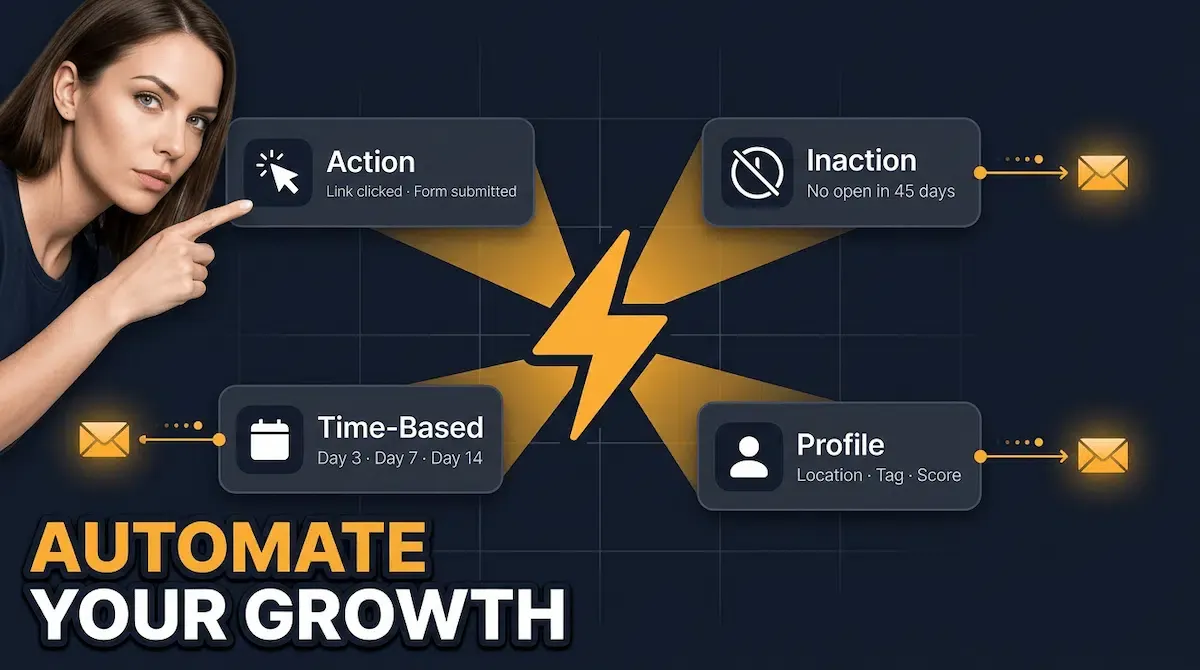
The 4 Trigger Categories Every Business Needs to Understand
Think of triggers in four clean categories. Once you understand these, every automation decision becomes obvious.
1. Action Triggers — something the subscriber does. They opt in, click a link, download a resource, make a purchase, fill out a form. These are the highest-intent triggers in your entire system because the subscriber has just told you exactly where they are in their journey without using a single word.
2. Inaction Triggers — something the subscriber stops doing. They have not opened an email in 45 days. They have not returned to your site since downloading your lead magnet. They abandoned a booking form halfway through. Inaction triggers rescue conversations that would otherwise simply end in silence.
3. Time-Based Triggers — events tied to a date or a delay. Three days after subscribing, send email two. Seven days after a purchase, ask for a review. Sixty days before an annual membership expires, start a renewal sequence. These are the backbone of any nurture drip and evergreen promotional flow.
4. Profile Triggers — changes in subscriber data. A contact updates their location field. A tag is added when they attend a webinar. Their lead score crosses a threshold that signals sales-ready intent. Profile triggers are where basic automation graduates into genuinely intelligent personalisation.
🎯 THE TRIGGER MOST SMALL BUSINESSES SKIP — AND SHOULDN'T
Inaction triggers are the single most underused lever in small business email automation. Every subscriber who goes quiet is a revenue conversation that never happened. Set a 45-day inaction trigger on your list today. You will be surprised how many people respond to a single well-timed "still there?" email — because nobody else thought to send one.
Behavioural vs Time-Based — Which One to Build First
Here is the question I hear constantly from entrepreneurs who are setting up their first automation: do I build time-based sequences or behaviour-based triggers first?
The honest answer is both — but in a specific order. Time-based triggers are easier to set up and cover the broadest subscriber scenarios regardless of behaviour. Start there. Your welcome series runs on time-based triggers. Your evergreen drip runs on time-based triggers. Your re-engagement sequence is triggered by inaction after a fixed number of days — still time-based at its core.
Behaviour-based triggers are the upgrade layer you add once the foundation is running. They make your system feel less like a scheduled newsletter and more like a conversation that responds to what subscribers actually do. Behaviour-triggered campaigns deliver the highest ROI across all industries cloudHQ — which is exactly why they are worth building as soon as your foundation sequences are live and generating results.
The full picture of how triggers connect to your wider automation in marketing strategy is worth understanding before you start building — because a trigger that fires into a poorly designed sequence is just a well-timed interruption. The sequence is what determines whether the conversation converts.
That sequence question is exactly what Section 3 answers — the seven core workflows that form the revenue engine of every properly automated email system.
3) The 7 Core Email Marketing Automation Workflows That Run Your Revenue Engine
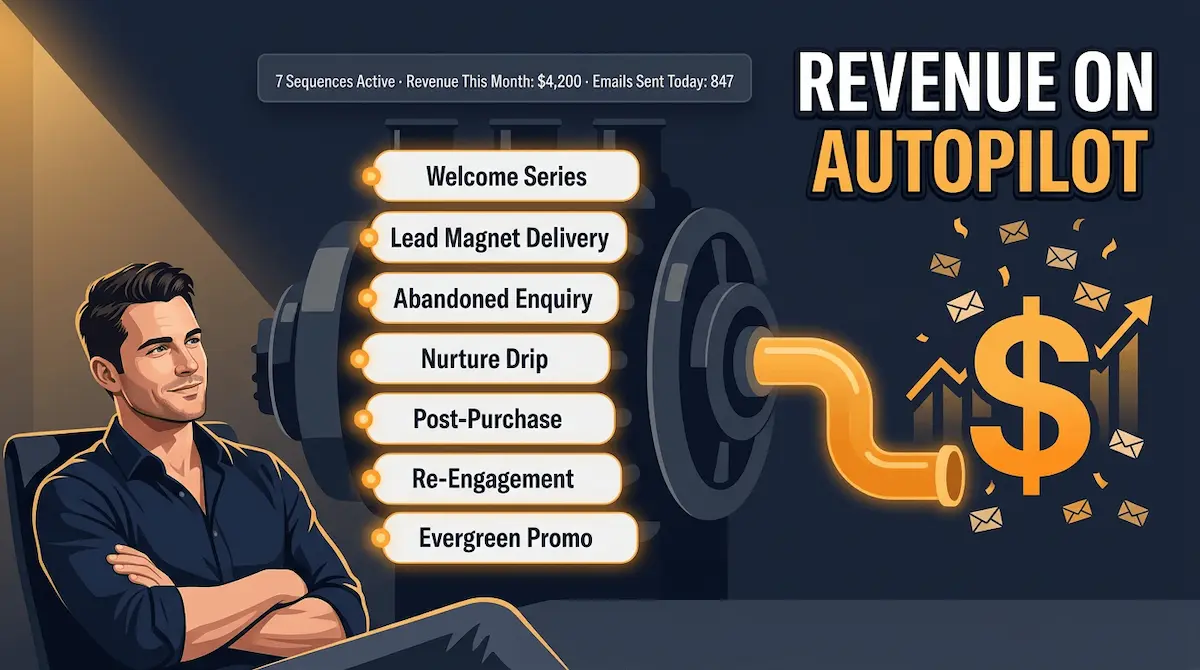
I want to be direct about something before we get into the list. Most guides on this topic give you ten, twelve, sometimes fifteen automation workflows and call it comprehensive. What it actually is, is overwhelming. You close the tab, open your email platform, stare at a blank workflow builder, and do nothing — which is the worst possible outcome.
So I am going to give you seven. The seven that matter. The ones where the revenue data is unambiguous, the build time is measured in hours not weeks, and the combination of all seven creates a system that covers every meaningful stage of the subscriber journey from first contact to long-term retention. Build all seven and you have a complete email revenue engine. Build even three of them and you are already outperforming the majority of small businesses sending manually every week.
The full strategic context for how these workflows connect to your wider automation in marketing ecosystem is worth reading — but here, we go straight to the workflows themselves.
Workflow 1 — The Welcome Series
Trigger: New subscriber joins your list Length: 3–5 emails over 7 days
This is the non-negotiable. Welcome email workflows have the highest click-to-conversion rate of any automation at 58.26% Brevo — and it is not close. The welcome series is the moment when a subscriber's attention is at its absolute peak. They just raised their hand. They just said yes. What you send in the next seven days shapes how they think about you for the entire relationship that follows.
Email 1 delivers on the promise — the lead magnet, the discount code, the free resource, whatever brought them to your list. Email 2 tells your story — who you are, why you built this, what you believe. Emails 3 through 5 demonstrate value without selling — case studies, quick wins, the most useful thing you know that your ideal subscriber needs right now. The ask, if there is one, comes last and feels earned.
Workflow 2 — The Lead Magnet Delivery Sequence
Trigger: Specific opt-in form for a content upgrade or freebie Length: 3 emails over 5 days
This sits alongside the welcome series rather than replacing it. Someone downloads your pricing guide, your checklist, your free template. They get the asset instantly — that is email one. Email two, two days later, asks a single question: did it help? Email three, on day five, goes deeper on the topic and introduces the next logical step in their journey. Short, specific, and hyper-relevant to exactly where that subscriber is.
Workflow 3 — The Abandoned Enquiry Recovery
Trigger: Lead visits a key page (pricing, booking, contact) without converting Length: 3 emails over 72 hours
Abandoned cart flows drive the highest average revenue per recipient of any automation at $3.65 — 37% higher than the second-best performing flow. Klaviyo For service businesses and solopreneurs, the equivalent is the abandoned enquiry — someone who got close, showed strong intent, then went quiet. Three emails. Two hours, twenty-four hours, seventy-two hours. The first email is a gentle nudge. The second removes a friction point. The third creates a soft deadline. Most entrepreneurs never send any of these. Which is why the ones who do convert at rates that feel almost unfair.
Workflow 4 — The Nurture Drip
Trigger: Joins after welcome series completes, or subscribes to a specific topic Length: 6–8 emails over 3–4 weeks
This is the relationship builder. No hard selling. No urgency tactics. Just consistent, genuinely useful content that compounds trust over time. The nurture drip is what turns a cold subscriber who downloaded a freebie into a warm lead who already feels like they know you before they ever spend a pound or a dollar. Think of it as a slow conversation — one email at a time — that does the qualification work your sales process used to do manually. For a deeper look at how this sequence fits into a complete email marketing marketing automation system, that is covered in detail in the linked post.
Workflow 5 — The Post-Purchase Sequence
Trigger: Subscriber makes a purchase or books a service Length: 4–5 emails over 21 days
The moment someone buys from you is the moment they are most open to buying from you again. Most businesses send one confirmation email and then disappear. A post-purchase sequence does four things simultaneously: it confirms the smart decision they just made, delivers any relevant onboarding content, asks for a review at the exact right moment, and introduces the next product or service with perfect contextual relevance. Around one in two people who click on automated welcome or abandoned cart emails end up making a purchase Omnisend — and the post-purchase sequence keeps that conversion momentum alive instead of letting it go cold.
Workflow 6 — The Re-Engagement Win-Back
Trigger: No email opens or clicks in 45–60 days Length: 3 emails over 14 days
Every list has a percentage of subscribers who go silent. Not unsubscribed — just quiet. The re-engagement sequence exists to find out which ones are still reachable before you stop sending to them entirely. Email one is a simple check-in with a direct subject line. Email two offers something of value — a new resource, an update, a question. Email three is the honest farewell: if they do not re-engage, you remove them cleanly. This is not just a revenue play. List hygiene directly affects your deliverability scores, which affects how many of your other six sequences actually reach inboxes.
Workflow 7 — The Evergreen Promotional Drip
Trigger: Subscriber completes welcome series and nurture drip without converting Length: 6–8 emails rotating over 6 weeks, then repeating
This is your always-on revenue engine. A rotating sequence of your best promotional content — offers, case studies, social proof, time-sensitive incentives — that runs on a loop for every subscriber who has been educated but not yet converted. Automated flows generate up to 30 times more revenue per recipient than one-off campaigns. WebToffee The evergreen drip is how you capture that compounding return from subscribers who needed more time — not more pressure — to say yes.
⚡ BUILD ORDER — START HERE, NOT EVERYWHERE
| Priority | Workflow | Build Time | Revenue Impact |
|---|---|---|---|
| 1st | Welcome Series | 2–3 hours | Immediate — highest CTR of all automations |
| 2nd | Lead Magnet Delivery | 1–2 hours | Converts highest-intent opt-ins |
| 3rd | Abandoned Enquiry Recovery | 1–2 hours | Highest RPR of any automation ($3.65 avg) |
| 4th | Nurture Drip | 3–4 hours | Compounds trust — feeds all downstream flows |
| 5th | Post-Purchase Sequence | 2–3 hours | Retention + repeat revenue + reviews |
| 6th | Re-Engagement Win-Back | 1–2 hours | Recovers lost revenue + protects deliverability |
| 7th | Evergreen Promotional Drip | 3–4 hours | Always-on revenue from unconverted subscribers |
Knowing which workflows to build is half the equation. The other half is knowing how to build the first one without wasting your weekend on a platform you barely understand — and that is exactly what Section 4 covers.
4) How to Build Your First Email Automation Workflow in Under 3 Hours
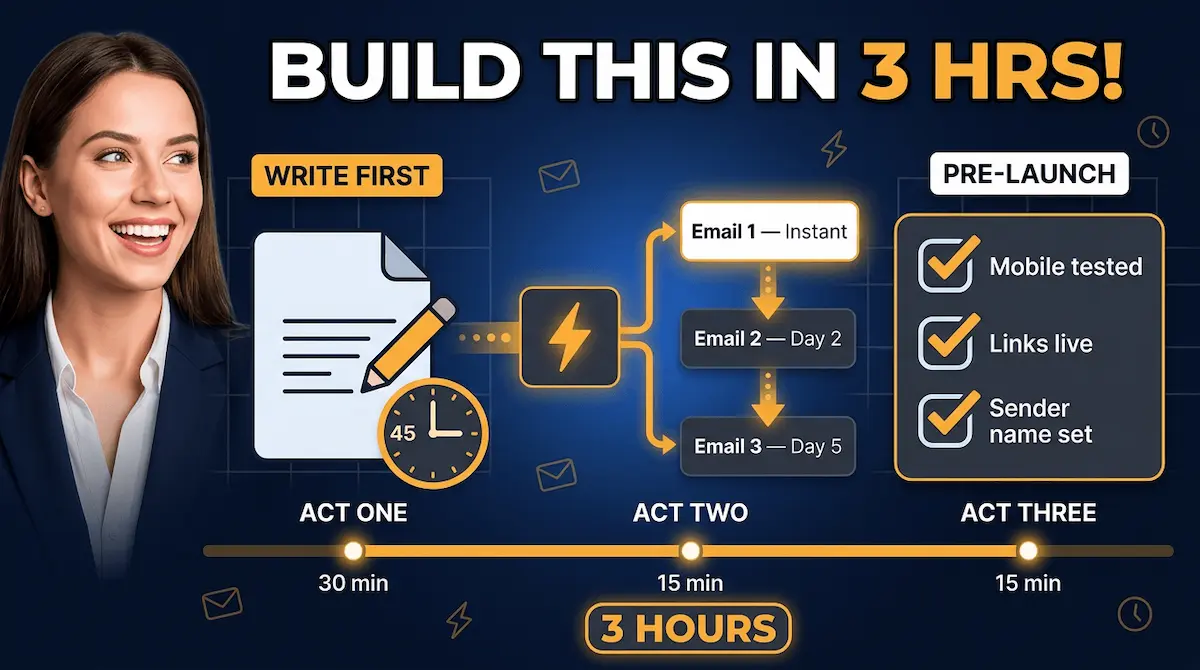
I need to say something plainly before I walk you through this. The reason most small business owners never build their first automation is not the technology. Every major email platform in 2026 has a drag-and-drop workflow builder that requires zero code, zero technical background, and about fifteen minutes to understand. The real reason is the blank page problem. People open the builder, see an empty canvas, and have no idea where to start — so they close the tab and tell themselves they'll come back to it when they have more time.
You will never have more time. But you will have a clear step-by-step process by the end of this section — and that is the only thing that was ever standing between you and a working automation.
We are building your welcome series first. Not because it is the most technically complex — it is the simplest — but because welcome series open rates consistently run at 50–60% OptiMonk, making it the highest-return sequence per hour of build time in your entire system. Get this one live, and you will have proof that the whole thing works before you spend another hour building anything else.
Step 1 — Write Before You Build (30–45 Minutes)
This is the step everyone skips. They open the automation builder first, get distracted by settings and triggers, and then try to write emails on the fly inside the tool. The result is weak copy, a half-finished workflow, and a sequence they do not trust enough to actually activate.
Write first. Outside the platform. In a Google Doc, a Notes file, anywhere.
Your welcome series needs three emails. Not five. Not ten. Three. Here is the exact structure I use and recommend to every entrepreneur setting this up for the first time:
Email 1 — Day 0, immediate delivery: Deliver the promise. If they signed up for a lead magnet, here it is. If they subscribed to your newsletter, here is the thing that made subscribing feel worth doing. One sentence about who you are. One link. Nothing else.
Email 2 — Day 2: Tell your story. Not your company history — your reason. Why did you build this? What problem were you in the middle of when you decided this needed to exist? This is the email that makes strangers feel like they already know you. Keep it under 250 words. Make it feel like a message from a real person, because it is.
Email 3 — Day 5: Demonstrate value without selling. Your single most useful piece of content — a tip, a framework, a short guide — that solves a problem your ideal subscriber has right now. End with a soft invitation: if they want more of this, here is where they find it.
✅ YOUR 3-EMAIL WELCOME SERIES — COPY THIS STRUCTURE
| Send Time | Purpose | Word Count | |
|---|---|---|---|
| Email 1 | Immediate | Deliver the promise — lead magnet or welcome gift | 100–150 words |
| Email 2 | Day 2 | Tell your story — the reason behind the business | 200–250 words |
| Email 3 | Day 5 | Deliver value — your best tip, tool, or framework | 200–300 words |
Step 2 — Configure the Trigger (15 Minutes)
Open your email platform. Find the automation builder. Create a new workflow and set the entry trigger as: subscriber joins your main list (or the specific opt-in form tied to your lead magnet, if you have one).
That is it. One trigger. Do not add conditions yet. Do not build branching logic. Do not set up different paths for different subscriber segments. Those upgrades come after the workflow is live and generating data. Right now, your only job is to get one clean, linear sequence activated.
Set Email 1 to send immediately — zero delay from trigger to first send. Set Email 2 to send two days after trigger. Set Email 3 to send five days after trigger. Turn on the workflow. You are done with the configuration.
Step 3 — The 3-Part Pre-Launch Check (15 Minutes)
Before you activate, do three things and only three things.
First, send each email to yourself as a test and read it on your phone. Over 41% of all emails are opened on mobile devices SalesHandy — if your formatting breaks on a small screen, your open rate is irrelevant because nobody is reading past the first scroll.
Second, click every link in every email. Broken links in an automated sequence go unnoticed for weeks. They are silent revenue killers. Click everything.
Third, check your sender name. It should be a person's name — yours, your founder's, your brand voice's name — not your company name. Visualising the customer journey helps surface friction points before automations go live Moosend — and the first friction point most subscribers encounter is an email that looks like it came from a corporation rather than a human being.
Activate the workflow. Watch the first email go out. The entire build — writing, configuring, testing — took under three hours. And unlike the newsletter you would have spent those same three hours writing and sending once to everyone, this sequence runs every single time a new subscriber joins your list. Forever. Without you touching it again.
Building the workflow is one thing. Choosing the right platform to build it on — and knowing which stack serves which stage of your business — is the question that trips up the most entrepreneurs who get this far. For the complete picture of how email marketing for small business principles apply across platforms, that comparison is worth reading before you lock in a tool.
That platform question is exactly what Section 5 answers — with a ranked breakdown of the best tools by stage, not by feature list.
5) The Best Tools for Automation in Email Marketing in 2026 — Ranked by Stage, Not by Feature List
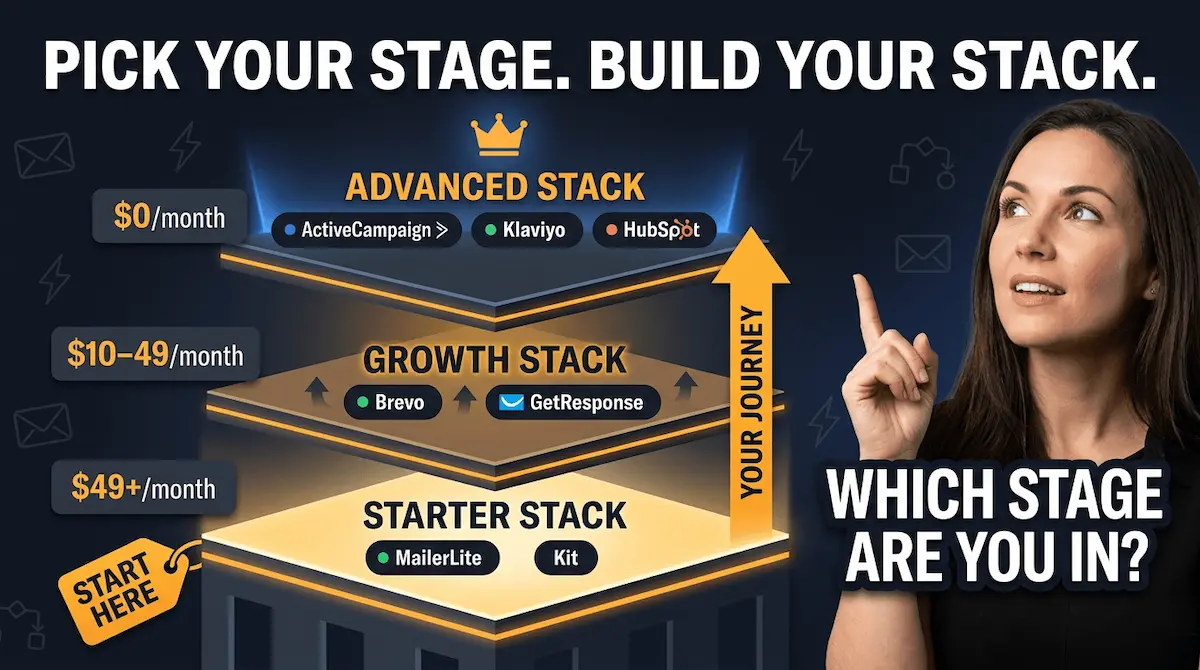
Every platform comparison guide I have ever read makes the same mistake. They line up twenty tools, list every feature each one has, assign stars, declare a winner, and leave you more confused than you were before you started reading. The problem is that the best tool for automation in email marketing depends almost entirely on one variable: where you are right now.
A founder with 200 subscribers who needs a working welcome series by the weekend needs a completely different tool to a business with 8,000 subscribers running seven active sequences and selling through multiple funnels. Recommending ActiveCampaign to the first person is like handing someone learning to drive the keys to a racing car. Technically more powerful. Practically, it means they crash in the first corner and never build anything.
So here is how I actually think about the tool question — not by feature lists, but by stage.
The Starter Stack — $0 to Launch
MailerLite is the right answer for the vast majority of entrepreneurs building their first automation system. The free plan covers up to 1,000 subscribers with unlimited sends, and every automation feature you need to build all seven workflows from Section 3 is included at zero cost. The visual automation builder supports multi-trigger capabilities, pre-built templates for welcome sequences and customer nurturing, and A/B testing Monday.com — all on the free tier, all without touching a line of code. The interface is the most intuitive of any platform I have tested, and I have tested most of them.
You will outgrow MailerLite eventually. That is a good problem to have. But starting there means your first sequence is live today, not after two weeks of platform research.
Kit (formerly ConvertKit) is the right choice if you are a creator — a blogger, podcaster, course creator, or newsletter publisher — who needs sophisticated tagging and subscriber segmentation from day one. Kit's advanced subscriber tagging tracks exactly how subscribers interact with your content, with a free plan covering up to 10,000 subscribers Guideflow. If your business model depends on understanding what your subscribers read, click, and buy in granular detail, Kit's creator-first architecture handles that better than MailerLite at the equivalent price point.
The Growth Stack — $10 to $49/month
Once your list crosses 1,000 engaged subscribers and your welcome series is converting, two tools become relevant that were overkill before.
Brevo becomes the right choice if you need to connect email to SMS, WhatsApp, or a basic CRM without paying for three separate tools. It charges per email sent rather than per subscriber stored — which means a list with 30% inactive contacts does not cost you the same as a fully engaged one. At 5,000 contacts, Brevo runs at $65 per month versus ActiveCampaign at $149 La Growth Machine, and for a business that needs multi-channel capability without enterprise-level complexity, that gap is significant.
GetResponse earns a mention here for one specific reason: its automation builder handles conditional branching — the "if they clicked this, send that; if they did not, wait three days and send this instead" logic — more intuitively than most tools at this price point. If your sequences are getting complex and you are still on a starter platform, GetResponse is the upgrade that does not require rebuilding everything from scratch.
The Advanced Stack — $49/month and above
🎯 THE ADVANCED STACK — ONLY WHEN YOU ARE READY
| Tool | Best For | Entry Price | Upgrade When |
|---|---|---|---|
| ActiveCampaign | Complex multi-step automation + CRM + lead scoring | $29/month | Your sequences have branching logic and you need a sales CRM in the same system |
| Klaviyo | Ecommerce — abandoned cart, post-purchase, product triggers | $45/month (5K contacts) | You sell products and need purchase-behaviour triggers natively built in |
| HubSpot | Full inbound marketing stack — email + CRM + landing pages + reporting | $15/month (starter) | You need marketing, sales, and service data in one place and budget allows |
ActiveCampaign is the tool I point entrepreneurs toward when their automation system is already working and they need to scale it. It has over 900 customisable workflow templates and connects the entire customer journey from lead generation to sales Brevo. The learning curve is real — budget two to four weeks to fully master the platform — but the ceiling is considerably higher than anything in the starter or growth tier.
The honest recommendation for anyone reading this who has not yet built their first automation: start with MailerLite, get your welcome series live, and evaluate platforms again in ninety days when you have real data telling you what you actually need. Choosing the perfect platform before you have a single sequence running is the productivity equivalent of picking the perfect running shoes before you have completed your first run.
The deeper question — how automated marketing for small business strategy connects platform choice to your full marketing system — is covered in the linked post and worth reading once your foundation is live.
Platform chosen. Sequences live. Now the question becomes: how do you know if any of this is actually working? Section 6 covers the only metrics that matter — and the four numbers that tell you, in under ten minutes, whether your automation system is generating revenue or just generating activity.
6) The Metrics That Tell You Whether Your Email Automation Is Actually Working
Here is something I see constantly with entrepreneurs who have built their first automation system: they check the wrong numbers, panic at the wrong things, and ignore the signals that actually matter.
Someone launches a welcome series, sees a 28% open rate on email two, and concludes the whole sequence is underperforming. They rewrite it from scratch. Three weeks later, same result. What they never checked was their click rate, their conversion rate, or how much revenue that sequence was generating per subscriber who entered it. The open rate was fine. The sequence was working. They just did not know what to look at.
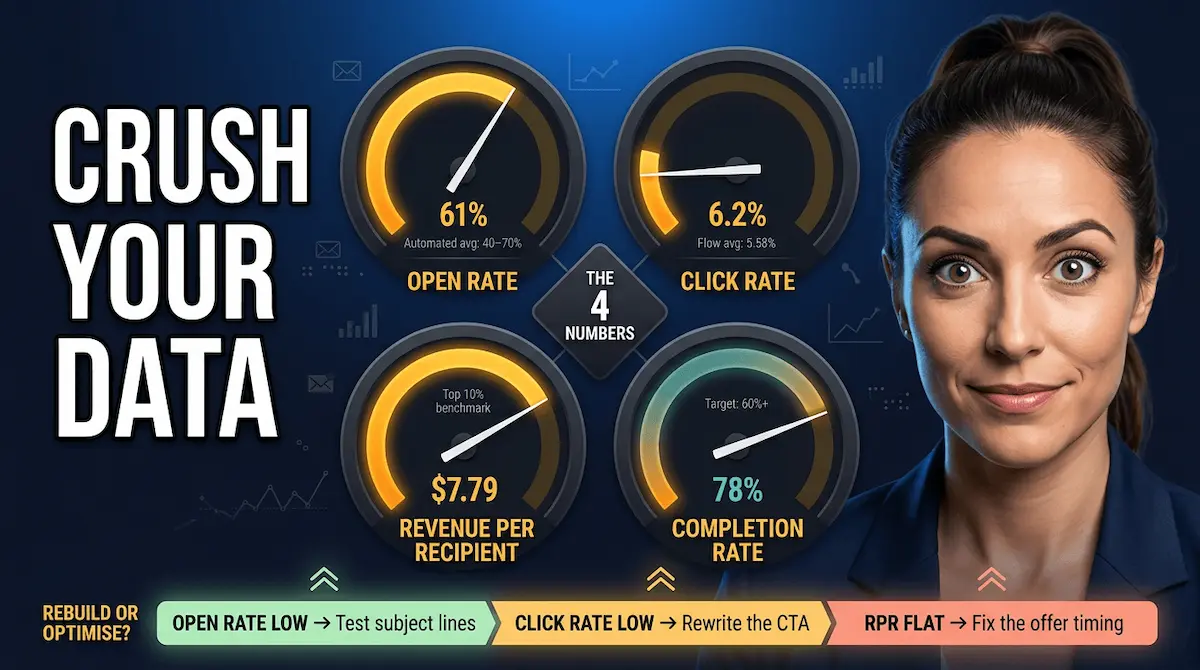
This section is the fix for that. Four numbers. That is all you need to tell you, within ten minutes of logging into your platform, whether your automation in email marketing is generating revenue or just generating activity.
The 4 Numbers That Actually Matter
1. Open Rate — your deliverability signal, not your vanity metric
Open rate tells you one thing: whether your email reached the inbox and whether your subject line earned the click. Nothing more. For automated or triggered email sequences, open rates between 40% and 70% are achievable Bloomreach — considerably higher than bulk campaign averages. If your automated welcome series is sitting below 30%, investigate deliverability first (check your domain authentication: SPF, DKIM, DMARC) and subject line relevance second. Do not rewrite sequence body copy because your open rate is soft. You have a subject line problem, not a content problem.
2. Click Rate — the number that tells you if your copy is working
Flow-based emails deliver three times higher click rates than campaign emails — 5.58% versus 1.69% Klaviyo on average across industries. If your automated sequences are sitting at or above 5%, your copy is connecting. Below 2% on an automated sequence (not a broadcast campaign — those numbers are different) means your call to action is either buried, unclear, or pointing people toward something they do not want yet. Fix the CTA before you touch anything else.
3. Revenue Per Recipient (RPR) — the only number your business actually cares about
RPR is calculated simply: total revenue attributed to a sequence divided by the number of subscribers who entered it. This is the metric that separates businesses that use email automation as a revenue engine from businesses that use it as a content calendar. Top 10% email flows achieve RPR as high as $7.79, with click rates over 10% Klaviyo. The average automated flow significantly outperforms one-off campaign emails. If you have never calculated RPR for each of your sequences, do it today. It will show you immediately which workflows are doing heavy lifting and which ones are sitting idle.
4. Sequence Completion Rate — the diagnostic no one talks about
Most platforms do not show this figure by default, so you need to calculate it manually: the percentage of subscribers who enter a sequence and receive every email in it, compared to the number who unsubscribe or go inactive partway through. A sharp drop-off after email two in a five-email welcome series is telling you something specific. Either the gap between emails is too long and the subscriber has forgotten who you are, or email two is asking for too much too soon. Completion rate is how you find the leak it costs you.
What Good Looks Like — By Sequence Type
✅ AUTOMATION HEALTH CHECK — BENCHMARKS BY SEQUENCE
| Sequence | Target Open Rate | Target Click Rate | Red Flag |
|---|---|---|---|
| Welcome Series | 50–65% | 5–10% | Below 35% open rate on email 1 |
| Abandoned Enquiry | 45–60% | 8–15% | Below 4% click rate on email 1 |
| Nurture Drip | 35–50% | 3–7% | Completion rate below 60% |
| Re-Engagement | 20–35% | 2–5% | Below 15% open rate — delete the list segment |
| Post-Purchase | 55–70% | 6–12% | Low RPR — check upsell relevance |
When to Rebuild vs When to Optimise
This is where most entrepreneurs waste months. They rebuild sequences that need a single subject line tweak, or they keep optimising sequences that are structurally broken and need to start again.
The rule I use: if open rate is the problem, test subject lines before touching anything else. Two to three subject line variations on email one will tell you within two weeks whether deliverability or relevance is the culprit. If click rate is the problem, rewrite the CTA on the underperforming email — one change, measured over thirty days. If RPR is flat despite reasonable open and click rates, the offer itself is misaligned. That is a sequencing problem, not a copy problem: the right offer is being made at the wrong point in the relationship.
The businesses generating consistent revenue from email automation are not the ones with the most sophisticated sequences. They are the ones who check these four numbers weekly, make one change at a time, and let the data tell them what to fix next. Understanding how automation and AI tools are starting to surface these diagnostics automatically — flagging underperforming sequences before you even log in — is where the next evolution of this system is heading. And understanding how automation connects to your broader automation in marketing strategy is what ties all of this together.
The conclusion pulls every piece of this together — the triggers, the workflows, the tools, the metrics — into the one decision that determines whether any of it runs this week or stays on your to-do list for another month.
Your Email Automation System Is Closer Than You Think
Most entrepreneurs who read guides like this one close the tab, add "set up email automation" to their to-do list, and do nothing with it for another six weeks. I understand why. The gap between knowing what to build and actually having it live and running feels enormous when you are already wearing twelve hats and the week is already gone by Tuesday.
But here is what that gap actually looks like in practice: it is one weekend. One Saturday morning where you sit down, pick your platform, open a sequence template, and wire three emails together. By Sunday afternoon, your first automation in email marketing is live. Real subscribers are entering it. And you have stopped trading your time for every single conversion.
What Vault AI Pro Members Skip Entirely
The part that takes everyone else four weekends — the writing, the sequencing, the trigger logic, the subject line testing — is already done for Vault AI Pro members.
Every workflow covered in this guide exists inside the vault as a complete, ready-to-deploy resource. The welcome series. The abandoned enquiry recovery sequence. The re-engagement win-back. The nurture drip. Pre-written. Pre-structured. Tested. All seven workflows, ready to copy into your platform and activate today — not after a weekend of staring at a blank screen.
Members also get the automation prompt library that generates on-brand email copy in under five minutes, the segmentation playbook that tells you exactly how to split your list for maximum RPR, and the metrics dashboard template that makes the four numbers from Section 6 visible at a glance.
This is the difference between building an automation system and having one.
One decision. Everything ready. Your sequences running by the weekend.
Stop Building From Scratch.
Your Entire Email Automation System
Is Already Inside.
Every workflow, sequence, prompt, and template from this guide — written, tested, and ready to activate. Join 10,000+ entrepreneurs who've stopped starting from zero.
"I set up my welcome series in one afternoon. It's been running for 4 months untouched and books me 3–4 calls a week." — Vault AI Pro Member
Save 3–5 hours daily · 1,000+ ready-to-use resources · Updated every week · Instant access on signup