Generating Images Using AI for Your Business — Product Photos, Social Content, and Brand Assets That Look Professional
Every guide to generating images using AI was written for artists. This one was written for business owners. Six image types, the right free tool for each, a plain-language prompt framework, and brand consistency explained.

She messaged me on a Tuesday afternoon. Her Shopify store had been live for four months. Sales were trickling in, but her product pages looked thin — one flat photo per listing, plain white background, shot on her phone in the spare bedroom. She wanted professional images but could not justify a $400 shoot for a candle brand that had not yet broken even.
I told her to open ChatGPT.
Forty-five minutes later she had twelve product images. Clean backgrounds. Warm lifestyle shots. A flat-lay with dried botanicals that looked like it belonged on a Pinterest board. She had not touched a camera. She had not opened Photoshop. She had not paid anything.
"Why did nobody tell me about this sooner?"
That is the question I hear constantly from small business owners. Not because generating images using AI is complicated — it is genuinely one of the most accessible things you can do with AI right now. But because every single guide written on the subject was built for the wrong person. The tutorials assume you want to create digital art. The tool comparisons assume you care about diffusion models and prompt weighting. The beginner guides assume you have hours to experiment and a tolerance for abstract creative outputs that have no obvious application to a real business.
You probably want a product photo. A social media graphic. A blog image that does not look stolen from a free stock site. A brand visual consistent enough that people start recognising your aesthetic before they read your name.
That is a completely different need — and it has almost nothing to do with the content currently filling page one of Google for this topic.
Here is what I have found working with entrepreneurs across dozens of industries: the business owners who get the most out of AI image generation are not the ones who understand the technology deepest. They are the ones who know exactly which business output they need, which tool was built to produce it, and how to ask for it in plain language. That is the entire skill. Nothing more technical than that.
34 million AI-generated images are created every single day Digital Silk — a volume traditional photography took 149 years to reach. The tools producing those images are not just accessible. For a business owner in 2026, they are essential. Small businesses using AI for product photography have cut production costs by up to 80% 2MC Global — and that number does not surprise me at all once you see how fast it works in practice.
This guide covers the complete system — the six business image types you actually need, the exact free tool for each one, a plain-language prompt framework that works whether you have never written a prompt before or have been struggling to get usable results for months, a full breakdown of what every free tier actually produces, and the commercial licensing rules every business owner must understand before publishing an AI image in a paid ad or product listing. There is also a section on brand consistency that, frankly, no other guide in this space is teaching — and it is the difference between a collection of AI images and an actual visual identity.
If you are building the broader picture of how to use artificial intelligence across your business, this is where the visual layer sits. Start here — and by the time you finish, the candle brand problem will feel like the simple one.
1 - What Generating Images Using AI Actually Means for a Small Business — and Why It Is Not What Most Guides Say It Is
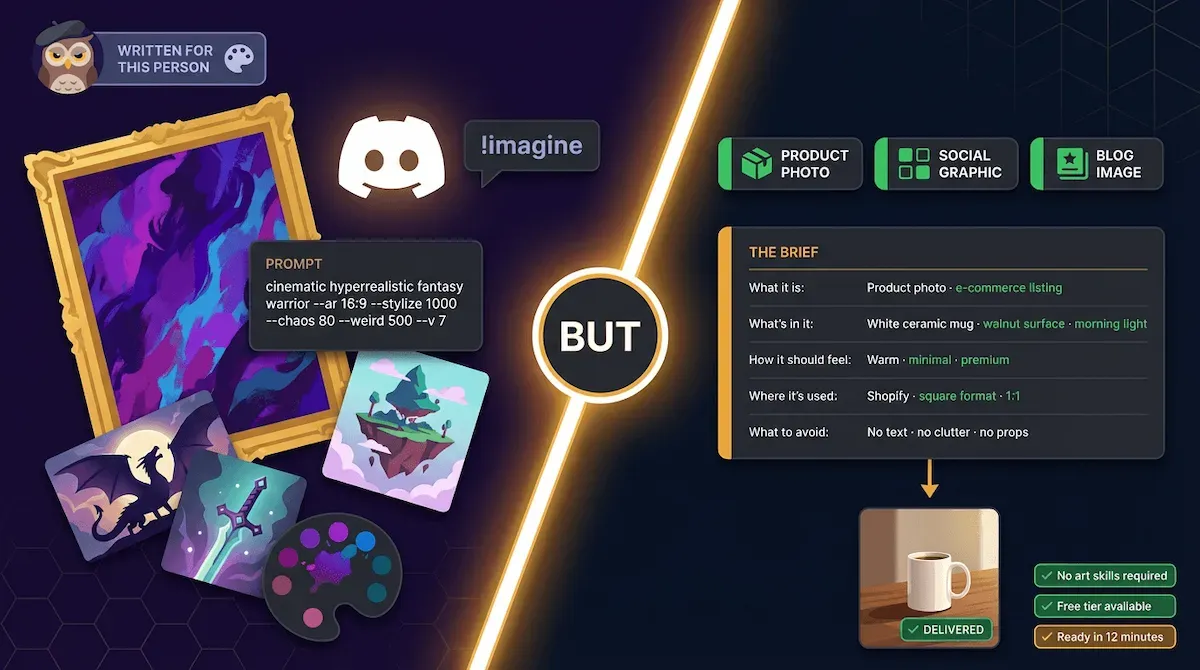
Why Every AI Image Guide Gets the Audience Wrong
I want to be direct about something before we go any further.
Every major guide ranking on page one of Google for this topic right now was written for a digital artist, a graphic designer, or a creative professional who wants to produce stunning visual outputs for their portfolio, their clients, or their personal projects. The tool comparisons are built around aesthetic quality scores. The prompt tutorials teach camera angles, lighting terminology, and art movement references. The platform recommendations lead with Discord servers, style modelling, and fine-tuning custom models.
None of that is relevant to you.
You are not trying to win an AI art competition. You are trying to run a business — and a business has specific, recurring, practical visual needs that have nothing to do with cinematic composition theory or the aesthetic differences between Midjourney V7 and Stable Diffusion 3.5.
I have watched small business owners spend entire weekends watching tutorials about tools built for a completely different use case — then walk away convinced that generating images using AI is complicated, technical, and not worth the learning curve. That conclusion is wrong. But it is completely understandable given what the current guides are teaching and who they are teaching it to.
The problem is not the tools. The problem is the audience mismatch. And it costs business owners real time, real money, and real missed opportunity every single week.
The One Shift That Changes Everything: From Art Tool to Business Tool
Here is the reframe that changes everything.
AI image generation is not an art skill. For a business owner, it is a procurement skill. The same mental shift you make when you brief a freelance photographer — "I need three product shots on a white background, clean lighting, square format for my Shopify listing, no props" — is the exact same mental shift you need to write an effective AI image prompt.
You are not creating. You are specifying. You are telling the tool what you need the way you would tell any supplier what you need — with clear requirements, a defined output format, and a specific use case in mind.
That shift in framing is, in my experience, the single thing that separates business owners who get genuinely useful AI images within their first session from those who spend three hours generating outputs they cannot use. The tool has not changed. The approach has.
Once you stop approaching AI image tools as creative software and start approaching them as visual asset suppliers, the entire experience becomes faster, more practical, and significantly less frustrating. You stop asking "what should I create?" — a question with no good answer when you are trying to stock a product page — and start asking "what do I need to produce?" — a question every business owner already knows how to answer.
Think about it this way. You would not sit down with a freelance photographer and say "surprise me." You would brief them. Same tool. Same logic. Different vocabulary.
What You Can Realistically Produce — and What You Cannot
I am going to be honest here in a way most guides are not, because overselling what AI image generation does leads to the frustration that makes business owners abandon it entirely.
What you can produce today, free, in under thirty minutes:
Product photos on clean or lifestyle backgrounds. Social media graphics with your brand colours and a text overlay. Blog featured images that are original, on-brand, and do not carry stock photo licensing risk. Email header visuals. Pitch deck images. Promotional banners. Concept illustrations for a service-based business that has no physical product to photograph.
What AI image generation still struggles with in 2026:
Exact brand logo reproduction inside a generated image. Precise text rendering — if you need specific words to appear in the image itself, most tools still distort them. Generating a specific real person accurately. Producing images that require photographic evidence of a real event or location.
🎯 Pro Tip
Before you open a single AI image tool, write down the one specific output you need — not "better visuals" and not "professional images." The exact thing. "A product photo of my ceramic mug on a white background, square format, for my Shopify listing." That sentence is already 80% of your prompt. The tool fills in the rest. Business owners who start with a specific output in mind get usable results in their first session. The ones who open the tool and improvise rarely do.
The honest version of this is: for the six core business image types that most entrepreneurs need most often — product visuals, social content, blog images, marketing materials, email graphics, and brand assets — generating images using AI covers the requirement completely. The edge cases where it falls short are real but narrow. They are not a reason to avoid the tool. They are simply a reason to know the tool's limits before you build your workflow around it.
This matters because I see two failure modes constantly. The first is business owners who expect AI image tools to replace every visual need immediately and get disappointed when they hit the edges. The second is business owners who hear about those edges and never try the tools at all — and keep paying a designer $75 an hour for images an AI could produce in four minutes.
36% of companies now use generative AI specifically to produce images Qualtrics — and that number is growing fast, not because every business has found the perfect workflow, but because enough of them have found a good enough one to make the time and cost savings undeniable.
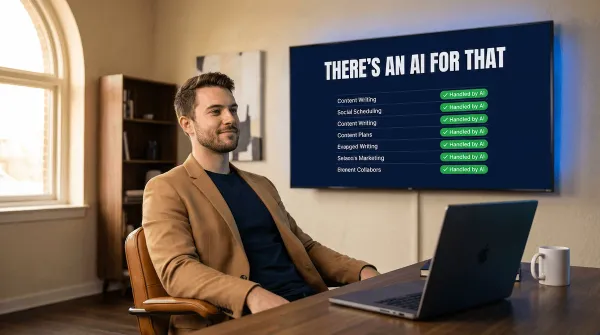
The how to use artificial intelligence framework I use across the whole business covers this principle in every category — find the tool built for the specific job, not the most impressive tool in the space. AI image generation is no different. And if you want the full map of which AI handles which business task beyond just images, there is an AI for that — every task category covered, tool by tool.
The reframe is now locked. AI image generation is a procurement skill, not an art skill. You are specifying, not creating. And the tools built for the six specific business image types you actually need are more capable — and more accessible — than any current guide in this space is telling you.
Which brings us to the practical question: which six image types, which tool for each one, and exactly how to use them for a real business output.
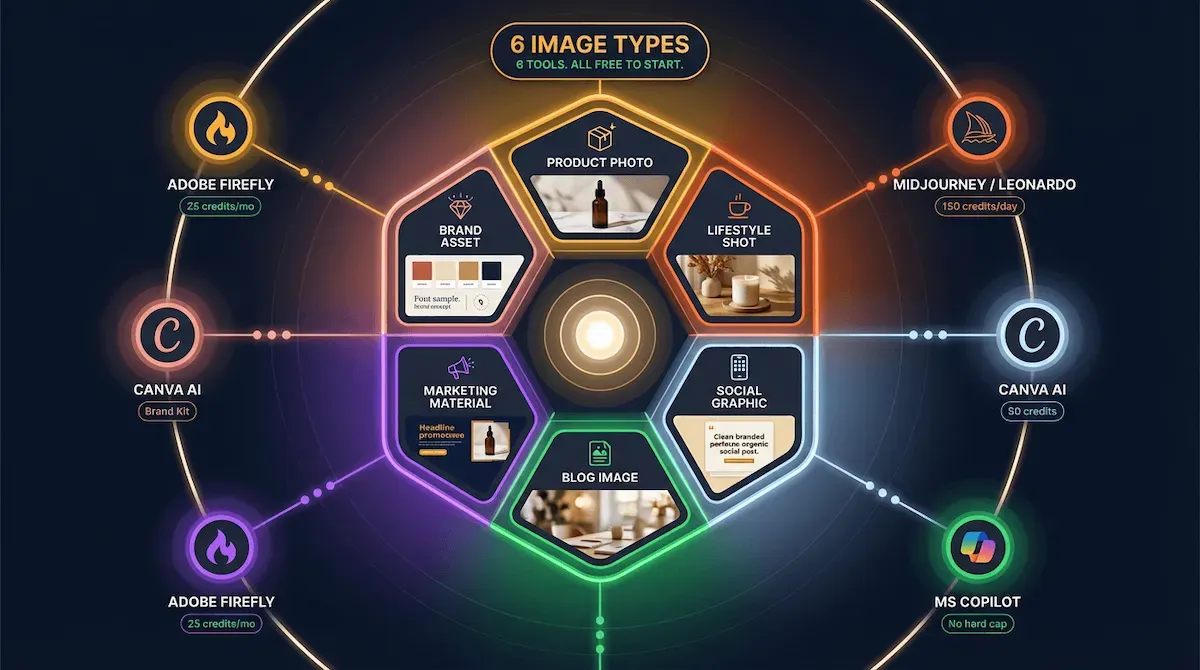
2 - The Six Business Image Types Every Entrepreneur Needs — and the Exact AI Tool for Each One
Product Photos and E-Commerce Visuals
Let me start with the image type that drives more purchase decisions than any other — and the one where I see small business owners either overspending badly or undershooting completely.
A product photo is not a creative exercise. It is a sales asset. Its job is to show the product clearly, in the right context, at the right quality level for the platform it lives on. A Shopify listing needs a clean white or neutral background shot. An Instagram feed needs a lifestyle image — the product in a real-world setting with warmth and context. A Facebook ad needs something that stops a scroll in under two seconds. Three different outputs. Three different prompts. One tool that handles all three for free.
The tool: Adobe Firefly or ChatGPT (GPT-4o)
Adobe Firefly is my first recommendation for product photography specifically — and the commercial licensing section later in this post explains exactly why. Every image Firefly produces is trained on licensed content and explicitly cleared for commercial use. For a product that is going into a paid ad or a marketplace listing, that matters enormously. Firefly's free tier gives you 25 credits per month — enough for a focused product shoot session.
ChatGPT with GPT-4o is the second option and the more flexible one. Free users get limited daily generations. The quality on product-style prompts — clean backgrounds, controlled lighting, specific compositions — is exceptional. For a business owner who needs product visuals quickly and wants conversational refinement ("make the background warmer," "shift the angle slightly left"), GPT-4o's back-and-forth editing workflow is genuinely faster than any other tool I have used.
If your business lives on e-commerce, the AI for e-commerce guide covers the full product visual workflow — including how AI image generation fits into a broader product photography system that cuts shoot costs by up to 80%.
Social Media Graphics and Content Images
This is where most entrepreneurs start — and where the free tier options are honestly excellent.
Social media visuals sit in two categories. The first is graphics — branded images with text overlays, promotional announcements, quote cards, carousel panels. The second is content images — original photography-style visuals that accompany a caption, illustrate a point, or anchor a post without competing with the copy. Both categories have a clear best tool. They are not the same tool.
For graphics: Canva AI
Canva AI is the obvious choice for social graphics — not because it produces the most technically impressive AI images, but because it sits inside the design environment where you are already building your social content. Generate the image, drop it into your template, adjust the text overlay, export. The workflow is fifteen minutes from brief to published post. The free tier gives you 50 AI credits — enough for a solid monthly content batch if you are selective.
For content images: Leonardo AI
Leonardo AI's free daily reset — 150 credits refreshed every 24 hours — makes it the most practical free tool for regular social content image generation. Lifestyle imagery, flat-lays, atmospheric shots, conceptual visuals for service-based businesses — Leonardo handles all of it with a quality level that holds up at Instagram resolution. I use it specifically for the kind of image that would otherwise require either a stock photo subscription or a half-day shoot.
Blog Featured Images, Marketing Materials, and Brand Assets
The third category covers everything else — and it is broader than most people expect.
Blog featured images are where stock photo fatigue is most visible. Every blog in every industry is pulling from the same three stock libraries. The images are recognisable. Worse, they are generic in a way that actively undermines authority — a post about financial strategy illustrated with a stock photo of a person pointing at a whiteboard does not inspire confidence. Generating original featured images using AI takes four minutes and produces something nobody else has.
The tool: Microsoft Copilot or ChatGPT
Microsoft Copilot's free tier is the most generous of any major AI image tool for blog and marketing visuals — no hard daily cap, reasonable quality, and zero commercial licensing concerns for standard marketing use. For a business owner producing two to four blog posts per week, Copilot handles the featured image requirement without touching a paid tier.
Marketing materials — ad creatives, email headers, promotional banners, pitch deck visuals — sit across both Canva AI (for template-based outputs) and Adobe Firefly (for standalone generated images going into paid placements). The rule I apply is simple: if the image is going into a paid ad or a client-facing document, Firefly. If it is going into an owned channel like email or social, Canva AI or Copilot.
Brand assets — conceptual logo directions, brand mood board images, visual identity references — are where Adobe Firefly's brand kit integration earns its place. Upload your brand colours and reference images. Every generated asset respects those constraints automatically. For a solopreneur building a visual identity without a designer, this single feature removes what used to be a three-hour briefing process.
Small businesses using AI for product photography in 2025 and 2026 cut production costs by up to 80% 2MC Global — and in my experience that figure holds across every image category, not just product shots. The saving compounds fast when you map the right tool to each output type rather than running everything through one tool that was not built for the specific job.
The AI for digital marketing guide covers how these image types slot into a full content and campaign workflow — including the scheduling and automation layer that turns a monthly image batch into a hands-off publishing system. And if you want the bigger picture of how image generation sits alongside every other AI tool in a small business stack, there is an AI for that — the full task-to-tool map, category by category.
⚡ Automate It
Block two hours on the first Sunday of every month. Open Leonardo AI for social content images, Canva AI for graphics, and Adobe Firefly for any product or marketing visuals going into paid placements. Work through all six image types in sequence using your saved prompt library. By midday Sunday, every visual asset for the next thirty days is generated, downloaded, and ready to schedule. No shoots. No designer invoices. No last-minute scramble at 11pm before a campaign goes live.
The six image types are now mapped to their tools. But having the right tool is only half the equation — the other half is knowing how to ask for what you actually want. That is where most business owners get stuck, and where every current guide in this space completely lets them down.
3 - How to Write a Prompt That Gets the Image You Actually Want — Without Learning Art Direction
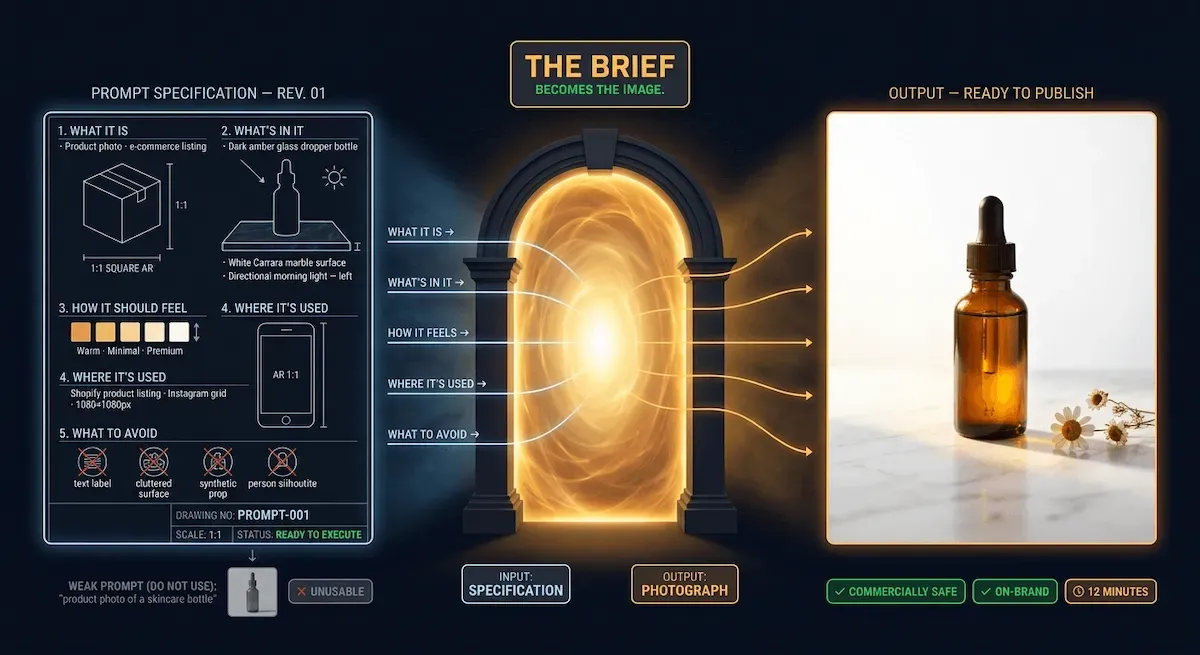
The Business Briefing Framework — Talk to AI Like You Would Brief a Designer
I have seen the same pattern repeat itself dozens of times. A business owner opens an AI image tool, types something like "professional photo of my product" or "social media image for my business," gets back something generic and flat, concludes the tool does not work, and closes the tab. The tool worked perfectly. The brief was the problem.
Here is the thing nobody in this space says plainly enough: an AI image prompt is not a search query. You are not googling. You are briefing. And the difference between a search query and a creative brief is the difference between "restaurant near me" and "I need a quiet table for two near the window, lunch service, somewhere with a proper wine list, not too loud." Same underlying need. Completely different level of output.
The business owners I work with who get the best results from generating images using AI are not the ones who have studied prompt engineering. They are the ones who already know how to brief a supplier. A designer. A photographer. A copywriter. That briefing instinct — the ability to specify exactly what you need and why — translates directly into AI prompt quality. You just need the right framework to make that translation.
The framework has five elements. They map directly to how you would brief any creative professional. Use them in this order, every time, for every image type.
The Five Elements Every Business Image Prompt Needs
1. What it is Name the image type explicitly. Not "an image" — a product photo, a social media graphic, a blog featured image, an email header, a lifestyle shot. The tool needs to know what category of visual output you are requesting before it can make any other decision correctly.
2. What is in it The subject, the setting, and the key details. Be specific in the way a photographer would need you to be specific: what is the product, what is it sitting on, what is in the background, how is it arranged. Vagueness at this stage produces generic results at every stage.
3. How it should feel The mood, the visual temperature, the tone. Warm and approachable. Clean and clinical. Bold and high-contrast. Soft and editorial. These are not art direction terms — they are the same words you would use to describe your brand to anyone. Use yours.
4. Where it will be used The platform and the format. Square for Instagram. Landscape 16:9 for a blog header. Vertical 9:16 for a Story or a Reel. Portrait for Pinterest. This single element determines aspect ratio, composition, and where the focal point needs to sit — and most business owners forget to include it entirely.
5. What to avoid The one or two elements that would make the image unusable for your specific purpose. No text in the image. No people. No busy backgrounds. No props that clash with the brand colour palette. This is the negative brief — and it is the fastest way to stop the tool producing the one thing you definitely do not want.
Five elements. That is the complete framework. It takes sixty seconds to write once you know what you need — and it produces outputs that are usable on the first or second generation rather than the fourteenth.
Before and After — Weak Prompt vs Strong Prompt for a Real Business Use Case
Let me show you the difference in practice. Same product. Same tool. Same free tier. Two completely different outcomes.
The business: A small skincare brand selling a glass dropper bottle of facial oil.
Weak prompt: "Product photo of a skincare bottle."
What you get: a generic amber glass bottle on a white surface, flat lighting, no context, no brand feeling, no usable composition. It looks like a catalogue image from a wholesaler. Nobody is buying because of that photo.
Strong prompt using the five-element framework: "Product photo of a dark amber glass dropper bottle — skincare facial oil — placed on a smooth white marble surface with two small dried botanicals beside it, soft warm natural light from the left, shallow depth of field, clean and minimal aesthetic, warm and premium brand feeling, square format for an Instagram product post, no text, no clutter, no synthetic-looking props."
What you get: a composed, lit, contextualised product image that looks like it was shot in a studio. The marble surface, the botanicals, the directional light — all of it came from the brief. The tool did not guess. It executed.
The gap between those two outputs is not the tool. It is not the free tier versus the paid tier. It is the quality of the brief. Every element of the strong prompt maps directly to one of the five framework components — and every element was something the business owner already knew, in plain language, without any knowledge of photography or design.
I want to be clear about one more thing here. The five-element framework works across every tool covered in this guide — ChatGPT, Adobe Firefly, Canva AI, Leonardo AI, Microsoft Copilot. The prompt structure is universal. What changes tool by tool is the vocabulary that performs best, which is exactly what the prompt library inside Vault AI Pro covers — tested, optimised prompt templates for each tool and each image type, ready to use without building from scratch.
The how to use artificial intelligence guide covers this briefing principle across every AI category — the same logic that makes a great image prompt makes a great writing prompt, a great automation trigger, a great AI customer service script. The underlying skill is specification, not creativity. And specification is something every business owner already does every day.
✅ Apply It
Pick one image your business needs this week. Write a prompt using the five-element framework — what it is, what is in it, how it should feel, where it will be used, what to avoid. Paste it into ChatGPT or Canva AI on the free tier. Compare the result to the last AI image you generated without the framework. The difference will tell you everything you need to know about why the brief matters more than the tool.
The framework is now yours. And the good news is that everything in this section applies whether you are on a paid tier or generating entirely for free — which brings us to exactly what every free tier actually produces, honestly mapped, with no marketing spin attached.
4 - Generating Images Using AI for Free — What Every Tool Actually Lets You Produce Without Paying
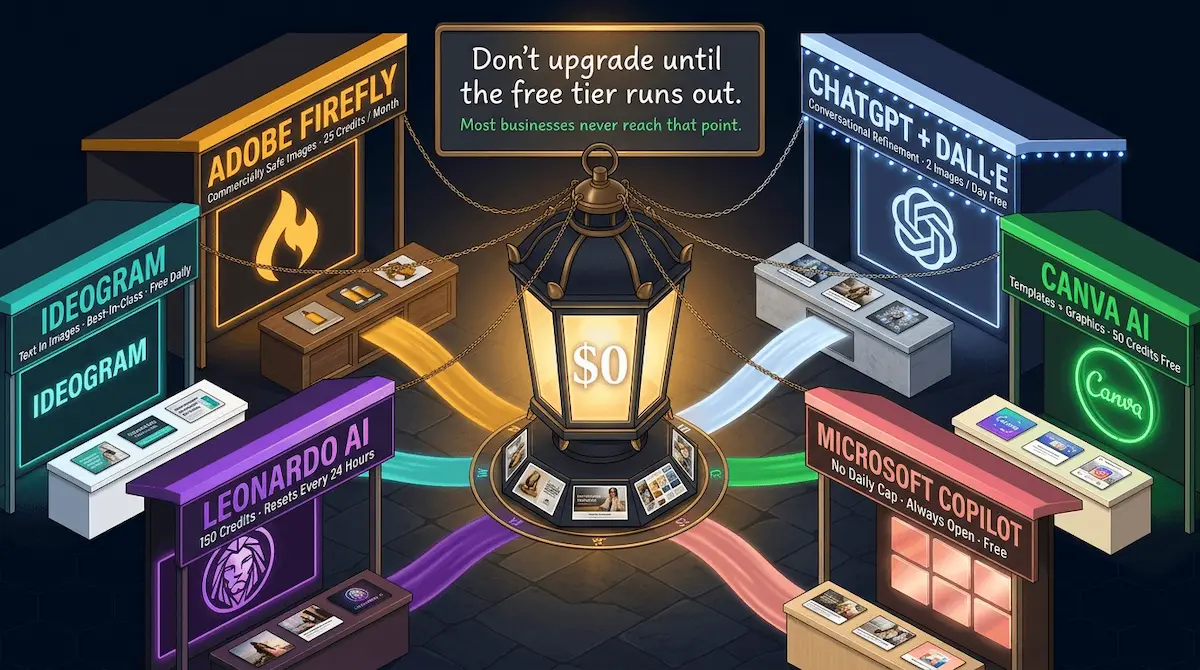
The Complete Free Tier Map — Six Tools, Zero Budget
The conversation around AI image tools almost always gravitates toward pricing — which platform costs what, which subscription unlocks which features, which paid tier is worth upgrading to. I understand why. But in my experience, most small business owners reach for a paid plan long before the free tier has actually stopped working for them.
The free tiers available in 2026 are not stripped-down trial versions designed to frustrate you into upgrading. Several of them are genuinely capable production tools for a business operating at a normal content volume. The issue is not that the free tiers are weak. The issue is that almost nobody has mapped them honestly — what each one actually produces, in plain numbers, for a real business use case — without the marketing language that makes everything sound more generous than it is.
Here is the honest map.
ChatGPT + DALL-E — Free plan Two image generations per day. That sounds limiting — and for batch work, it is. But for a business owner who needs one blog featured image and one social post visual per day, two generations is exactly enough. The output quality on the free plan is identical to the paid plan. You are not getting a worse image. You are getting fewer of them. Use this tier for your highest-priority daily image — the one that goes on the page or post with the most traffic.
Canva AI — Free plan 50 credits total on the free plan — not per day, not per month, 50 total before the counter stops. Each generation costs one credit. Used carefully across a month of social content, 50 credits produces a respectable batch. Used carelessly in a single afternoon of experimenting, it is gone before you have a usable output. The rule here is simple: do not experiment on Canva AI's free tier. Know what you need before you open the tool.
Adobe Firefly — Free plan 25 generative credits per month. Slower reset, lower volume — but Firefly's free tier has one capability that no other free tier on this list matches: every image it produces is explicitly cleared for commercial use. Product photos, ad creatives, client-facing materials — all covered. For a business owner who needs a small but reliable monthly supply of commercially safe images, 25 Firefly credits per month is a meaningful resource.
Microsoft Copilot — Free plan The most generous free tier of any major AI image tool currently available. No hard daily cap in standard use, reasonable generation speed, and solid output quality for blog images, social content, and marketing visuals. Copilot does not match Midjourney for artistic quality or Firefly for commercial licensing clarity — but for a business owner who needs a consistent supply of original blog and social images without counting credits, it is the free tier I recommend starting with.
Leonardo AI — Free plan 150 credits per day, reset every 24 hours. This is the free tier that surprises most people when they discover it. 150 daily credits is a volume that covers the image needs of most small businesses entirely — social content, lifestyle imagery, conceptual visuals for service businesses, blog images. The quality holds up at every standard publishing resolution. In my view, Leonardo AI's free daily reset is the most underused resource in the entire AI image generation space for entrepreneurs.
Ideogram — Free plan Limited daily generations, but with one specific strength worth noting: Ideogram handles text rendering inside images better than almost any other free tool. If you need a promotional graphic with a short headline baked into the image itself — a launch announcement, a sale banner, a quote card — Ideogram's free tier produces cleaner in-image text than ChatGPT, Canva AI, or Leonardo at any tier.
What Free Actually Gets You — Honest Limits, No Spin
Here is where I am going to be more direct than most guides allow themselves to be.
The free tiers above cover the image needs of a small business operating at a normal content volume — two to four social posts per week, one to two blog posts per week, occasional marketing materials, seasonal promotional visuals. That is not a low bar. That is the actual content output of most solopreneurs and small teams I work with.
Where free tiers stop being sufficient is specific and predictable. High-volume e-commerce businesses generating product images for dozens of SKUs weekly will hit the Firefly and ChatGPT limits quickly. Agencies producing visual assets for multiple clients simultaneously will outgrow Leonardo's daily reset within a week. Businesses running continuous paid ad campaigns that require daily fresh creative will need a paid tier for the volume.
But here is what I want you to notice about that list: every scenario where the free tier breaks is a scenario where the AI image tool is already generating direct, measurable commercial return. At that point, upgrading is not a cost. It is a straightforward investment decision.
Workers using generative AI save an average of 5.4% of their working hours every week — with frequent users saving over nine hours per week AmplifAI — and visual content production is one of the highest-concentration areas of that saving for a business owner who has historically done it manually or outsourced it expensively.
The free tiers exist because the tools work well enough at zero cost to demonstrate that value clearly. Use them until they break. Then, and only then, consider what upgrading is actually worth.
The One Rule — Never Pay Until the Free Tier Becomes the Bottleneck
This rule applies to every AI tool — and I cover it in detail in the broader how to use artificial intelligence framework — but it matters most in the image generation category because the paid tiers here are genuinely tempting.
Midjourney's output quality is spectacular. Adobe Firefly's paid brand kit integration is genuinely useful. ChatGPT Plus removes the daily generation limit and unlocks features that make iterative prompt refinement significantly faster. I am not going to pretend these upgrades are not worthwhile — they are, for the right business at the right volume.
The mistake is upgrading before you have proven the free tier cannot cover your needs. Most business owners who upgrade in their first two weeks do so out of enthusiasm rather than necessity. They hit a credit limit once, feel frustrated, and pay. Then they discover they were hitting the limit because they were experimenting — not because their actual business image needs exceeded the free tier capacity.
Build the workflow first. Run it on the free tier for a full month. Count the times you hit the limit because of genuine business volume rather than experimentation. If you hit it more than twice in that month for real production needs — not testing, not playing — upgrade. That is the only evidence base that justifies the cost.
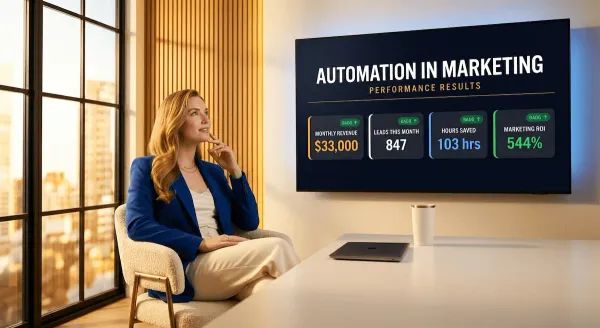
The automation in marketing system covers this principle in the context of the full marketing stack — every tool evaluated against actual production output before a paid commitment is made. The same logic that keeps your automation stack lean applies directly to your image generation stack.
💜 Stack Snapshot
Start with this zero-cost stack: Microsoft Copilot for blog images and social content — no credit cap, no daily limit in standard use. Leonardo AI for lifestyle imagery and higher-quality social visuals — 150 credits reset every 24 hours. Adobe Firefly for any image going into a paid ad or client-facing document — 25 commercially safe credits per month. Total monthly cost: $0. Total monthly output: enough to cover every image need of a small business running a normal content calendar.
The free tier question is now answered honestly. But free or paid, every image you generate for your business carries a question that almost every guide in this space ignores completely — are you actually allowed to use it commercially? That answer is more specific, and more important, than most business owners realise.
5 - Commercial Licensing, Copyright, and What Every Small Business Owner Must Know Before Using AI Images in Their Marketing
Which Tools Produce Commercially Safe Images — and Which Do Not
I am going to open this section with the statement that every other guide in this space buries in a footnote or skips entirely.
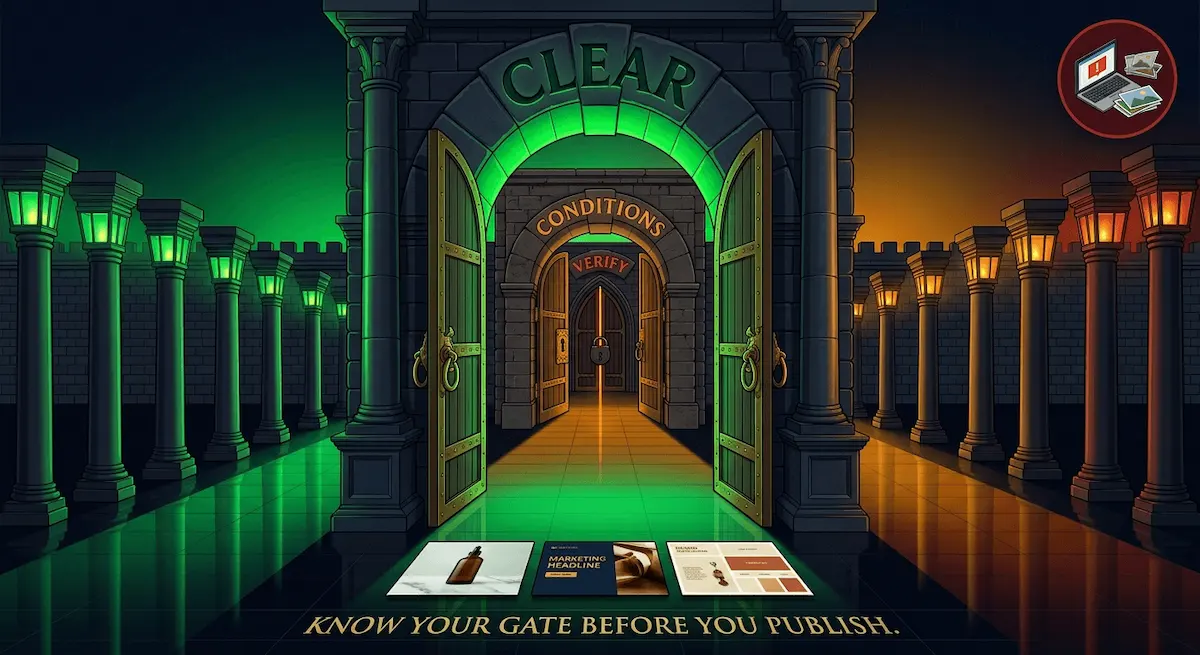
Not every AI-generated image is yours to use commercially. And "commercially" does not just mean selling the image itself. It means using it in a paid Facebook ad. It means putting it on a product listing on Amazon or Etsy. It means including it in a pitch deck sent to a client. It means publishing it on a website that generates revenue. Every one of those use cases is a commercial application — and the tool you used to generate the image has a direct say in whether that use is permitted.
This is the section most business owners wish someone had shown them before they ran their first AI image campaign. Not after.
The landscape in 2026 breaks cleanly into three tiers when it comes to commercial use rights.
Tier 1 — Explicitly commercially safe:
Adobe Firefly is the only major AI image tool trained exclusively on licensed, rights-cleared content — Adobe Stock images, openly licensed works, and public domain material. Every image Firefly produces carries explicit commercial use permission. No plan restrictions. No exceptions to read carefully. If the image came from Firefly, you can use it in a paid ad, a product listing, a client deliverable, or a brand campaign without a licensing question hanging over it. This is why I recommend Firefly specifically for any image going into a paid placement — not because its outputs are always the most visually impressive, but because its commercial clearance is the cleanest in the industry.
Canva AI permits commercial use of generated images within its standard content licence terms — covering marketing materials, social media, websites, and business communications. The licence is broad enough to cover the vast majority of small business applications. Read the specific terms for your plan before using generated images in third-party advertising placements, but for owned channel use, Canva AI is commercially safe.
Tier 2 — Commercially permitted with plan restrictions:
ChatGPT and DALL-E — OpenAI grants users ownership and commercial use rights for images generated via ChatGPT, subject to their usage policies. The free plan is included. The restrictions are specific: no images of real named individuals, no deliberate replication of a living artist's style as the primary output, no content that violates OpenAI's content policy. Within those constraints — which cover the overwhelming majority of legitimate business image needs — ChatGPT-generated images are commercially usable.
Midjourney permits commercial use on paid plans only. Free tier images — generated during a trial or on the basic free access tier — are not commercially licensed. This is the most common licensing mistake I see small business owners make: generating images in Midjourney's free or trial mode and using them in paid ads without realising the commercial licence only activates on a paid subscription. If you are using Midjourney for business, you need a paid plan. No exceptions.
Leonardo AI permits commercial use on paid plans. The free daily reset tier — which I recommended in the previous section for social content volume — does not carry commercial licence rights for paid advertising placements. For organic social content, blog images, and owned channel use, the free tier is generally acceptable under Leonardo's terms. For paid ad creative, upgrade or use Firefly.
Tier 3 — Licence depends on the specific model:
Stable Diffusion and open-source tools — the commercial licence here depends entirely on which model version and which fine-tuned variant you are running. The base Stable Diffusion models carry a CreativeML Open RAIL-M licence that permits commercial use with restrictions. Fine-tuned community models may carry different terms. If you are using an open-source tool, find the specific model card and read the licence section before any commercial application. This is not paranoia — it is the same due diligence you would apply to any content licence.
The Copyright Question — Who Owns an AI-Generated Image?
This question comes up in almost every conversation I have with business owners about AI image generation — and the honest answer in 2026 is more nuanced than most people want it to be.
The US Copyright Office has consistently ruled that AI-generated images produced without sufficient human creative input are not eligible for copyright protection. The images are not in the public domain — that is a separate legal category. They simply occupy an unprotected middle ground where neither the AI tool, nor the tool's developer, nor the user automatically holds enforceable copyright over the output.
What this means practically for a small business owner:
Nobody can copyright-claim an AI image you generated and demand you remove it from your website — provided you generated it yourself on a tool with appropriate commercial use rights. You are not infringing anyone's copyright by using your own generated outputs in your business.
But you also cannot claim copyright protection over those images yourself in most jurisdictions. If a competitor takes your AI-generated product photo and uses it in their own marketing, your legal recourse under standard copyright law is limited. This changes when there is demonstrable human creative input — significant manual editing, composite work, original artistic direction built into the output. The more human intervention in the final image, the stronger the case for copyright protection.
The AI image generation market is forecasted to reach $917.4 million by 2030 GetGuru — and the legal frameworks governing commercial use are still catching up to that growth rate. The rules will continue to evolve. What I recommend in the meantime is straightforward: use tools with clear commercial licences, document which tool produced which image, and apply basic human editing to any image you want to argue carries original creative expression.
Three Things to Check Before You Publish Any AI Image in a Business Context
This is the practical checklist I give every business owner before they go live with an AI image in any commercial context. Three questions. Sixty seconds. They have saved more than one business owner from a policy violation notice or a platform takedown.
Check 1 — Does your plan include commercial use rights? Free tier or paid tier — find the specific terms for the plan you are on, not the tool's general marketing page. Midjourney and Leonardo are the two tools where free and paid tiers have meaningfully different commercial permissions. Check your plan, not the tool's reputation.
Check 2 — Does the image contain any elements that could constitute infringement? A generated image that closely replicates a living artist's signature style, incorporates what appears to be a trademarked logo or branded product, or depicts an identifiable real person without consent carries infringement risk regardless of which tool produced it. AI tools have content filters for this — but the filters are not perfect. Review the output before publishing, not after.
Check 3 — Does the platform you are publishing on have its own AI image policy? Facebook, Google Ads, Amazon, and Etsy all have policies governing AI-generated content in commercial placements that operate independently of the tool's own licence terms. Facebook requires disclosure of AI-generated content in certain ad categories. Amazon has specific guidelines for AI-generated product images in certain categories. Google Ads policies on AI creative are evolving. Check the destination platform's current policy — not just the source tool's licence.
Three checks. Every image. Every time. It takes less time than the generation itself — and it removes the single biggest avoidable risk in an otherwise straightforward workflow.
The AI for digital marketing guide covers platform-specific content policies in the context of the full campaign and ad creative workflow — including the compliance layer that keeps paid campaigns running without interruption. And for e-commerce businesses specifically, the AI for e-commerce guide covers marketplace image requirements across the major platforms in detail.
🎯 Pro Tip
Default to Adobe Firefly for any image going into a paid ad, a marketplace product listing, or a client-facing deliverable. It is the only major AI image tool where the commercial licence question has a one-word answer: covered. Use everything else for owned channels — blog, organic social, email, internal materials — where the licence requirements are broader and the risk of a platform policy conflict is significantly lower.
Commercial licensing is now covered — and with it, the last structural risk in the AI image generation workflow is off the table. What remains is the capability that turns a collection of individual AI images into something worth far more to a business than any single image on its own: a consistent visual identity that people recognise before they read your name.
6 - How to Generate Consistent Brand Images Using AI — The Capability Nobody Else Is Teaching

Why Consistency Matters More Than Quality for a Small Business Brand
I want to make an argument here that runs against almost everything the AI image generation space talks about.
Quality is not your primary visual goal as a small business owner. Consistency is.
A single extraordinary AI image — perfectly lit, beautifully composed, technically flawless — does almost nothing for your brand on its own. Post it once, get a spike of engagement, move on to the next piece of content. Three weeks later nobody remembers it and nobody associates it with you. This is the pattern I see constantly with business owners who chase the best possible individual output from every generation session rather than building a visual system that compounds over time.
Think about the brands you recognise instantly without reading their name. The ones where you see an image in a feed and know immediately who posted it before the handle loads. That recognition is not the result of one great photo. It is the result of thirty, sixty, ninety images that share the same visual language — the same colour temperature, the same compositional style, the same feeling. That is what brand consistency actually means. And it is entirely achievable with AI image tools, for free, once you understand the three components that make it work.
Here is what I find interesting when I look at the current landscape: every guide in this space focuses on generating the best possible single image. None of them — not one in the top twenty results I analysed before writing this post — addresses the question of how to make the twentieth image look like it belongs with the first. That is the gap. And it is the most valuable practical capability in the entire AI image generation workflow for a business owner trying to build something people recognise.
Consistency does not require a paid designer. It does not require a brand guideline document. It requires three things: a style reference, a prompt library, and a batch workflow. Build those once. Use them every month. Your visual identity takes care of itself.
The Three Tools That Support Brand Consistency in 2026
Not every AI image tool handles consistency equally — and this is a meaningful differentiator that most tool comparisons completely ignore. Here are the three that do it best, and specifically how each one supports a consistent brand visual system.
Midjourney — Style Reference (--sref)
Midjourney's style reference parameter is, in my opinion, the most powerful brand consistency tool available in the AI image generation space right now. The mechanism is straightforward: you provide a reference image — your own best product photo, a mood board image that captures your brand aesthetic, a screenshot of a visual style you want to replicate — and Midjourney uses it as a style anchor for every subsequent generation in that session.
Every image produced with that style reference shares the same colour palette, the same lighting temperature, the same compositional language as the reference. You are not describing a style in words and hoping the tool interprets it correctly. You are showing it. The difference in output consistency between a prompted style description and a visual style reference is significant — and once you have a reference image that captures your brand accurately, you can use it indefinitely.
The practical application: take your single best existing brand image — the one that looks most like what you want your visual identity to feel like — and use it as your Midjourney style reference for every subsequent generation. Your tenth image will match your first. Your fiftieth will match your tenth. That is the compound effect of a consistent style anchor.
Note that Midjourney's commercial use licence requires a paid plan — covered in detail in the previous section. For brand consistency work at any meaningful volume, the paid plan is the right tier.
Adobe Firefly — Brand Kits
Firefly's brand kit integration is the most business-appropriate consistency tool in the list — and the one I recommend most often to entrepreneurs who are building a visual identity from scratch rather than extending an existing one.
The workflow is simple. Upload your brand colours as hex values. Upload your brand fonts. Upload two or three reference images that represent your visual direction. Firefly generates every subsequent image within those constraints automatically — your palette, your typographic style, your visual reference, applied to every output without manual adjustment.
For a solopreneur who has no design background and no existing brand asset library, Firefly's brand kit removes what used to be a three-hour designer briefing process and replaces it with a fifteen-minute upload session. Every image that comes out of that brand kit looks like it belongs to the same business. That is not a small thing when you are building brand recognition from zero.
Canva AI — Brand Kit Integration
Canva's brand kit locks your colours, fonts, and logo placements at the platform level — and AI image generation within Canva respects those constraints. The generated image drops into a template that already carries your brand typography and colour system. The consistency is not just in the image itself — it is in the complete visual unit that gets published.
For a business owner whose entire content workflow already lives in Canva — social graphics, email headers, presentation slides — this is the path of least resistance to visual consistency. You are not moving assets between tools. You are generating and publishing inside the same environment, with the brand kit enforcing consistency at every step.
Building Your Brand Image System — Style Reference, Prompt Library, and Batch Workflow
This is the section I wish existed when I first started building visual systems for small businesses using AI. It did not — so here it is.
A brand image system has three components. Build all three once. After that, maintaining a consistent visual identity costs two hours per month and nothing in designer fees.
Component 1 — The Style Reference
Find one image that looks exactly like what you want your brand to feel like. It does not have to be your own existing content. It can be a photograph you admire, a competitor's image whose aesthetic you want to match, a mood board image from Pinterest. One image. The one that, if every piece of content your business published looked like it, you would be happy.
Save it. This is your style anchor. Upload it to Midjourney as your --sref parameter. Upload it to Firefly's brand kit as your visual reference. Keep it in a dedicated folder labelled "brand reference." Every generation session starts by loading this image. Every output is measured against it.
Component 2 — The Prompt Library
Build ten to fifteen saved prompts — one per image type you generate regularly. Product photo on white background. Product lifestyle shot. Instagram square content image. Blog featured image. Email header. Promotional banner. Each prompt is written using the five-element framework from Section 3, tested until it produces a consistent output, then saved exactly as written.
The prompt library is the document that makes batch work possible. You are not writing prompts from scratch every month. You are loading a saved prompt, adjusting the specific product or subject, and generating. The style reference handles the visual consistency. The prompt library handles the structural consistency. Together they produce outputs that look like they came from the same shoot.
Component 3 — The Batch Workflow
One session. First Sunday of the month. Two hours maximum for a normal small business content calendar.
Open your tools. Load your style reference. Work through your prompt library in sequence — product images first, social content second, blog images third, marketing materials last. Generate three to five variations per image type. Select the best one per type. Download, label by image type and month, drop into your content scheduling tool.
That is the entire workflow. Thirty days of brand-consistent visual content. Two hours. No designer. No shoot. No invoice.
Generating consistent characters and visual styles across multiple scenes is one of 2026's most valuable AI image capabilities — directly transforming how brands build and maintain visual identity at scale. LTX Studio The tools that support this are available right now, largely for free, and the workflow to use them consistently takes one setup session to build and two hours per month to run.
I have watched a food entrepreneur go from posting visuals that looked like they came from five different businesses to building a feed so visually coherent that her audience started commenting on the aesthetic specifically — not just the food. She did not hire a photographer. She did not commission a brand identity project. She built a style reference from one image she loved, saved eight prompts, ran a two-hour Sunday session, and let the system do the rest. Her Instagram engagement increased 34% in the first month of consistent visual identity. The content had not changed. The consistency had.
That compound effect — the recognisability that builds over thirty, sixty, ninety consistent images — is what separates a business with a visual identity from a business with a collection of images. And it is entirely within reach of any entrepreneur willing to spend two hours building the system once.
The complete how to use artificial intelligence framework covers this systems-first approach across every AI category — building once, running repeatedly, compounding over time. Visual consistency is one output of that approach. The there's an AI for that guide covers the full task map for every other area of your business where the same principle applies.
⚡ Automate It
Build your brand image system this weekend. Step one: find your style reference image and save it. Step two: write one prompt per image type using the five-element framework — ten prompts maximum. Step three: run your first batch session and generate a full month of content. The whole setup takes under three hours. Every month after that takes two. After ninety days of consistent visual output, your brand looks like it has a full-time creative director. It does not. It has a Sunday morning and a saved prompt library.
The system is now complete. Six image types mapped to their tools. A prompt framework that works in plain business language. A full free-tier map with honest limits. Commercial licensing covered tool by tool. And a brand consistency system built to compound over time. The only thing left is putting it all together — and understanding why the business owners who do this well are not the most technically sophisticated ones in the room.
The Shortcut Every Business Owner Wishes They Had Found First
Remember the candle brand owner from the opening of this post.
Spare bedroom. Phone camera. $400 shoot she could not justify. Four months of product pages that looked thin and unconvincing next to competitors who clearly had a proper visual setup.
She is not struggling with that problem anymore.
She runs a two-hour Sunday session once a month. She has a style reference saved in a folder on her desktop. She has eight prompts in a notes document — one per image type, tested, refined, working. She opens Leonardo AI for her lifestyle shots, Firefly for anything going into a paid ad, Canva AI for her social graphics. By midday she has everything she needs for the next thirty days. The images look professional. They look consistent. They look like they belong to a real brand — because now they do.
She did not get there by watching tutorials for three weekends. She did not upgrade to four paid tiers and cancel three of them. She did not spend six months generating outputs that missed the brief before finally landing on a workflow that worked.
She got there because someone handed her the system.
That is the part nobody tells you about generating images using AI — and honestly, about using AI across your business in general. The technology is genuinely accessible. The tools are largely free. The capability is real and it is available right now. But the gap between "I have heard AI can do this" and "I have a workflow that runs every month without friction" is not a technical gap. It is a trial-and-error gap. And trial and error, for a business owner running everything themselves, is not free. It costs the one thing you cannot get back.
Time.
Every hour you spend testing tools that were not built for your use case is an hour you are not spending on the business. Every afternoon you lose to prompt experimentation that produces nothing usable is an afternoon that was supposed to go somewhere else. Every month you delay building the visual system because you are not sure where to start is a month your competitors — who figured it out, or who had someone hand them the framework — are posting consistent, professional, on-brand content while yours looks like it came from three different businesses.
I built Vault AI Pro for exactly this moment. Not the moment when you are curious about AI. The moment when you are ready to stop experimenting and start using it — with resources that are already built, already tested, and already mapped to the specific jobs a small business owner actually needs done.
Inside the premium membership, the AI image generation system is ready to run from day one. Done-for-you prompt templates for every image type covered in this post — product photos, lifestyle shots, social graphics, blog images, marketing materials, brand assets — written in the five-element framework, tested across multiple tools, optimised for free tier use. The commercial licensing reference guide, tool by tool and plan by plan. The brand consistency system — style reference guide, batch workflow checklist, monthly content calendar — the whole thing built and documented so your first Sunday session produces usable outputs rather than a list of questions.
And that is one resource cluster inside a vault of over 1,000.
AI prompts across every business function. Automation workflows. Email sequences. Social media templates. Sales scripts. Customer service playbooks. Content calendars. SOPs. Every resource built for the same audience — entrepreneurs, solopreneurs, and small business owners who are running everything themselves and need tools that work immediately, not after a learning curve.
Workers using generative AI save an average of 5.4% of their working hours every week — with daily users saving over nine hours per week. AmplifAI That saving does not come from having access to the tools. It comes from knowing exactly how to use them. The tools are free. The system is what is worth paying for.
The candle brand owner did not find her workflow through three weekends of YouTube tutorials. She did not piece it together from ten different blog posts that were each written for a different audience. She got the system, ran it once, and it worked. That is what 1,000-plus ready-to-use resources looks like in practice — not a library you browse out of curiosity, but a toolkit you open when you have a specific job to do and need it done today.
The trial-and-error phase of your AI journey is optional. Most business owners do not realise that until they are already six months into it.
You do not have to be one of them.
⚡ Vault AI Pro — Premium Membership
Stop Testing. Start Producing.
Your AI Image System Is Already Built.
Every prompt template, workflow, checklist, and resource in this post — and 1,000+ more across every area of your business — done for you, tested, and ready to use today.
- ✦Done-for-you AI image prompt library — every type, every tool, free tier optimised
- ✦Brand consistency system — style reference guide, batch workflow, monthly calendar
- ✦Commercial licensing reference — tool by tool, plan by plan, platform by platform
- ✦AI automation workflows, email sequences, sales scripts, content playbooks
- ✦1,000+ AI resources across every area of your business — updated every single week
🔒 Instant access · Cancel anytime · Saves 3–5 hours every day · Used by 10,000+ entrepreneurs
Replaces $50/hr freelancer work · Saves 3–5 hours every day · Instant ROI · No contracts