There's an AI for That: Every Tedious Business Task Mapped to the Tool That Handles It
Most small business owners have heard "there's an AI for that" — and assumed it meant something complicated. It doesn't. This is the task-by-task map: every tedious business job you do manually, the exact AI that handles it, and the order to build your stack.

I was sitting with a client last year — a nutritionist running her practice alone — and she spent twenty minutes walking me through her week. Monday: write three blog posts. Tuesday: schedule social content for the next seven days. Wednesday: chase four unpaid invoices and respond to twelve customer enquiries. Thursday: write five follow-up emails to leads who had gone quiet. Friday: build next week's content calendar and update the CRM.
She finished the list and looked at me. "There is never enough time."
I asked her to read the list back to me, one task at a time. After each one, I said the same words: "There's an AI for that".
Blog posts — there's an AI for that. Social scheduling — there's an AI for that. Invoice chasing, customer enquiries, lead follow-up, content calendars, CRM updates — there's an AI for every single one of them.
She stopped looking tired and started looking annoyed. The specific annoyance of someone who realises they have been doing something the hard way for a very long time.
That is what this post is. Not a vague overview of artificial intelligence. Not a tool directory with three thousand options and no guidance. A task-by-task map — every tedious, repeatable job a small business owner does every single day, matched to the specific tool built to handle it, with a clear starting point for each one.
The tools exist. Most of them are free. Every task on that list has a solution already waiting.
Start here.
1 - What "There's an AI for That" Actually Means — and Why Most Entrepreneurs Are Only Using 10% of What's Available
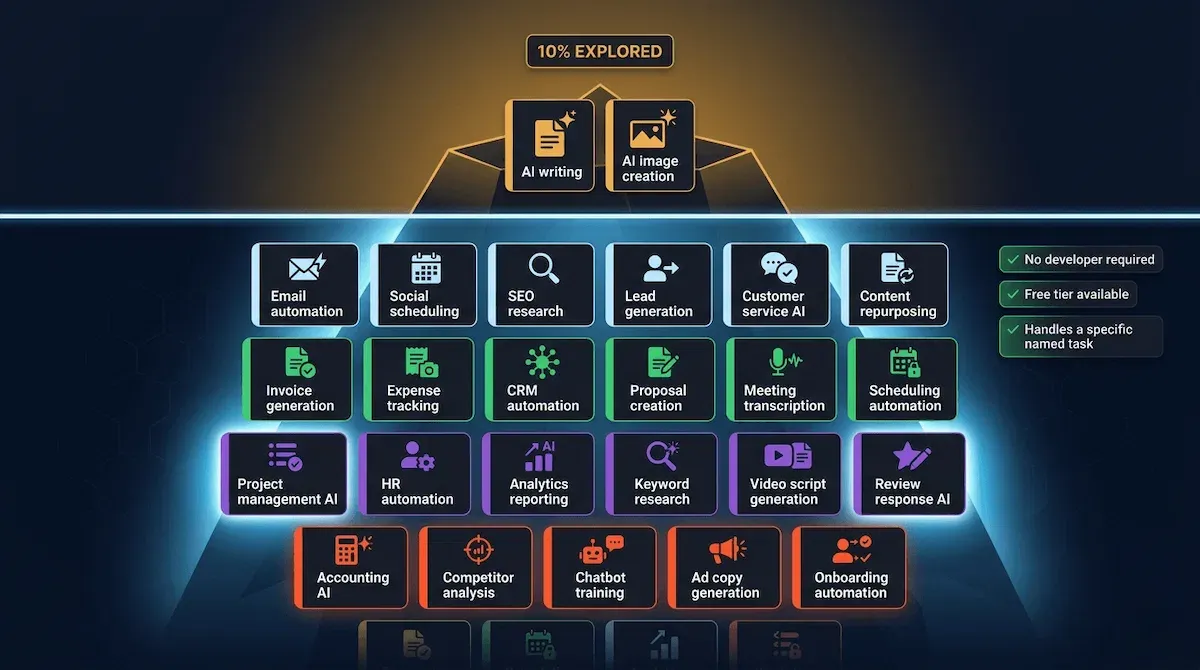
The phrase gets thrown around constantly now. At networking events, in podcasts, in every LinkedIn post about productivity. Someone mentions a problem — writing product descriptions, responding to customer reviews, chasing overdue invoices — and someone else says it. There's an AI for that.
The problem is that most entrepreneurs hear it and nod — and then go back to doing the task manually anyway. Not because they do not believe it. Because they have no idea which AI, where to find it, how much it costs, or whether it will actually work for their specific situation without requiring three hours of setup and a computer science degree.
I have worked with hundreds of small business owners over the past two years, and the pattern is remarkably consistent. Almost everyone is using AI for one or two things — usually writing assistance and occasionally image generation. Almost nobody has mapped it across their entire operation. The result is a business that uses AI as a spellchecker when it could be using it as an entire department.
The Difference Between Knowing AI Exists and Knowing Which AI Does What
There are currently more than 30,000 AI tools listed across various directories — a number that is not helpful to a founder running a business alone — Media and Learning. It is overwhelming. And overwhelm produces inaction, which is exactly why so many small business owners are still manually writing every follow-up email, building every social post from scratch, and spending Friday afternoons updating their CRM by hand.
The phrase "there's an AI for that" only becomes useful when it is followed by: and here is specifically which one, here is what it costs, and here is the one thing you do first to get it working in your business today. Without that specificity, it remains a vague promise rather than a practical instruction.
This post is the specificity.
The One Thing Every AI Tool in This Guide Has in Common
Every tool I recommend here passes three filters before it makes the list.
First — it works without a developer. No API keys, no code, no technical configuration that requires hiring someone to set it up. If a non-technical founder cannot have it running inside thirty minutes, it is not in this guide.
Second — it has a free tier that is genuinely functional. Not a crippled free plan designed purely to upsell. A free version that a small business owner can use to prove value before spending a single dollar.
Third — it handles a specific, named task that a small business owner actually does every week. Not a vague capability. A concrete job. Email follow-up. Invoice generation. Social content scheduling. Customer FAQ responses. The kind of task that appears on the same to-do list every Monday morning without fail.
Every tool in this guide passes all three. No exceptions.
For a broader look at how to approach artificial intelligence as a whole system rather than a collection of individual tools, the how to use artificial intelligence guide covers the complete strategic picture — from first tool to full AI-powered operation.
🎯 Pro Tip
Before you read another section of this post, write down the five tasks that appear on your to-do list every single week without exception. Not the important tasks — the frequent ones. Those five tasks are your starting point. By the end of this guide, every one of them will have a specific AI matched to it. That list is worth more than any tool directory.
The most immediate, most accessible, and most time-saving category for almost every small business owner is content — and it is also the category where AI has been available the longest, which means the tools are mature, reliable, and genuinely free at the level most founders need. That is where we start.
2 - There's an AI for Your Content — Every Writing, Design, and Publishing Task You Do Manually
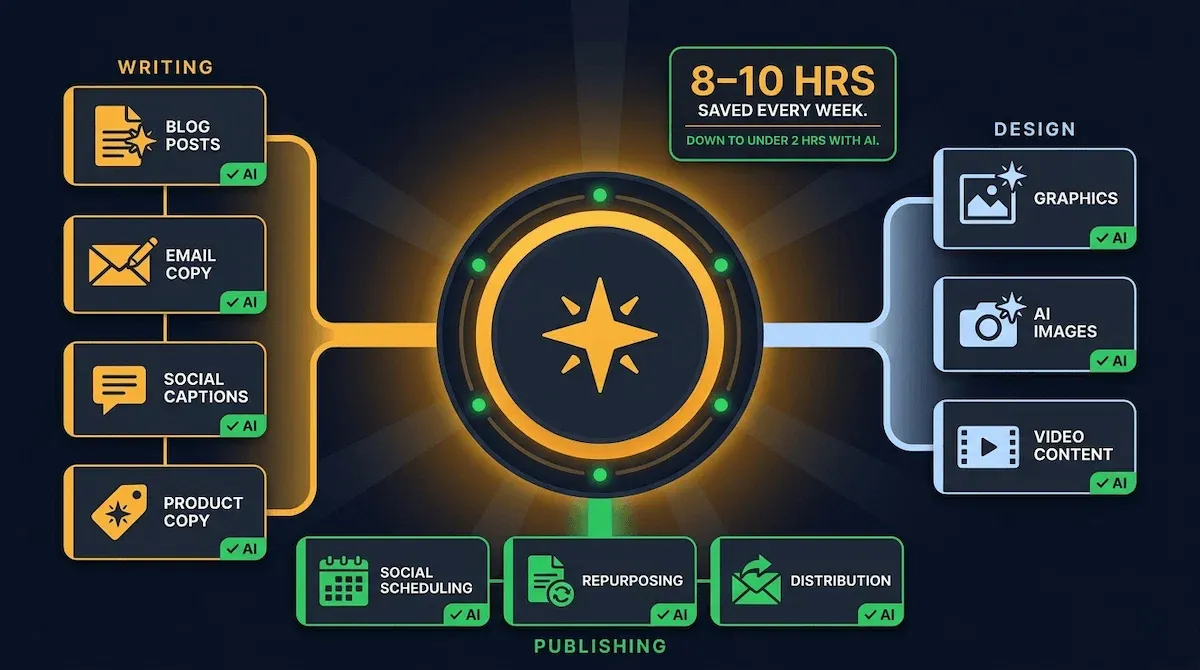
Content is where most small business owners feel the pain of doing things manually most acutely — and where AI delivers the fastest, most visible time savings from the moment you start using it. Writing, design, scheduling, repurposing — every piece of the content operation that used to require either a team or an enormous personal time investment now has a specific, accessible, genuinely free tool built for it.
I want to be precise here because the word "content" covers a lot of ground. I am not talking about vague AI assistance that produces average output you spend two hours editing. I am talking about specific tools that handle specific jobs — and produce output good enough to publish, send, or schedule with light editing rather than a complete rewrite.
Writing: Blog Posts, Emails, Social Captions, and Product Descriptions
The writing tasks that consume the most hours for most small business owners fall into four categories — and each one has a purpose-built solution.
For long-form content — blog posts, guides, newsletter issues — Claude and ChatGPT are the two tools worth knowing. Both have free tiers capable of producing a complete, well-structured draft from a detailed prompt in under three minutes. The difference between AI-generated content that sounds robotic and AI-generated content that sounds human is almost entirely in the quality of the brief you give it. Feed it your tone of voice, your audience, your angle, and your key points — and the draft it produces becomes a strong starting point rather than a blank page.
For email sequences and follow-up copy — Claude is my preference because it holds context across a long conversation, which means you can brief it on your brand voice once and it carries that voice consistently across every email in the sequence. For social media captions specifically, ChatGPT's free tier handles platform-specific formatting — LinkedIn professional, Instagram conversational, X punchy — without you needing to reformat each one manually.
Design: Graphics, Images, and Visual Content Without a Designer
Canva's AI features — Magic Design, Magic Write, and the background removal tool — have turned a tool most small business owners already use into a complete visual content engine. On the free plan, you can generate branded social media graphics, resize content across every platform in one click, and produce professional-quality visuals without design experience or a Canva Pro subscription.
For custom image generation — where you need a specific visual that does not exist in any stock library — Adobe Firefly is free, commercially safe to use, and produces high-quality results from plain-language text prompts. I use it specifically for blog featured images and social graphics where the visual needs to be original rather than generic.
Publishing: Scheduling, Distribution, and Repurposing Across Every Channel
Buffer's free plan schedules content across three social channels simultaneously — you batch-write seven days of posts in one sitting, schedule them all in under twenty minutes, and the week's social presence runs without you touching it again. That single workflow saves most small business owners between four and six hours every week.
The repurposing layer is where content AI becomes genuinely extraordinary. A single blog post can be turned into five social posts, a newsletter introduction, three short-form video scripts, and a LinkedIn article — not by rewriting everything from scratch, but by feeding the original post into Claude with a clear repurposing brief. Most founders I work with go from one piece of content to seven distribution formats in under ninety minutes once this workflow is set up.
Content creation and distribution combined consume an average of eight to ten hours per week for a solo small business owner operating without a team. A properly built content AI stack brings that figure to under two hours — alfred_.
For a complete picture of how to use artificial intelligence specifically for content creation at scale — including the prompt frameworks and distribution workflows that produce consistent output week after week — how to use artificial intelligence covers the full system.
⚡ Automate It
This week: write one piece of long-form content — a blog post, a newsletter issue, or a guide. Then open Claude, paste the full text, and ask it to repurpose the content into five social posts, one email introduction, and one LinkedIn article. Do not rewrite anything. Just brief it clearly and edit the output lightly. That single session will produce more content distribution than most small business owners generate in a full week of manual work.
Content is the foundation — but the category that produces the most direct revenue impact for a small business operating without a marketing team is not content creation. It is marketing execution — email sequences, SEO, lead generation — and every one of those jobs already has an AI built specifically to handle it.
3 - There's an AI for Your Marketing — Email Automation, SEO, Lead Generation, and Social Without a Marketing Team
The single biggest misconception I encounter when working with small business owners on their marketing is that AI is useful for the creative parts — writing a caption, drafting an email — but not for the strategic and technical parts. SEO research, lead scoring, campaign performance analysis. Those still require a human, a freelancer, or an agency.
They do not. And the cost of that misconception is significant — because most small business owners are either skipping those tasks entirely or spending money on outside help for work that a free or near-free AI tool handles in minutes.
Every layer of a small business marketing operation already has an AI built specifically for it. Here is the task-by-task breakdown.
Email Marketing: Sequences, Segmentation, and Follow-Up on Autopilot
The most important email marketing insight I can give any small business owner is this: stop thinking of email as something you send and start thinking of it as something that runs. The difference is automation — behaviour-triggered sequences that fire the right message to the right person at the right moment, without you writing a single word at the point of send.
MailerLite's free plan handles welcome sequences, lead nurture tracks, and re-engagement campaigns for up to one thousand subscribers — with a visual automation builder that a non-technical founder can configure in an afternoon. ActiveCampaign adds deeper behavioural triggers and CRM integration for businesses that have outgrown MailerLite's segmentation. Both tools have AI-assisted subject line generation built in — a feature that sounds minor until you realise a subject line improvement from a 22% to a 35% open rate is worth more than any new subscriber you add that month.
SEO and Content Strategy: Research and Optimisation Without an Agency
SEO is the marketing task small business owners are most likely to pay someone else to do — and most likely to overpay for. Keyword research, competitive analysis, content gap identification, meta title optimisation — these are all tasks that AI handles faster and more accurately than a junior freelancer, and for a fraction of the cost.
Perplexity AI does real-time keyword research and competitive analysis for free. SurferSEO's entry-level plan scores your content against the top ten ranking pages and tells you exactly what to add, remove, or restructure to improve ranking. Claude handles meta title and description generation in bulk — feed it twenty URLs and a primary keyword for each, and it returns twenty optimised meta descriptions in under three minutes.
Lead Generation: Finding, Qualifying, and Nurturing Prospects Automatically
Lead generation is where the phrase "there's an AI for that" produces the most scepticism from small business owners — and the most dramatic results once they see it working.
Clay enriches every new contact in your database automatically — pulling job title, company size, LinkedIn profile, recent news, and buying signals without manual research. Apollo.ai identifies new prospects matching your ideal client profile and generates personalised outreach for each one. Neither requires technical knowledge to set up. Both replace tasks that used to consume entire mornings.
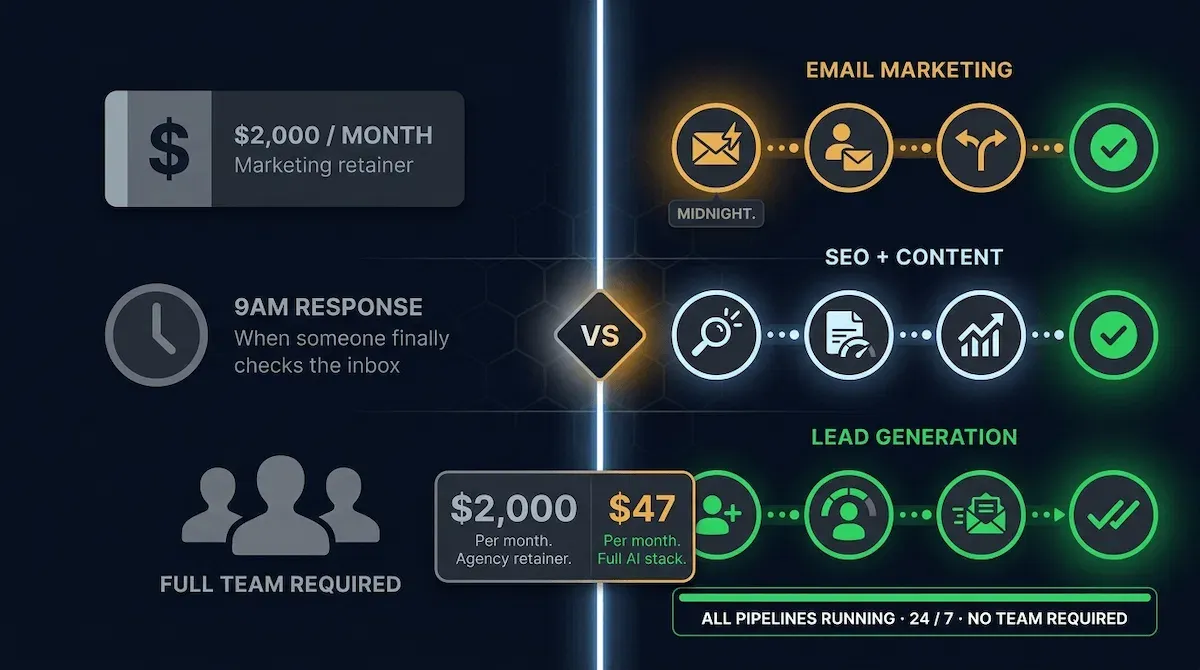
The lead nurture layer — the sequence of messages that follows a new lead from first contact to buying decision — is where email and lead generation connect into one system. I have watched small business owners replace a two-thousand-dollar monthly marketing retainer with a forty-seven-dollar AI tool stack that produces measurably better results — more leads captured, faster response times, higher conversion rates — because the AI follows up at midnight when the prospect is ready, not at nine the next morning when a human finally checks the inbox.
Businesses that implement AI across their marketing function see an average 34% increase in revenue compared to businesses running the same channels manually — RevenueMemo.
For a complete breakdown of how AI applies specifically to digital marketing — the exact platforms, campaign structures, and measurement frameworks that produce consistent results without a marketing hire — ai for digital marketing covers every channel in detail.
✅ Apply It
This week, run one SEO audit on your highest-traffic page using a free tool like Perplexity or SurferSEO's free tier. Identify the one change — a missing keyword, a weak meta description, a header structure issue — that would most improve its ranking. Make that single change. Then set a calendar reminder to do the same for a different page next week. SEO improvement compounds. One page per week, every week, produces visible ranking movement within sixty to ninety days without an agency invoice.
Marketing handles visibility and lead flow. But once a lead arrives — once a real person with a real problem reaches out to your business — the work of converting them and keeping them belongs to your sales and customer service operation. And yes, there is an AI for every part of that too.
4 - There's an AI for Your Sales and Customer Service — Follow-Up, Support, and Relationship Management Without Manual Work
Sales and customer service are the two business functions where small business owners are most resistant to the idea that AI can genuinely help. The objection is always the same: my customers are people, relationships require a human touch, and automating that interaction will make my business feel cold and impersonal.
I understand the instinct. I also know it is wrong — or at least, it is applying the right concern to the wrong layer of the work.
The human touch matters in the moments that require judgement, empathy, and genuine relationship-building. It does not need to be present in the moment a lead submits a contact form at 11pm and waits twelve hours to hear back. It does not need to be present when a customer sends the same FAQ question that forty other customers sent this month. It does not need to be present when a deal goes quiet for ten days and someone needs to follow up before the prospect moves on entirely.
Those are the moments AI was built for. The relationship layer stays human. The execution layer runs automatically.
Sales Follow-Up: The AI That Chases Every Lead So You Never Have To
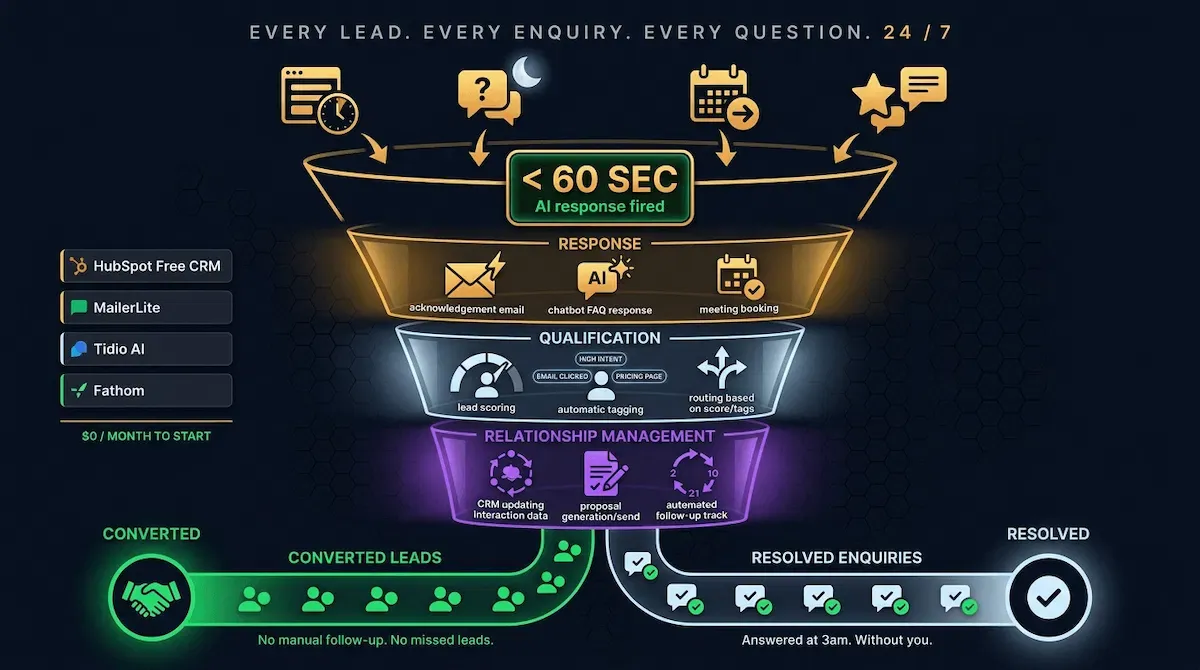
Nine out of ten leads who do not hear back within five minutes of making contact will move on — not because your offer was wrong but because someone else followed up faster. For a solo operator managing client work simultaneously, a five-minute response window is not a realistic standard without automation.
HubSpot's free CRM fires an automatic acknowledgement within sixty seconds of every new contact form submission — telling the lead their enquiry has been received, setting an expectation for next steps, and delivering one useful thing before the conversation has even begun. MailerLite sequences then follow up at days two, five, ten, and twenty-one with progressively more specific emails — handling objections, demonstrating expertise, and making a direct invitation — without the founder writing a single word after the initial setup.
The proposal and quote layer has an AI too. PandaDoc generates professional, branded proposals from a simple brief in minutes. Better Proposals does the same with built-in e-signature and payment collection. Both replace the two-hour manual proposal process that most service business owners quietly dread every time a new enquiry arrives.
Customer Service: Instant Responses, 24/7 Support, Without a Support Hire
The customer service task that consumes the most time for most small businesses is not the complex, relationship-critical conversations — it is the repetitive ones. The same twelve questions asked by different customers every single week. What are your prices. How long does delivery take. Do you offer refunds. Can I reschedule my appointment.
Tidio's free AI chatbot trains on your website content, your FAQ document, and your standard responses — and answers every one of those questions instantly, at any hour, without you being present. The conversations that require genuine judgement get escalated to you. The conversations that do not — which represent the vast majority of your customer service volume — never reach your inbox at all.
Zendesk AI goes further for businesses with higher support volume — sentiment analysis, priority routing, and AI-drafted responses that a human reviews and sends rather than writing from scratch. The result is not impersonal customer service. It is faster, more consistent customer service — and the research confirms that customers overwhelmingly prefer a fast AI response to a slow human one. 81% of consumers now consider AI a standard part of modern customer service — Neuwark.
CRM and Relationship Management: The AI That Remembers Everything
The CRM is the memory of the business — and for most small business owners, it is either empty, out of date, or both. Not because they do not understand its value but because manual CRM updates are the first task to get skipped when client work gets busy.
HubSpot's free CRM updates contact records automatically from email interactions, form submissions, and website visits — no manual data entry required. Clay enriches every new contact with company size, job title, LinkedIn profile, and recent news without a single research hour. Fathom records every sales call, transcribes it, extracts the action items, and pushes them directly into the CRM before the call window has closed.
For a complete picture of how AI applies to customer relationship management specifically — the scoring logic, pipeline automation, and contact enrichment workflows that turn a contact list into a revenue engine — ai for customer relationship management covers the full build. And for the customer care layer specifically — the AI tools that handle enquiries, complaints, and support tickets without a dedicated hire — artificial intelligence customer care walks through every platform worth knowing.
💜 Stack Snapshot
The core sales and customer service AI stack — four tools, all free to start:
The sales and customer service stack keeps revenue flowing and relationships moving forward. The layer underneath all of it — the operational infrastructure that most entrepreneurs ignore until it breaks — is where AI produces the quietest and most underestimated time savings in the entire business. And yes, there is an AI for every part of that too.
5 - There's an AI for Your Operations — Invoicing, Scheduling, Project Management, and Admin Without the Grind
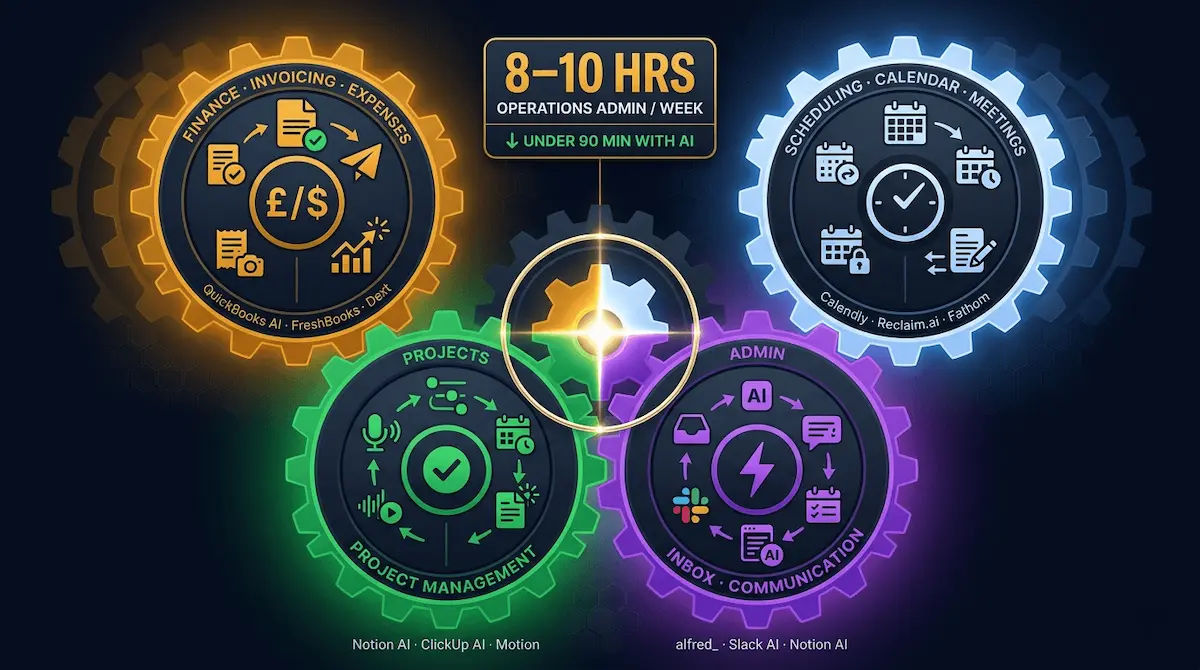
Operations is the category that nobody talks about when they talk about AI for small business — and the one that consistently produces the biggest surprise when founders finally map their week honestly.
Content gets the attention. Marketing gets the excitement. Sales gets the investment. Operations gets ignored — until a founder sits down and actually counts the hours. The invoice that takes forty-five minutes to build and send. The three-email back-and-forth to book a thirty-minute call. The Monday morning spent updating project statuses and chasing deliverables across four different threads. The expense receipts piling up in a folder that will become a very unpleasant Friday afternoon at some point before tax season.
I have yet to meet a small business owner whose operations admin takes less than eight hours a week. Most estimate ten. Most are undercounting.
Every one of those hours has an AI solution already built for it.
Finance and Invoicing: The AI That Handles Your Admin Before You Remember to Do It
The invoicing problem for most small business owners is not complexity — it is friction. Creating the invoice, formatting it correctly, attaching the right details, sending it, following up when it goes unpaid. Each individual step takes minutes. Combined, repeated across every client every month, they consume an afternoon that could have gone to billable work.
QuickBooks AI generates invoices automatically from project notes and time logs — formatted, branded, and sent without manual data entry. FreshBooks does the same with built-in payment reminders that fire automatically at seven, fourteen, and twenty-one days overdue, without the founder having to remember to chase. Dext photographs and categorises expense receipts in real time — one photograph per receipt, automatic categorisation, direct sync to your accounting software. The shoebox of receipts becomes a clean, reconciled expense record that your accountant can access any time without a thirty-minute data-entry session from you first.
Scheduling and Calendar Management: The AI That Books, Confirms, and Reminds Without the Back-and-Forth
Calendly eliminates the scheduling back-and-forth entirely — a booking link in your email signature means every prospect, client, and collaborator books directly into your calendar based on your real availability, without a single exchange of "does Tuesday work for you." Reclaim.ai goes further by automatically protecting focus blocks in your calendar — if you have four hours of client work to deliver, Reclaim finds the optimal time and marks it unavailable before anyone else can book into it.
The combination of the two tools produces something most small business owners have never experienced: a calendar that reflects genuine priorities rather than whoever emailed most recently.
Project Management and Admin: The AI That Keeps Every Task on Track
Notion AI turns voice notes, email threads, and meeting transcripts into structured project plans — named tasks, assigned deadlines, organised by project — without manual formatting. ClickUp AI does the same within a full project management environment and generates weekly status reports automatically, pulling from the actual task completion data rather than requiring anyone to write a summary from scratch.
Motion AI is the tool I recommend most often to founders who feel like their days disappear without clear output. It takes every task on your list, every meeting in your calendar, and every deadline in your project management tool — and builds a prioritised daily schedule automatically, rescheduling around interruptions in real time rather than requiring you to rebuild the day from scratch every time something changes.
Operations admin consumes an average of eight to ten hours per week for a solo small business owner — time that drops to under ninety minutes with a properly configured AI operations stack — alfred_.
For a detailed look at how artificial intelligence applies to project management specifically — the tools, the workflow configurations, and the reporting systems that keep complex projects on track without daily manual oversight — artificial intelligence for project management covers the complete picture. And for the finance and accounting layer — the AI tools that handle invoicing, expense tracking, tax preparation, and cash flow forecasting without an accountant on retainer — artificial intelligence for accounting walks through every platform worth building into your stack.
🎯 Pro Tip
Before adding any new AI tool to your operations stack, run this test: track exactly how long a specific admin task takes you this week — not an estimate, an actual timed measurement. Then install the AI tool built for that task, use it for five consecutive days, and measure again. The before-and-after comparison is the only ROI calculation you need. Most founders who run this exercise find a return of ten to twenty hours per month from a single tool that costs less than twenty dollars.
Content, marketing, sales, customer service, and operations — there is an AI for every task in every category. What most small business owners need now is not more tools. It is a clear, specific start order that gets the most important ones running in the shortest possible time without overwhelming the person building the stack alone.
6 - How to Build Your AI Stack — The Start Order That Gets You From Zero to Running in One Week
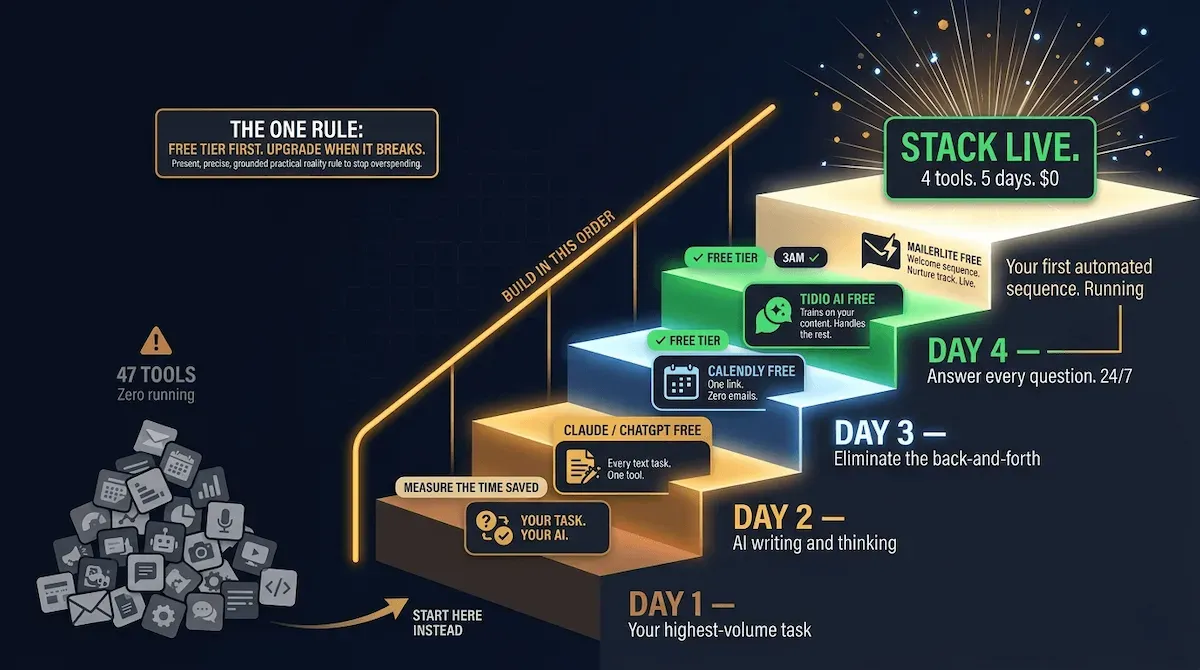
Most small business owners who decide to start using AI make the same mistake on day one. They open a browser, search for the best AI tools, land on a listicle with forty-seven recommendations, spend two hours reading comparison articles, and close the laptop having installed nothing and changed nothing.
The problem is not motivation. It is scope. Forty-seven tools is not a starting point — it is a paralysis trigger. The correct approach is the opposite of comprehensive. It is specific, sequential, and deliberately narrow — one task, one tool, one week at a time.
I have helped founders build AI stacks from scratch more times than I can count, and the ones who see results fastest share one behaviour: they start smaller than feels significant and build from there. The founders who try to automate everything at once build nothing that actually runs.
Day One: The Single Tool That Produces Immediate Visible Results
Before installing anything, write down the one task that appears on your to-do list most frequently — not the most important task in your business, the most frequent one. For most small business owners this is either social content creation, email follow-up, or customer FAQ responses.
Install the single AI tool built for that specific task. Use it every day for five working days. Time yourself before and after. Do not install anything else until the five days are complete and the time saving is confirmed.
That measurement — the before-and-after of one task, in hours, in one week — is worth more than any AI strategy document ever written. It is the proof that justifies everything you build next. And it is the specific evidence that makes the next tool feel inevitable rather than experimental.
Week One: The Four-Tool Stack That Covers 80% of Your Highest-Value Tasks
Once Day One is confirmed, add one tool per day for the remaining four days of the week — in this exact sequence:
Day 2 — Claude or ChatGPT free tier: Handles every text-based task across content, marketing, sales, and operations simultaneously. One tool, used well, replaces the blank page across every category.
Day 3 — Calendly free plan: Eliminates all manual scheduling back-and-forth. One booking link in every email signature. Done.
Day 4 — Tidio AI free tier: Trains on your website content and handles every FAQ response twenty-four hours a day without your involvement. Install, train, activate.
Day 5 — MailerLite free plan: Builds and activates your first automated email sequence — welcome, follow-up, or re-engagement. The sequence runs from the moment it goes live without further input.
By Friday of Week One, four tools are running. They collectively cover content creation, scheduling, customer service, and email marketing — the four highest-volume manual task categories for most small businesses — at a combined cost of zero dollars.
The One Rule That Stops You Buying Too Much Too Fast
Never pay for a tool until the free version has become the bottleneck. Not when you think it might become the bottleneck. Not when a comparison article suggests the paid tier is significantly better. When the free version is genuinely limiting the output your business needs — that is the moment to upgrade, and not a day before.
Almost every tool in this guide — Claude, MailerLite, HubSpot CRM, Tidio, Buffer, Canva, Calendly — has a free tier capable of handling a small business owner's volume for months before hitting any meaningful limitation. The founders I see overspending on AI are almost always paying for capacity they have not yet earned.
For a broader understanding of how artificial intelligence fits into the complete business picture — beyond individual tools and into the strategic architecture of a fully AI-powered operation — artificial intelligence and business covers the full picture. And if the automation layer is the next thing you want to build on top of your AI stack — the workflows, sequences, and connected systems that make every tool work harder — automation in marketing is the complete playbook for exactly that.
⚡ Automate It
This week: install one tool from this guide — just one. Pick the task you do most often, find the tool mapped to it in this post, and use it every day for five days. Do not read another comparison article. Do not research alternatives. Use the tool, time the task, and compare. That single week of focused use will tell you more about whether AI is worth building into your business than six months of reading about it ever could.
Every task on that Monday morning list has an AI built for it. The only variable left is which one you start with today.
Yes — There Really Is an AI for That
Remember the nutritionist from the opening of this post. The one with the twenty-minute task list and the exhausted look on her face.
Two weeks after we built her stack — four tools, five days, zero dollars spent — she sent me a message on a Wednesday afternoon. She was sitting in a coffee shop. Client work done by two o'clock. The rest of the afternoon hers.
"I cannot believe I was doing all of that by hand," she wrote.
That is not a productivity story. That is a business ownership story. The difference between a business that consumes every available hour and a business that runs with enough intelligence built into it that the owner has afternoons free on Wednesdays.
Every task on the list she read me that day now has an AI handling it. Blog posts. Social scheduling. Invoice chasing. Customer enquiries. Lead follow-up. Content calendars. CRM updates. None of it lands on her desk anymore unless it requires something only she can provide — judgement, creativity, relationship, expertise.
The tools exist. You have seen them mapped, category by category, task by task, in this guide. Most of them are free. None of them require technical knowledge to set up. The only thing standing between where you are now and a Tuesday morning that looks like hers is the decision to start.
But here is the part most guides leave out.
Building all of this from scratch — writing the prompts from scratch, configuring the workflows from scratch, testing and iterating until everything produces output you can actually use — takes time. Weeks, sometimes. Time most small business owners do not have sitting spare.
That is exactly what Vault AI Pro was built to solve.
Inside the membership, every AI tool covered in this guide already has a done-for-you resource waiting — a tested prompt, a pre-built workflow, a ready-to-deploy template, a step-by-step setup guide. Not a starting point that still requires two hours of configuration. A finished, field-tested, professional-grade resource that plugs directly into your business and works from day one.
Over 1,000 of them. Across every category in this guide — content, marketing, sales, customer service, operations, and beyond. Updated every single week as new tools emerge and existing ones improve.
Stop building from scratch. Stop spending your evenings testing prompts that someone else has already perfected. Stop starting from zero on every workflow when a better version of what you need is already built and waiting.
Stop Starting From Scratch.
Every AI Tool in This Guide Is Already
Built for You.
Every prompt, workflow, template, and setup guide covering the tools in this post is already inside the Vault — done for you, field-tested, and ready to deploy in your business today. No blank screens. No building from scratch. No endless trial and error.
🔒 Instant access · Cancel anytime · Saves 3–5 hours every day · Used by 10,000+ entrepreneurs
Replaces $50/hr freelancer work · Saves 3–5 hours every day · Instant ROI · No contracts